


Both Wistia and Zoom can host great live webinars, but they’re built with different priorities. Zoom grew out of meeting software, while Wistia is built for marketers running an ongoing webinar program. That means production tools designed for hosting a show, plus a way to turn recordings into content that keeps generating leads after everyone signs off.
How do Wistia and Zoom Webinars compare?
If you’re using Zoom Meetings to host smaller webinars where everyone needs to participate, that might be all you need. But if you’re looking for a dedicated webinar platform built for presentations, here’s how Wistia Webinars and Zoom Webinars compare.
| Feature | Wistia Webinars | Zoom Webinars |
|---|---|---|
| Best for | Marketing teams running webinars to generate leads and create reusable content | Interactive sessions and broadcasts |
| Attendee experience | Join directly in a browser, no download required | Join through the Zoom app or browser, with phone dial-in options |
| Breakout rooms | No | Available on Zoom Webinars Plus |
| Live production | Browser-based studio with backstage chat, private whispers, and controls for bringing speakers and media onstage | Familiar Zoom controls and practice sessions; Dedicated backstage and Production Studio on Zoom Webinars Plus |
| Audience engagement | Chat, Q&A, polls, custom emoji reactions, and the ability to display audience interactions onstage | Chat, Q&A, polls, and reactions; hand-raising and breakout rooms |
| Clickable CTAs and resources | Clickable CTAs over the live video, pinned chat messages, and downloadable files or links in the event’s Resources section. | Resource links and CTAs in a separate panel on Zoom Webinars Plus |
| Branding and website embedding | Customizable registration pages and video replay embeds on both plans. Embed the full registration, live event, and replay experience on your website with Wistia Webinars Plus. | Customizable registration pages and embedded forms. Additional branding and livestream embedding options on eligible event plans. |
| On-demand replay | Automatic replay at the same event link; recordings you can embed or show in branded channels | Cloud-hosted replays, with on-demand channels and additional publishing options on Zoom Webinars Plus |
| Editing and repurposing | Built-in video editor, AI-powered highlight reels, clips and motion graphics with Mochine | Recording trimming and AI chapters; AI repurposing and clip editing on Zoom Webinars Plus |
| Analytics | Individual viewing heatmaps, focused attendee rate, source and UTM tracking, and engagement across your other Wistia-hosted videos | Registration, attendance, and engagement reports; more detailed attendee and cross-event analytics on Webinars Plus |
| Marketing automation sync | Native integrations with HubSpot, Marketo, Pardot, Eloqua, ActiveCampaign, and Klaviyo | CRM and marketing automation integrations available through Zoom’s App Marketplace |
| Simulcasting | YouTube, Facebook, LinkedIn, and other platforms via custom RTMP | YouTube, Facebook, and other platforms via custom RTMP |
| SEO value of replays | Video embeds and Channels add SEO metadata to your website, helping replays appear in search results. LLM-friendly embeds can also make video transcripts easier for AI search tools to discover. | Zoom-hosted replay pages and video embedding options on supported plans. |
| Audience size and pricing | Webinars: 500 attendees at $429/month.
Webinars Plus: 1,000 attendees at $829/month. Both include three Business users, video hosting, AI editing tools, and marketing analytics. |
Webinars: 500 attendees at $83.33/month.
Webinars Plus: 1,000 attendees at $565.83/month. Requires separate Workplace licensing, starting at $14.16/user/month. Additional production and video tools are available on Webinars Plus. |
Which is better for live webinar production, Wistia or Zoom?
Wistia is better for structured, show-style webinars, with backstage chat, a private whisper feature, and one-click controls for bringing speakers, slides, and videos on stage. Zoom is better suited for meeting-style sessions where attendees join the conversation.
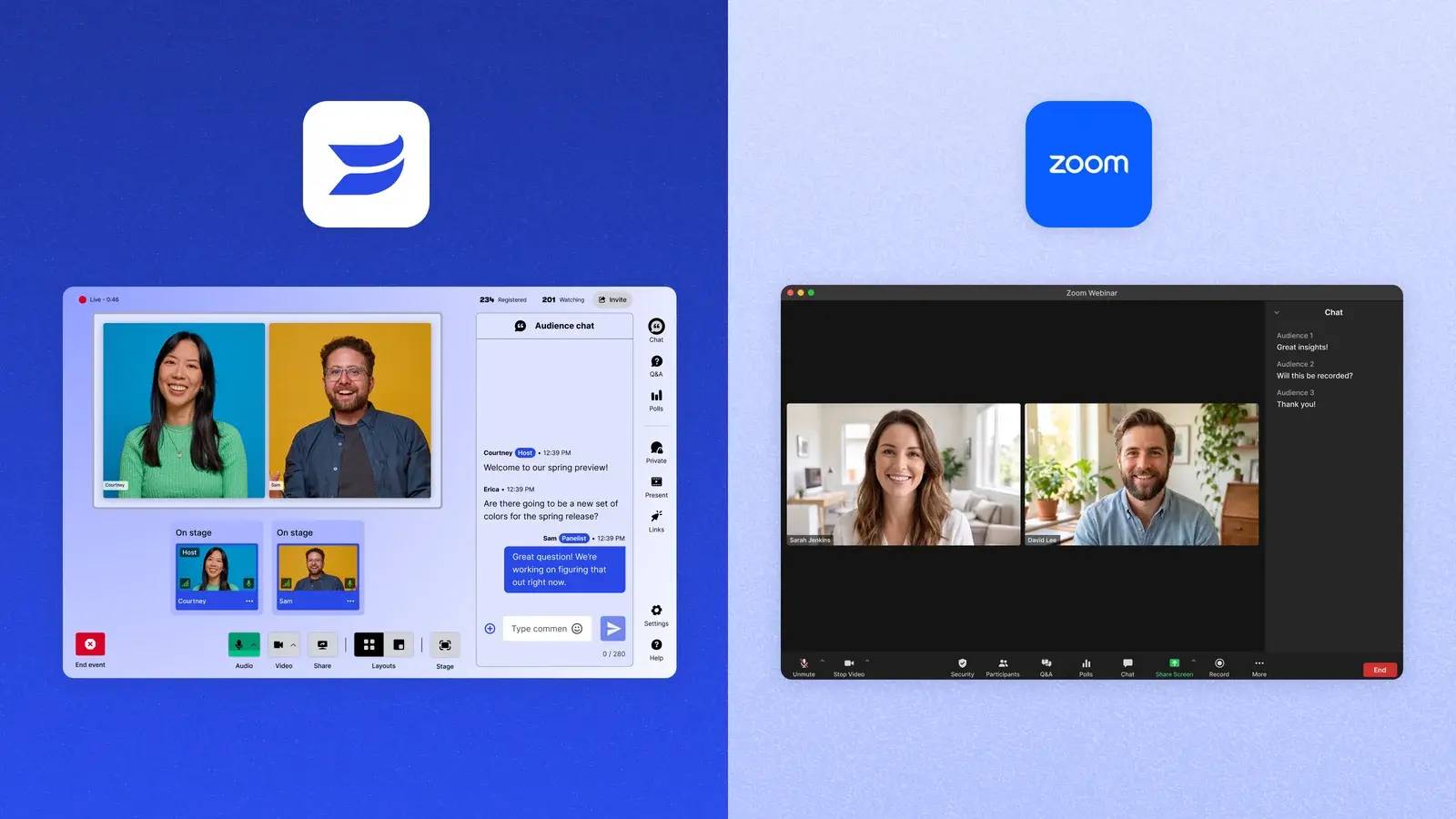
For Alicia at Empowerly, Zoom’s interactive features became less useful as the company’s webinar audience grew. Keeping the presentation on track became more important than bringing attendees onstage.
“I can see the value in [Zoom’s] interactive features, but once you hit the volume we’re at, they’re just not as important.”
How do Wistia and Zoom compare for audience engagement?
Both Wistia and Zoom offer live chat, Q&A, and polls, but Wistia lets you bring audience interactions and clickable CTAs directly onto the live video.
You can also customize emoji reactions, pin chat messages, and share resources with attendees. Zoom Webinars Plus offers CTAs and resources too, but attendees access them through a separate panel rather than over the video.
Can you brand and embed webinars on your own site with Wistia or Zoom?
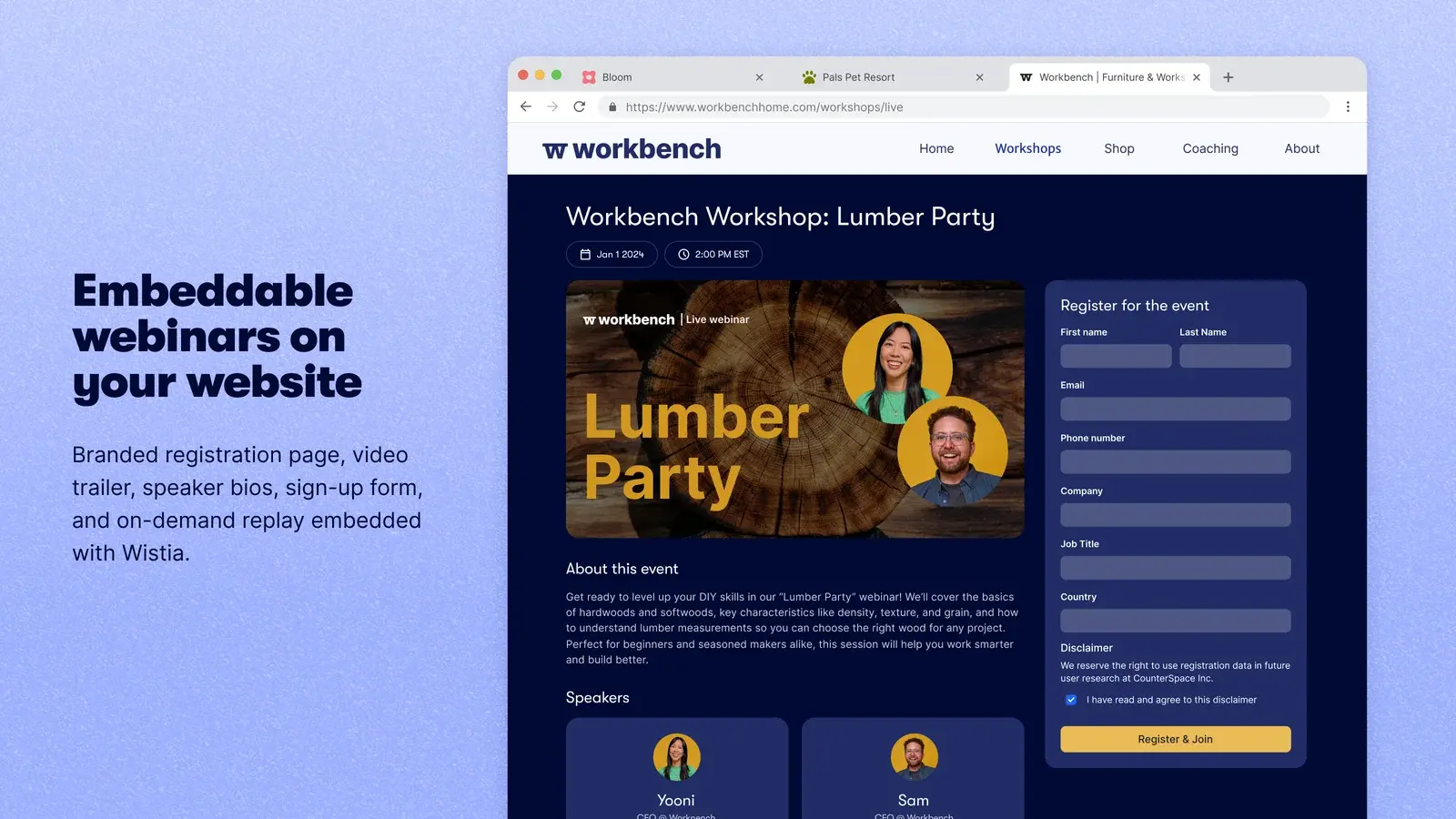
Both Wistia and Zoom offer customizable webinar registration pages, but Wistia Webinars Plus lets you embed the entire experience, from registration to replay, on your own website.
Embed it once, and the page automatically updates from registration to the live event to the replay. That means the link you spent weeks promoting can keep bringing in viewers and leads long after the event ends.
You can also customize your registration page with your brand colors, add a video trailer, and choose between Wistia’s built-in form or your own marketing automation form. Returning visitors can even register in one click.
Zoom offers customizable registration pages and embedded forms, with livestream embedding available in certain Zoom Events setups. Wistia Webinars Plus keeps registration, live participation, and replay together in one embedded experience on your own site.
How do Wistia and Zoom host and share webinar replays?
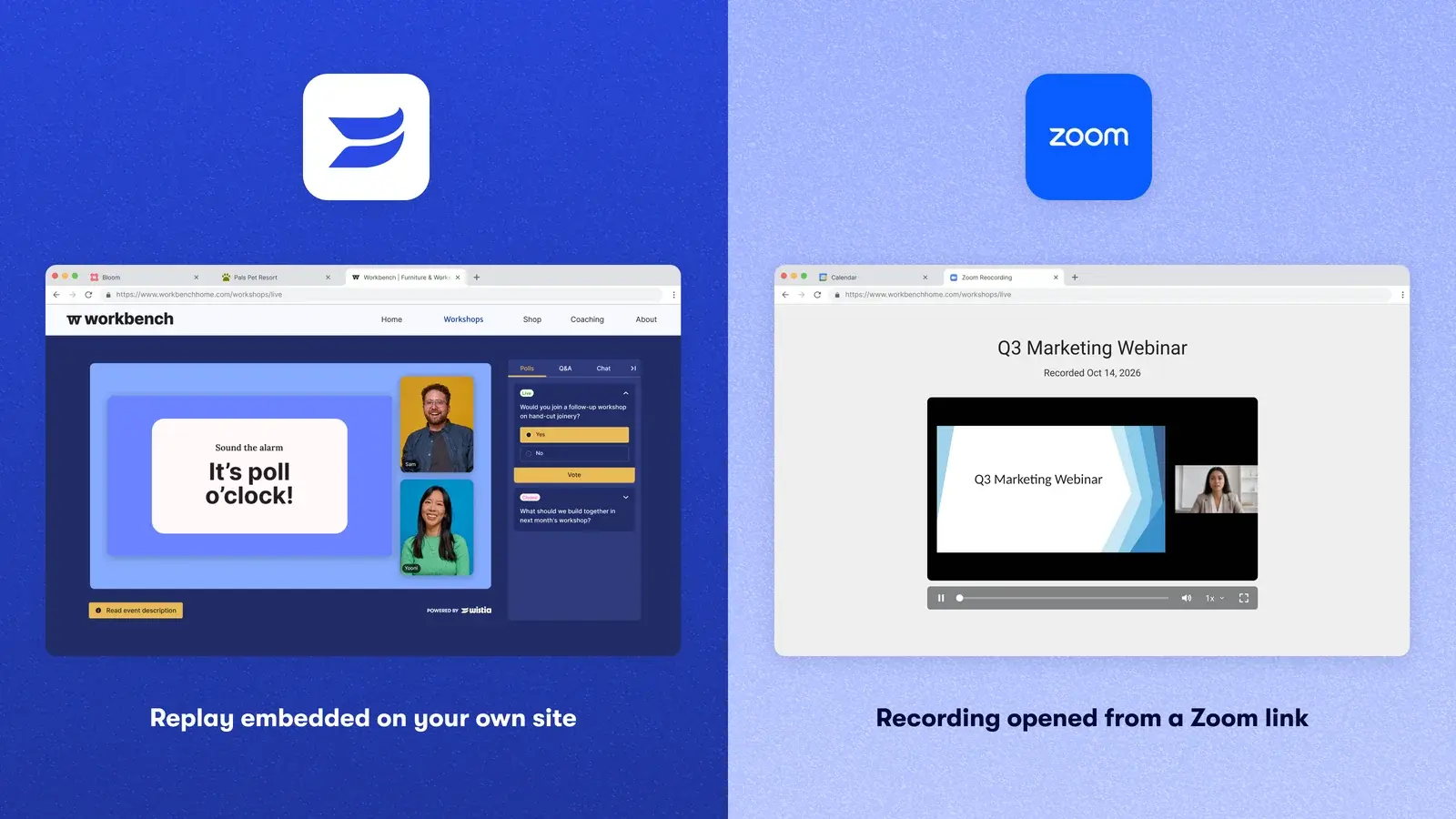
Both Wistia and Zoom offer webinar replays, but Wistia automatically saves the recording to your video library and turns the event link into an on-demand replay, with chat, Q&A, and polls preserved.
You can use Wistia Channels to turn your recordings into a branded, on-demand video library right on your website. Organize your videos however you’d like, capture subscribers, and help new viewers discover your content with Wistia’s video pages and SEO tools.
Zoom offers cloud recordings, on-demand viewing, and embedded video playlists on supported plans. But if you want a more customizable, lead-generating video library on your own website, you may need to move your recordings to a dedicated video marketing platform like Wistia.
How do Wistia and Zoom compare for AI video editing and repurposing?
Compared to Zoom, Wistia gives you more ways to turn webinar recordings into branded videos, with a full video editor and AI-powered production tools.
Wistia’s built-in video editor goes well beyond trimming recordings. You can stitch together clips, add music and sound effects, create slides, layer videos and graphics over your footage, and resize everything for different channels, all without leaving the platform.
Mochine, Wistia’s agentic video editor, can turn your webinar into highlight reels and social clips with a simple prompt, complete with custom motion graphics. You can even create a motion kit that matches your brand using your website URL, reference images, or a description of the look you’re going for.
Zoom offers AI-generated clips, written content, and recording editing, with more advanced clip editing through Content Studio on supported plans.
Which has better webinar analytics for lead follow-up, Wistia or Zoom?
For lead follow-up, Wistia connects webinar engagement with the rest of your video data, while Zoom offers webinar reporting with more advanced analytics on higher-tier plans. With Wistia, you can use poll responses and individual viewing heatmaps to understand what interests each attendee, then personalize follow-up through native marketing integrations like HubSpot.
You can also see whether attendees kept the webinar tab active or clicked away with Wistia’s focused attendee rate. Plus, source and UTM tracking show where registrations came from, while engagement with your other videos gives you even more context.
Zoom also reports on registration, attendance, polls, and Q&A, with additional on-demand and cross-event analytics on higher-tier plans.
How much do Wistia Webinars and Zoom Webinars cost?
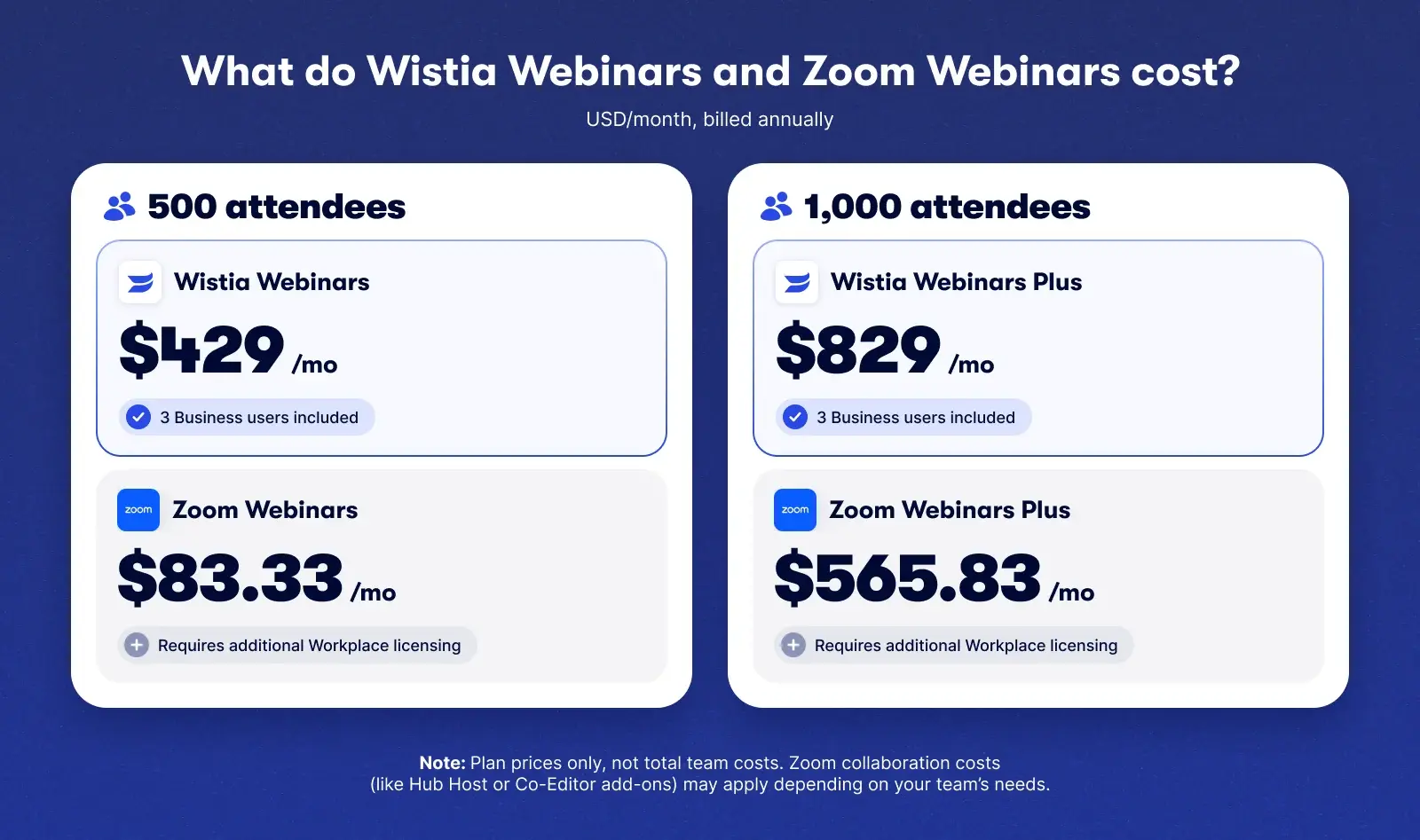
Wistia Webinars starts at $429/month for 500 attendees, while Webinars Plus starts at $829/month for 1,000 attendees. At the same capacities, Zoom Webinars starts at $83.33/month and Zoom Webinars Plus at $565.83/month. All prices are billed annually, but Zoom also requires separate Workplace licensing, with additional collaboration costs depending on your team’s needs.
Zoom has a lower starting price, especially if your company already pays for Workplace. Wistia includes video hosting and editing tools with either webinar plan, so it’s worth considering what’s included beyond the live event.
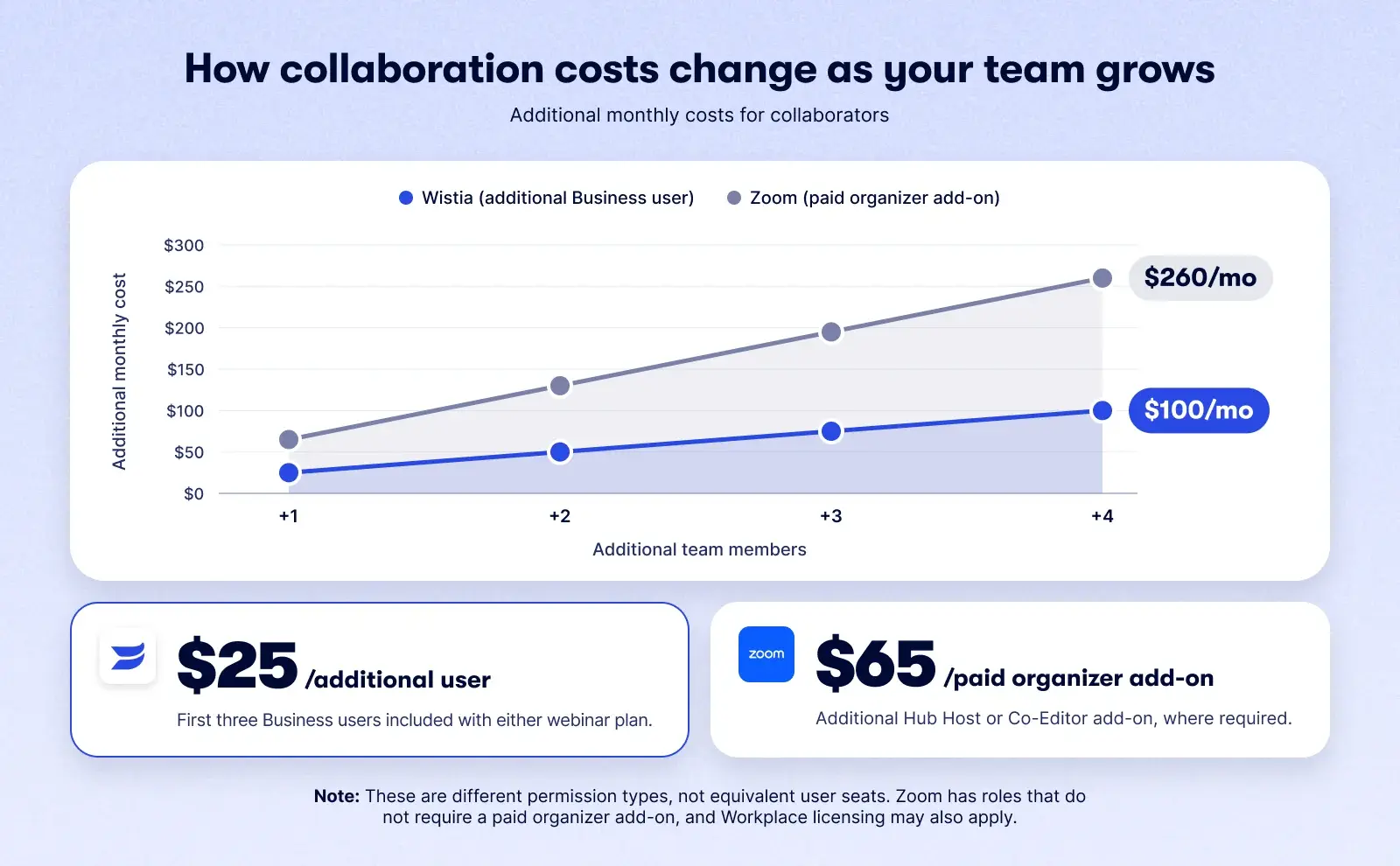
How do costs change as your team grows with Wistia Webinars and Zoom Webinars?
Wistia includes three Business users with either webinar plan, with additional users starting at $25/month each. Zoom Webinars Plus offers additional Hub Host and Co-Editor licenses at $65/month each.
All-in-one Webinar Platform
Streamline Your Webinar Process
Learn more
That matters when you’ve got a webinar crew: someone hosting, someone producing, and someone keeping an eye on the chat. Wistia charges the same for each additional paid user, regardless of their role, while Zoom’s collaboration costs depend on the access each person needs.
For current plans, check Wistia Webinar pricing and Zoom Webinar pricing.
How to move your webinars from Zoom to Wistia
Use Wistia’s Zoom integration to bring eligible Zoom cloud recordings into your Wistia library and start putting them to work.
- To move your Zoom webinar recordings to Wistia, connect both accounts. You’ll need a Zoom account with cloud recording enabled.
- Choose where your recordings go. Automatically import new recordings or manually select recordings from the past 30 days.
- Set up your webinar experience. Customize your registration page and connect your marketing automation platform.
- Give your recordings a new home. Organize them into a Wistia Channel, repurpose them into shorter videos, or use an imported recording to run a pre-recorded webinar.
Follow Wistia’s Zoom import guide for the full setup process.
Should your team choose Wistia or Zoom for webinars?
If you’re hosting occasional, highly interactive webinars, Zoom may already have everything you need. But if webinars are a regular part of your marketing strategy, Wistia gives you the production, editing, and audience insights to get more out of every event.
FAQs about Wistia and Zoom webinars
-
What does Wistia offer for webinars?
Wistia lets marketers host branded live and pre-recorded webinars, track attendee engagement, and turn recordings into content they can keep using. You can edit videos, create AI-powered clips, organize recordings into on-demand channels, and connect engagement data to your marketing tools. Wistia Webinars Plus also lets you embed the full webinar experience on your website.
-
Is Wistia a good Zoom Webinars alternative?
Wistia is a good alternative to Zoom Webinars because it’s built for marketers, while Zoom is built for meetings and larger live broadcasts. Both run webinars, but Wistia offers stronger branding, analytics, and content repurposing. Every step of the webinar experience lives in one place.
You can host branded registration pages and events on your website, repurpose recordings into clips and other pieces of content, and capture rich engagement data that flows right to your marketing automation platform. Zoom offers some of these capabilities on supported plans, but Wistia connects your webinar content and engagement data with the rest of your video marketing, so you can get more value from every event.
-
How much does Wistia cost compared to Zoom Webinars?
At 500 attendees, Wistia Webinars starts at $429/month, while Zoom Webinars starts at $83.33/month, both billed annually. Zoom also requires Workplace licensing starting at $14.16/user/month. On Zoom Webinars Plus, additional Hub Host and Co-Editor licenses cost $65/month each when needed.
But with Wistia, you also get a place to host your webinar recordings, a video editor and AI tools to turn your recordings into different pieces of content, and rich engagement analytics that flow straight into your marketing automation platform.
-
How do Wistia and Zoom Webinars compare for panelists and backstage production?
Wistia gives hosts and panelists more ways to coordinate backstage than Zoom Webinars does. Hosts can move speakers on and off stage, add slides and pre-recorded videos, and communicate with other hosts and panelists via a dedicated chat and a backstage “whisper” feature. Zoom supports private host and panelist messaging, but its dedicated backstage area and Production Studio are only available on Webinars Plus.
-
Which has better webinar analytics, Wistia or Zoom Webinars?
Wistia offers deeper analytics than Zoom Webinars does. Wistia includes attendee-level analytics on both webinar plans, so you can use that data to personalize lead follow-up without upgrading. You get viewer-level heatmaps, drop-off points, chat messages, poll answers, and Q&A contributions. And since your webinar analytics live alongside the rest of your video data in Wistia, you can also track how attendees interact with your other videos.
Zoom also offers registration, attendance, and engagement reporting, with more advanced analytics on higher-tier plans. But Wistia’s focused attendee rate also shows whether attendees kept the webinar tab active or switched away, giving you another signal of audience engagement.
-
How do Wistia and Zoom Webinars handle webinar recordings?
Wistia saves webinar recordings to your video library and automatically converts the event page into an on-demand replay page where you can capture leads long after the event ends. Zoom Webinars shares your recordings via Zoom links, and you have to redirect expired webinar links after the event ends.
-
Does Wistia or Zoom do more for post-webinar editing and repurposing?
Wistia offers more post-webinar editing and repurposing tools than Zoom Webinars does. With Wistia, you get a full video editor for combining clips, adding music, slides, and overlays, and resizing videos for different channels. Mochine, Wistia’s agentic video editor, can also turn webinars into clips and highlight reels with custom branded motion graphics. Zoom offers recording trimming and AI-powered repurposing through Content Studio on qualifying plans.
-
Does Wistia integrate with more marketing automation platforms than Zoom Webinars does?
Wistia natively integrates with two more marketing automation platforms than Zoom Webinars does. Both Wistia and Zoom connect to HubSpot, Marketo, Pardot, and Eloqua to support B2B marketers, and Wistia also integrates with ActiveCampaign and Klaviyo to support B2C, D2C, and e-commerce marketers.
-
Can I move my Zoom webinar recordings into Wistia?
You can import Zoom webinar recordings and transcripts directly into Wistia. You can then rerun them as simulive events, and the same link will become an on-demand replay as soon as the live broadcast ends. Follow the instructions in our help center to connect your Zoom account to Wistia.
Get in touch with Wistia’s team
See how Wistia helps you host branded events, repurpose recordings, and turn audience insights into better follow-up, all in one place.
Let’s go →
