
Close Menu
Trendswave MediaTrendswave Media
  • Home
  • About Us
    • Contact Us
  • Services
  • Influencer Marketing
  • Marketing
  • SEO
  • Social Media
  • Web Design
  • Shop

Subscribe to Updates

Get the latest creative news from Trendswave about Marketing, SEO & Web Design.

Please enable JavaScript in your browser to complete this form.
Loading
What's Hot

14 Email Subject Line Best Practices to Get More Opens

December 4, 2025

15 Powerful Ways to Use AI in Email Marketing

December 4, 2025

Proven Case Studies Showing AI in Advertising Moves the Needle

December 4, 2025
Facebook X (Twitter) Instagram
Trendswave MediaTrendswave Media
  • Home
  • About Us
    • Contact Us
  • Services
  • Influencer Marketing
  • Marketing
  • SEO
  • Social Media
  • Web Design
  • Shop
Trendswave MediaTrendswave Media
Home»SEO»Get instant clarity on your SEO with the new Yoast SEO dashboard
SEO

Get instant clarity on your SEO with the new Yoast SEO dashboard

adminBy adminJanuary 4, 2025No Comments2 Mins Read
Facebook Twitter Pinterest LinkedIn Tumblr WhatsApp VKontakte Email
Get instant clarity on your SEO with the new Yoast SEO dashboard
Share
Facebook Twitter LinkedIn Pinterest Email


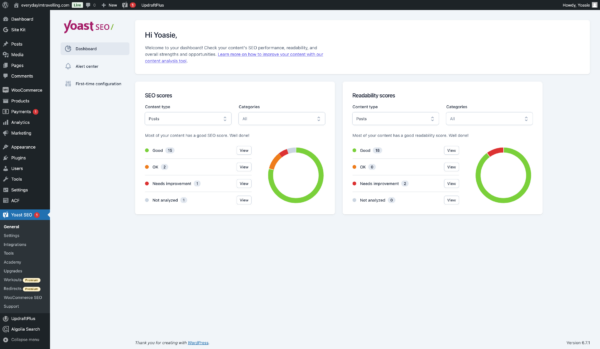
With the new Yoast SEO Dashboard, you can see how your site is doing at a glance. Instead of hunting through pages, you’ll find all your key metrics in one place. It’s easy to spot which posts need attention, see where you can improve, and figure out what to tackle first so you can spend more time refining your content and less time searching for data.

We know it can be challenging to improve your content when you have to dig through every post and page. That’s why we created a dashboard that instantly shows your site’s SEO Performance. It streamlines the process so you can focus on what matters: making your content shine.

What you get from the Yoast SEO Dashboard:

  • Top-level overview of your SEO: see critical insights at a glance without hunting through individual pages
  • Filterable views of SEO and readability scores: quickly spot where you can make the most significant improvements

Designed for clarity and direction, our dashboard makes it easy to check in, prioritize your next steps, and enhance your content strategy immediately. It’s straightforward, efficient, and all about helping you work smarter.
How to access the Yoast SEO Dashboard:

To access the Yoast SEO Dashboard, you just need to:

  1. Ensure your Yoast SEO plugin is up-to-date: In your WordPress admin area, go to “Plugins” and update Yoast SEO to the latest version
  2. Navigate to the Dashboard: Click on “Yoast SEO” in your WordPress sidebar to land on the dashboard, or click on “Dashboard”
  3. Explore your insights: Review the overview, filter your scores, and start working through your task list

Ready to see how much simpler managing your SEO can be?
Get Yoast SEO today and let your new dashboard guide you toward better performance.

Carl Henry Addoumieh

When I first started working in marketing, Yoast SEO was the first plugin I used. Today, I work with the tool that I depended on the most. I’m Carl Henry, my background is in SaaS growth marketing with a focus on content. I like basketball, padel, painting, and gaming.

Avatar of Carl Henry Addoumieh


Source link

clarity dashboard instant SEO Software releases and updates Yoast Yoast SEO Yoast SEO Premium
Share. Facebook Twitter Pinterest LinkedIn Tumblr WhatsApp Email
Previous ArticleCSS Properties to Make Hyperlinks More Attractive – Speckyboy
Next Article The Ultimate Guide to Expert Event Content Curation
admin
  • Website

Related Posts

Do Self-Promotional “Best” Lists Boost ChatGPT Visibility? Study of 26,283 Source URLs

December 4, 2025

How to Show Up in ChatGPT Responses

December 3, 2025

What is search intent? • SEO for beginners • Yoast

December 1, 2025

Google’s Mueller Says Sites In A ‘Bad State’ May Need To Start Over

November 30, 2025
Leave A Reply Cancel Reply

  • Facebook
  • Twitter
  • Pinterest
  • Instagram
  • YouTube
  • Vimeo
Don't Miss
Marketing

14 Email Subject Line Best Practices to Get More Opens

By adminDecember 4, 20250

By Sean Tinney December 1, 2025 Your subject line determines whether your email gets opened…

15 Powerful Ways to Use AI in Email Marketing

December 4, 2025

Proven Case Studies Showing AI in Advertising Moves the Needle

December 4, 2025

Do Self-Promotional “Best” Lists Boost ChatGPT Visibility? Study of 26,283 Source URLs

December 4, 2025

Subscribe to Updates

Get the latest creative news from Trendswave about Marketing, SEO & Web Design.

Please enable JavaScript in your browser to complete this form.
Loading
About Us

Trendswave is an Influencer Marketing Agency with access to one of the largest influencer networks in the Poland, connecting brands and agencies to only the best influencers and social media thought leaders.

Our Picks

14 Email Subject Line Best Practices to Get More Opens

December 4, 2025

15 Powerful Ways to Use AI in Email Marketing

December 4, 2025
Quicklinks
  • Influencer Marketing
  • Marketing
  • SEO
  • Social Media
  • Web Design
  • About Us
  • Contact Us
  • Disclaimer
  • Privacy Policy
  • Terms and Conditions
© 2025 Trendswave.All Rights Reserved

Type above and press Enter to search. Press Esc to cancel.