
Close Menu
Trendswave MediaTrendswave Media
  • Home
  • About Us
    • Contact Us
  • Services
  • Influencer Marketing
  • Marketing
  • SEO
  • Social Media
  • Web Design
  • Shop

Subscribe to Updates

Get the latest creative news from Trendswave about Marketing, SEO & Web Design.

Please enable JavaScript in your browser to complete this form.
Loading
What's Hot

How to Grow on Instagram Without Reels : Social Media Examiner

August 1, 2026

17 Ways to Get Found in 2026

August 1, 2026

AI models favor familiar brands in search: Study

July 31, 2026
Facebook X (Twitter) Instagram
Trendswave MediaTrendswave Media
  • Home
  • About Us
    • Contact Us
  • Services
  • Influencer Marketing
  • Marketing
  • SEO
  • Social Media
  • Web Design
  • Shop
Trendswave MediaTrendswave Media
Home»SEO»Google AI Overviews Explain Overlay Testing Bottom Tray
SEO

Google AI Overviews Explain Overlay Testing Bottom Tray

adminBy adminAugust 19, 2025No Comments2 Mins Read
Facebook Twitter Pinterest LinkedIn Tumblr WhatsApp VKontakte Email
Google AI Overviews Explain Overlay Testing Bottom Tray
Share
Facebook Twitter LinkedIn Pinterest Email


Google AI Overviews Explain Overlay Testing Bottom Tray

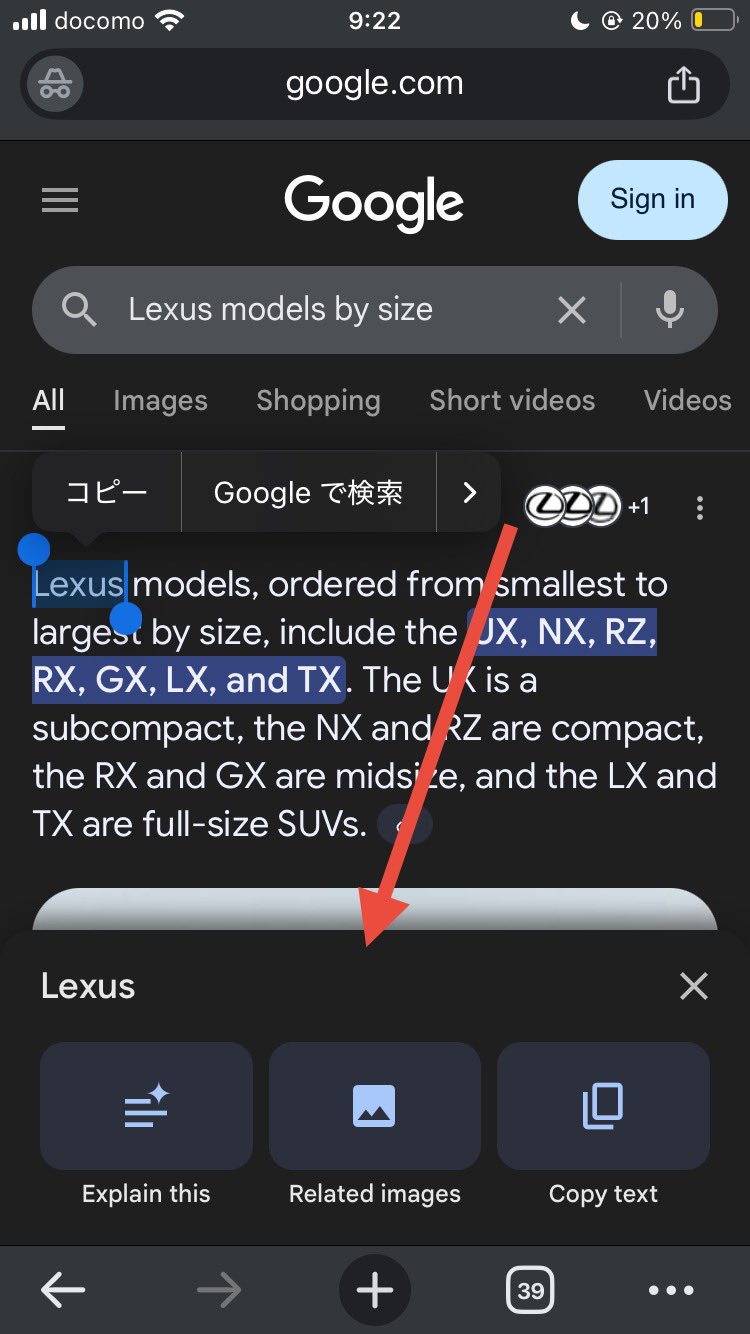
Google AI Overviews has this feature where you can select the text in the AI Overview and an overlay with explain this, related images and copy text (sometimes other features) overlay as buttons for you to do more with. Google even tested keyboard shortcuts for it. But now Google is testing this in a bottom tray design.

The bottom tray interface, when loaded, will let you choose from those:

  • Explain this
  • Related images
  • Copy text

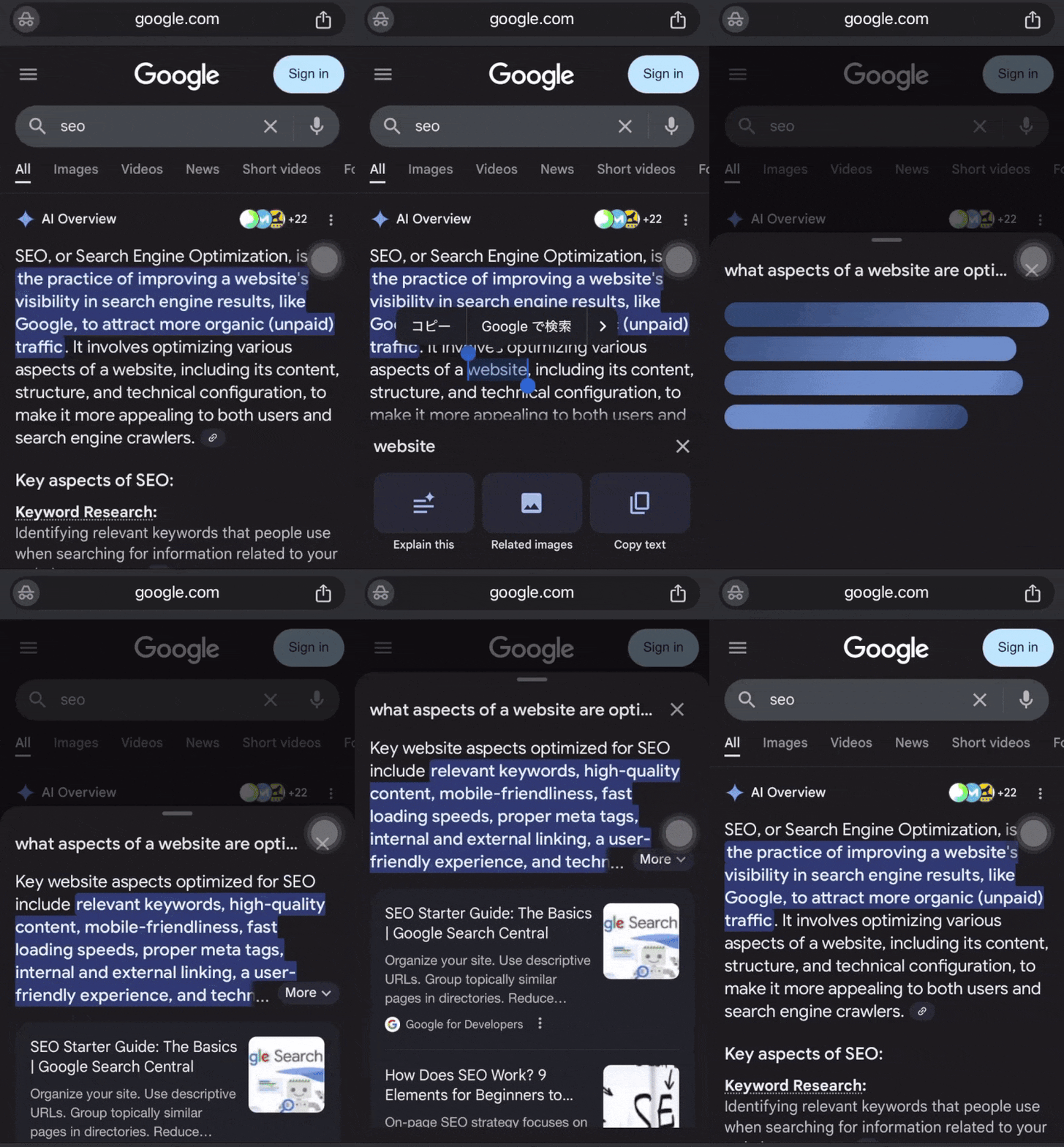
While these features are not new, the interface is and it might be a bigger deal. Because when you click on explain this or related images, the results load in the tray at the bottom and do not take you to a new page.

This was spotted by Matsushita Sotaro who posted some screenshots on X:

Here is what the tray looks like when you select text:
Google Ai Overview Explain Tray Bottom

Then if you click on related images, it loads the results in the tray and does not take you to a new screen:

Google Ai Overview Explain Tray Bottom Expand

This is how it works when you click explain this:
Google Ai Overview Explain Tray Bottom

Send a video of the action when you click on “Explain this”

It appears that an AI Overview on the selections will be developed. pic.twitter.com/n8n3KPgnti

— 松下 聡太郎(Matsushita Sotaro) (@w55UMqzEVGqD7FP) August 19, 2025

This is actually from at least May:

Google’s AI Overview Explain mode and text copy feature are now live on mobile. @rustybrick @gaganghotra_ @brodieseo pic.twitter.com/U0jXAGOvtr

— Sachin Patel (@SachuPatel53124) May 22, 2025

Forum discussion at X.


Source link

Bottom Explain Google Overlay Overviews Testing Tray
Share. Facebook Twitter Pinterest LinkedIn Tumblr WhatsApp Email
Previous ArticleWhich E-Commerce Platform is Best for You?
Next Article A Creator Risk Management Framework I Traackr
admin
  • Website

Related Posts

Vibe Coding for Marketers: A Beginner’s Guide

July 30, 2026

Keyword mapping for SEO: Guide + free template

July 29, 2026

How Long Does It Take to Build a Website with AI? • Yoast

July 27, 2026

X Live-Tweets Its Fight Against Chatbot Spam In Real-Time

July 26, 2026
Leave A Reply Cancel Reply

  • Facebook
  • Twitter
  • Pinterest
  • Instagram
  • YouTube
  • Vimeo
Don't Miss
Marketing

How to Grow on Instagram Without Reels : Social Media Examiner

By adminAugust 1, 20260

Social Marketing Trends The data you’ve been missing! Need a new plan?…

17 Ways to Get Found in 2026

August 1, 2026

AI models favor familiar brands in search: Study

July 31, 2026

Vibe Coding for Marketers: A Beginner’s Guide

July 30, 2026

Subscribe to Updates

Get the latest creative news from Trendswave about Marketing, SEO & Web Design.

Please enable JavaScript in your browser to complete this form.
Loading
About Us

Trendswave is an Influencer Marketing Agency with access to one of the largest influencer networks in the Poland, connecting brands and agencies to only the best influencers and social media thought leaders.

Our Picks

How to Grow on Instagram Without Reels : Social Media Examiner

August 1, 2026

17 Ways to Get Found in 2026

August 1, 2026
Quicklinks
  • Influencer Marketing
  • Marketing
  • SEO
  • Social Media
  • Web Design
  • About Us
  • Contact Us
  • Disclaimer
  • Privacy Policy
  • Terms and Conditions
© 2026 Trendswave.All Rights Reserved

Type above and press Enter to search. Press Esc to cancel.