


f you’re running a WordPress website and want to sell products or services, you don’t need to migrate to Shopify or BigCommerce. The beauty of WordPress’s extensible architecture means you can transform your existing site into a fully functional online store through the right WordPress ecommerce plugins.
You already know how important plugins are if you’re using WordPress. These tools simplify everything from optimization to content management. And the right ecommerce plugin can help you maximize revenue from every website visitor, whether you’re selling physical goods, digital downloads, memberships, or services.
As someone who has been advising businesses as a Fractional CMO for years, I’ve seen firsthand how the right ecommerce setup can make or break an online business. Through my work with clients across industries, my experience teaching digital marketing at universities, and insights from my books including Digital Threads, I’ve learned that choosing the right tools matters more than most entrepreneurs realize. Some of these I use myself; others I’ve seen deliver results for clients or come recommended by marketers I respect.
Here’s the reality: with global ecommerce now accounting for approximately 20.5% of global retail sales, there’s never been a better time to get your WordPress store running properly. The global ecommerce market is projected to reach $6.86 trillion in 2025, and WordPress stores powered by plugins like WooCommerce are capturing a significant share of that growth.
Key Takeaways
✅ WooCommerce powers over 4.5 million stores and holds 33.4% of the global ecommerce market share, making it the dominant WordPress solution.
✅ Choose your plugin based on what you’re selling: physical products, digital downloads, memberships, or services each have ideal solutions.
✅ The average cart abandonment rate is 70%, so checkout optimization tools like CartFlows can dramatically increase your revenue.
✅ Most successful WordPress stores combine multiple plugins: a foundation platform plus specialized tools for search, analytics, and automation.
✅ Free plugins often require paid extensions for advanced features, so factor total cost of ownership into your decision.
What Is a WordPress Ecommerce Plugin and What Can It Do?
A WordPress ecommerce plugin transforms a standard WordPress website into a functional online store capable of accepting payments, managing inventory, and processing orders. The core purpose is enabling you to sell physical or digital goods through popular payment gateways like Stripe, PayPal, and Square. Beyond transaction processing, you’ll also get inventory management tools to track stock levels and customer relationship features.
But there’s much more to these plugins than simple payment processing. The best ones come with customization options that significantly boost your visitors’ shopping experience. Many include analytics for measuring engagement, conversion rates, and search engine performance. You’ll also find tools for handling recurring payments if you’re selling subscriptions or memberships.
Online stores can also benefit from website-building functionality. Many WordPress ecommerce plugins let you create product pages, checkout pages, and entire storefronts from scratch, even with minimal technical skills. Business owners can use pre-built templates to launch a professional ecommerce platform quickly, with many offering compatibility with both Gutenberg and Elementor for frontend design flexibility.
If you’re exploring other ecommerce tools to complement your WordPress setup, there’s no shortage of options. And if you’re weighing platforms beyond WordPress, check out my comparison of Amazon vs Shopify or this guide to free ecommerce platforms.
How Should You Evaluate WordPress Ecommerce Plugins?
Before committing to any plugin, consider these factors:
| Evaluation Criteria | What to Look For |
|---|---|
| Payment Methods | Integration with Stripe, PayPal, Square, and payment methods your customers prefer |
| Transaction Fees | Some plugins charge fees on top of payment processor fees |
| Security Features | SSL support, PCI compliance, fraud protection |
| Scalability | Can it grow with your business without performance issues? |
| Update Frequency | Regular updates indicate active development and security patches |
| Customer Reviews | Check WordPress.org ratings and independent reviews |
| Pricing Structure | Compare free plans, premium tiers, and hidden costs |
| API Access | Integrations with your email marketing, CRM, and other tools |
| Support & Tutorials | Thorough documentation, tutorials for beginners, responsive customer support |
You want a solution with powerful features that handles your current needs while scaling as you grow. Security, regular updates, and responsive support are non-negotiables for any serious ecommerce operation.
15 Best WordPress Ecommerce Plugins for Your Business
1. WooCommerce

WooCommerce is the most popular WordPress ecommerce plugin, with a 33.4% global market share and over 4.5 million active stores worldwide. This open-source solution offers incredible flexibility for selling physical and digital goods, and its massive ecosystem means you can find add-ons for virtually any functionality.
Key Features:
- Unlimited products with no transaction fees from WooCommerce itself
- 100+ payment gateways including Stripe, PayPal, and Square
- Built-in inventory management, shipping calculations, and tax settings
- Thousands of themes and extensions for customization
- Full control over your storefront design and functionality
Pricing: The core plugin is free. WooPayments charges 2.9% + $0.30 per transaction for U.S.-issued cards. Premium extensions range from $29-$299/year depending on functionality.
| Pros | Cons |
|---|---|
| Extremely flexible and customizable | Can require multiple paid extensions for advanced features |
| Massive community and extension library | Steeper learning curve than hosted solutions |
| No platform lock-in (you own your data) | You’re responsible for hosting, security, and updates |
| Works with virtually any WordPress theme | Performance can suffer without proper optimization |
Best for: Small to medium businesses wanting full control over their online store without recurring platform fees.
2. Easy Digital Downloads

Unlike WooCommerce’s focus on physical products, Easy Digital Downloads (EDD) is purpose-built for selling digital products: ebooks, software, courses, music, templates, and more. If you’re a content creator or entrepreneur selling downloads, this streamlined solution eliminates the complexity of shipping and inventory.
Overwhelmed by Digital Marketing?
Just released: my new book to help small businesses, entrepreneurs, and marketers master digital marketing in today’s digital-first world.
Drawing on my Fractional CMO experience, Digital Threads simplifies complex strategies into clear, actionable steps for success.
Transform your business today—grab your copy! Click the cover or button below to buy on Amazon.

Key Features:
- Optimized checkout specifically for digital product delivery
- Software licensing for selling plugins, themes, or apps
- Customer management with detailed purchase history
- Discount codes and promotional pricing
- Integrations with Stripe, PayPal, Slack, Mailchimp, and 100+ tools via API
Pricing: Core plugin is free. Pro plans start at $99.50/year (Personal), $199.50/year (Extended), and $299.50/year (Professional) with additional features and extensions.
| Pros | Cons |
|---|---|
| Clean, intuitive dashboard for managing digital sales | Not suitable for physical products |
| Built specifically for downloads (no bloated features) | Advanced features require paid extensions |
| Strong security for file protection | Smaller ecosystem than WooCommerce |
| Excellent reporting and analytics |
Best for: Content creators, software developers, and entrepreneurs selling digital products exclusively.
If you’re wondering how to make money with ecommerce, digital products offer some of the highest profit margins because there’s no inventory or shipping costs.
3. Shopify Buy Button (Sell on WordPress)
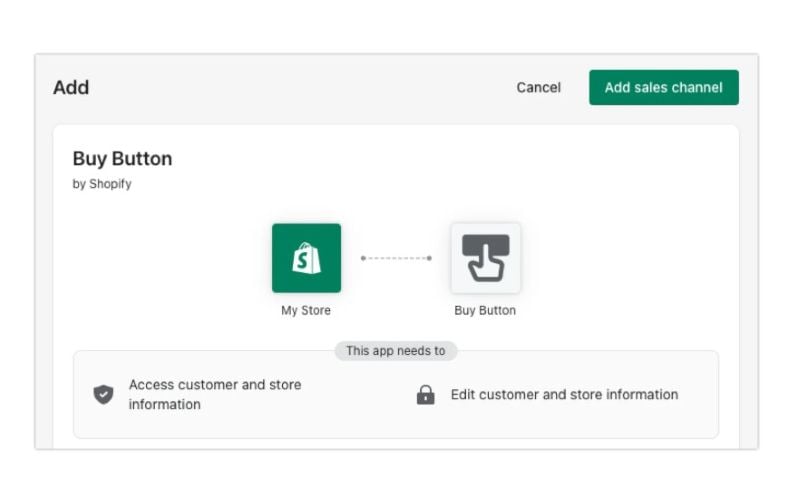
Already have a Shopify store but want to use your WordPress blog or content site? Shopify’s Buy Button lets you embed products directly into WordPress pages without building a separate WooCommerce store. It’s the bridge between Shopify’s powerful ecommerce backend and WordPress’s content flexibility.
Key Features:
- Embed individual products or entire collections on any WordPress page
- Shopify handles inventory, payments, and fulfillment
- Consistent checkout experience across all sales channels
- Real-time inventory sync between platforms
- Mobile-optimized buy buttons and cart
Pricing: Requires a Shopify plan starting at $5/month (Starter) for Buy Button functionality. Standard plans start at $39/month with lower transaction fees.
| Pros | Cons |
|---|---|
| Use Shopify’s robust ecommerce infrastructure | Monthly Shopify fees plus WordPress hosting |
| No need to manage separate WordPress payment processing | Less control than native WordPress solutions |
| Easy to add products to blog posts and landing pages | Transaction fees unless using Shopify Payments |
| Unified inventory across channels | Limited customization of embedded elements |
Best for: Businesses already using Shopify who want to sell through their WordPress content site without migration.
For a deeper look at combining these platforms, read my guide on how to use Shopify and WordPress together.
4. MemberPress
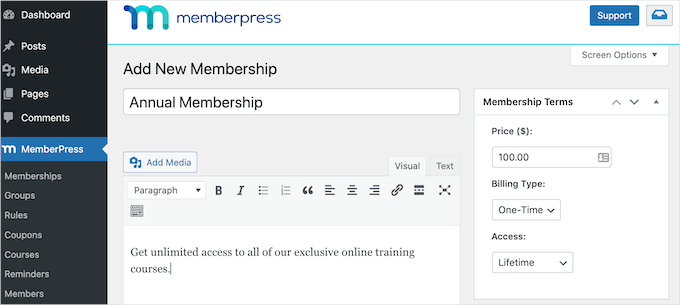
MemberPress is the premier membership plugin for WordPress, making it ideal for entrepreneurs selling online courses, premium content, or subscription-based services. If your business model revolves around recurring payments and gated content, this plugin delivers the tools you need.
Key Features:
- Powerful access rules to restrict content by membership level
- Built-in course builder for creating and selling online courses
- Drip content to release materials on a schedule
- Community forums and member directories
- Integrations with email marketing, payment processors, and more
Pricing: Plans start at $179.50/year (Basic), $349/year (Growth), and $499/year (Scale). The Scale plan eliminates transaction fees.
| Pros | Cons |
|---|---|
| All-in-one solution for memberships and courses | Higher price point than general ecommerce plugins |
| Intuitive content restriction rules | Overkill if you’re just selling individual products |
| Strong payment gateway support | Some features require higher-tier plans |
| Excellent documentation and tutorials |
Best for: Course creators, coaches, and content businesses building recurring membership revenue.
5. BigCommerce for WordPress
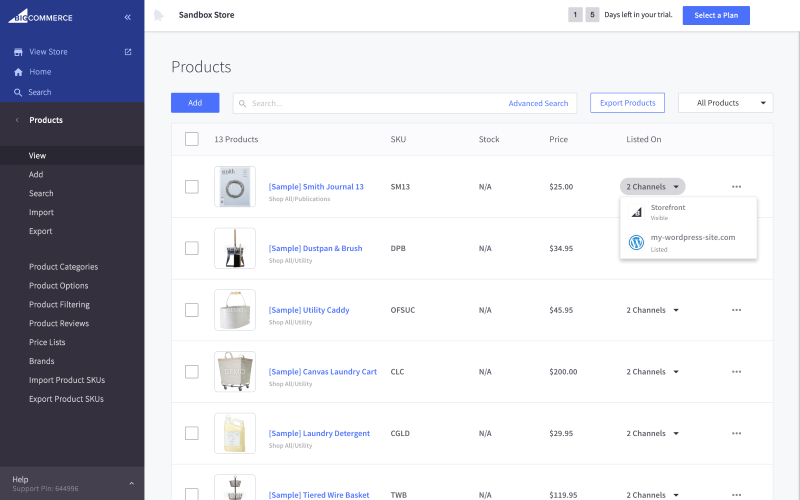
BigCommerce offers a unique “headless commerce” approach: you get BigCommerce’s enterprise-grade ecommerce engine powering your store while WordPress handles your content and frontend design. This separation delivers scalability that native WordPress plugins struggle to match.
Key Features:
- Unlimited products, bandwidth, and storage on all plans
- 0% transaction fees (you only pay payment processor fees)
- Multi-currency and multi-channel selling built-in
- Enterprise-grade security and PCI compliance
- Handles high traffic without slowing your WordPress site
Pricing: BigCommerce plans start at $29/month (Standard), $79/month (Plus), and $299/month (Pro). The WordPress plugin is free.
| Pros | Cons |
|---|---|
| No transaction fees on any plan | Monthly platform fee in addition to hosting |
| Handles scale without WordPress performance issues | Less flexibility than WooCommerce for customization |
| Built-in multi-currency for international sales | Steeper learning curve for the BigCommerce backend |
| Strong B2B features |
Best for: Growing businesses needing enterprise features and scalability without enterprise complexity.
If you’re comparing platforms, check out my analysis of ecommerce CMS platforms for a broader view.
6. Ecwid

Ecwid stands out for its simplicity: you can add a fully functional online store to your existing WordPress site without changing your design or rebuilding anything. It’s especially powerful for entrepreneurs who want to sell across multiple channels from one dashboard, and it’s user-friendly enough that beginners can get started quickly.
Key Features:
- Add a store to any existing website with one click
- Sell on Facebook, Instagram, Amazon, and Google Shopping simultaneously
- Automatic inventory sync across all channels
- Built-in POS for in-person sales
- Mobile app for managing your store on the go
Pricing: Free plan available (up to 10 products). Paid plans: Venture ($14.08/month), Business ($29.08/month), and Unlimited ($82.50/month) when billed annually.
| Pros | Cons |
|---|---|
| Extremely easy setup, no coding required | Limited customization compared to WooCommerce |
| Powerful multi-channel selling from one dashboard | Free plan restricted to 10 products |
| Free plan for testing and small catalogs | Advanced features locked behind higher tiers |
| Doesn’t slow down your WordPress site |
Best for: Small business owners wanting to quickly add ecommerce to an existing site and sell across multiple platforms.
7. SearchWP

WordPress’s default search is notoriously poor at finding products. SearchWP replaces it with a powerful custom search engine that helps visitors find exactly what they’re looking for. This directly translates to higher conversions and better user engagement on your ecommerce site.
Consider this: if customers can’t find your products, they can’t buy them. Research from Baymard Institute shows that poor site search is a major contributor to the approximately 70% cart abandonment rate that plagues ecommerce.
Key Features:
- Search product attributes, custom fields, categories, and tags
- PDF and document search for digital product stores
- Keyword stemming and fuzzy matching for better results
- WooCommerce and EDD integration
- Detailed search analytics to understand customer intent
Pricing: Plans start at $99/year (Standard), $149/year (Pro), and $399/year (Agency).
| Pros | Cons |
|---|---|
| Dramatically improves product discoverability | Additional cost on top of your ecommerce plugin |
| Easy integration with major ecommerce plugins | Requires configuration for optimal results |
| Search analytics reveal what customers want | May be overkill for very small product catalogs |
| Reduces bounce rates from failed searches |
Best for: Any ecommerce store with more than a handful of products where search is critical to the buying journey.
8. WP Simple Pay

If you need to accept payments without the complexity of a full ecommerce platform, WP Simple Pay is your answer. It’s the simplest way to add Stripe payments to WordPress, perfect for service businesses, consultants, and anyone selling a limited number of products or services.
Key Features:
- Accept one-time and recurring payments
- Custom payment forms without coding
- Buy now, pay later options through Stripe
- Subscription and installment payments
- Apple Pay and Google Pay support
| Pros | Cons |
|---|---|
| Much simpler than full ecommerce solutions | Free version adds 3% transaction fee |
| Drag-and-drop form builder | Limited to Stripe (no PayPal in core plugin) |
| No shopping cart complexity | Not suitable for large product catalogs |
| Quick setup for accepting payments |
Best for: Consultants, coaches, and service providers who need simple payment collection without a full store.
9. WP EasyCart

WP EasyCart offers a lightweight alternative to WooCommerce with an emphasis on simplicity. It’s a solid choice for small businesses that want essential ecommerce functionality without the learning curve or extension costs of larger platforms.
Key Features:
- Sell physical, digital, and subscription products
- Built-in Stripe, PayPal, and Square integration (even on free plan)
- Shipping integrations with USPS, FedEx, and UPS
- Simple inventory and order management
- Gift cards and promotional tools
Pricing: Free version available. Pro ($89/year) and Premium ($129/year) unlock additional features and integrations.
| Pros | Cons |
|---|---|
| Lower cost than WooCommerce with extensions | Smaller ecosystem than WooCommerce |
| Payment integrations included in free version | Fewer themes and design options |
| Straightforward setup and management | Limited scalability for large catalogs |
| Good for self-hosted WordPress stores |
Best for: Budget-conscious small businesses wanting simple ecommerce without WooCommerce’s complexity.
10. WPForms

WPForms is primarily a form builder, but its payment integrations make it surprisingly useful for ecommerce. If you need to collect payments through custom forms (donations, registrations, simple orders, or service bookings) WPForms handles it elegantly with workflows that automate your processes.
Key Features:
- Drag-and-drop form builder (no coding needed)
- Stripe, PayPal, Square, and Authorize.net integration
- Order forms with quantity, pricing options, and calculations
- Donation forms with suggested amounts
- Registration forms with payment collection
Pricing: Free Lite version available. Paid plans: Basic ($49.50/year), Plus ($99.50/year), Pro ($199.50/year), and Elite ($299.50/year).
| Pros | Cons |
|---|---|
| Extremely user-friendly interface | Not a full ecommerce solution |
| Versatile beyond just payments | Payment features require paid plans |
| Strong conditional logic for complex forms | Limited inventory management |
| Excellent email marketing integrations |
Best for: Businesses needing custom payment forms, registrations, donations, or simple order collection.
11. SureCart
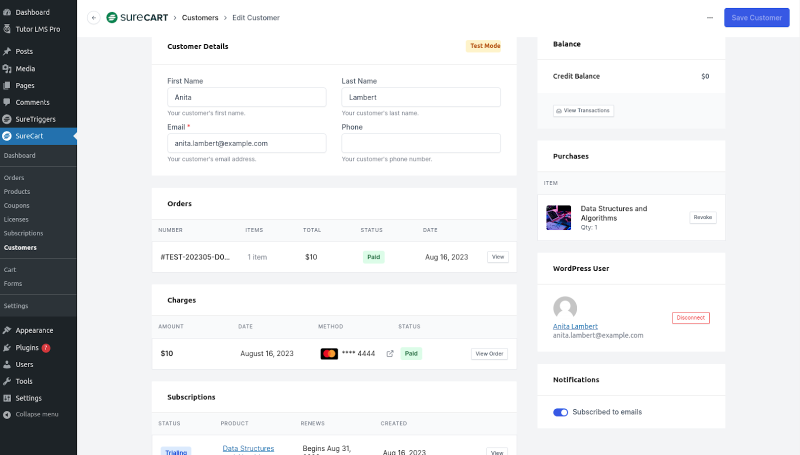
SureCart is a rising star among WordPress ecommerce plugins, offering a modern approach that’s lighter and faster than WooCommerce. It’s particularly attractive for entrepreneurs selling digital products, subscriptions, or a smaller catalog of physical goods, with a frontend optimized for conversions.
Key Features:
- Hosted checkout (secure, fast, and optimized for conversions)
- Subscription and payment plan support built-in
- Bump offers and one-click upsells
- Abandoned cart recovery
- Integration with popular WordPress plugins and page builders like Elementor and Gutenberg
Pricing: Free plan available with all 100+ features (1.9% transaction fee). Pro plans start at $199/year (annual) or $399 one-time payment, eliminating transaction fees.
| Pros | Cons |
|---|---|
| Full feature access on free plan | Smaller ecosystem than WooCommerce |
| Faster and lighter than WooCommerce | Free plan includes transaction fee |
| Modern, conversion-optimized checkout | Newer platform with smaller community |
| No extension bloat: features built-in |
Best for: Digital product sellers and entrepreneurs wanting a modern, lightweight alternative to WooCommerce.
12. SeedProd

SeedProd is a drag-and-drop website builder that’s particularly powerful for ecommerce landing pages. Whether you’re launching a product, running a promotion, or building sales pages, SeedProd helps you create high-converting pages without touching code.
Key Features:
- 300+ professionally designed templates
- WooCommerce blocks for product grids, carts, and checkouts
- Built-in sales countdown timers and urgency elements
- Coming soon and maintenance mode pages
- Mobile-responsive designs out of the box
Pricing: Plans start at $39.50/year (Basic), $89.50/year (Plus), $159.60/year (Pro), and $239.60/year (Elite).
| Pros | Cons |
|---|---|
| Create landing pages in minutes | Not a standalone ecommerce solution |
| Conversion-focused templates and elements | Requires separate plugin for payment processing |
| Works alongside any ecommerce plugin | Some templates require higher-tier plans |
| No coding required |
Best for: Marketers and entrepreneurs who need high-converting landing pages for product launches and promotions.
For more on building effective pages, check out my guide to blog design best practices.
13. CartFlows
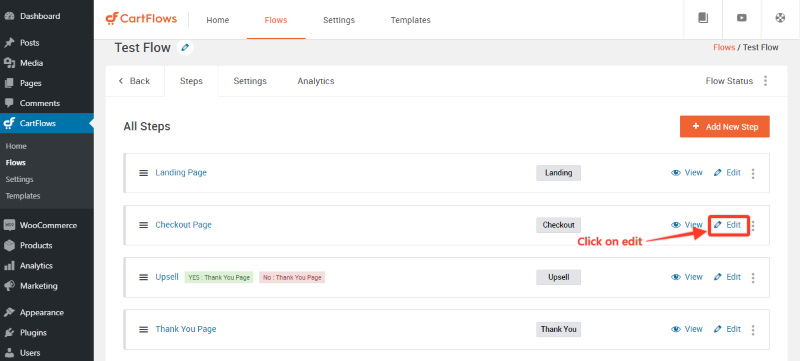
CartFlows transforms WooCommerce’s basic checkout into a conversion-optimized sales funnel. If you’re leaving money on the table with a standard checkout process, CartFlows adds upsells, order bumps, and A/B testing to maximize revenue per customer.
Here’s why this matters: the average cart abandonment rate globally is approximately 70%, according to Baymard Institute’s analysis of 50 different studies. And 39% of consumers abandon their carts due to extra costs like shipping and taxes. A properly optimized checkout can recover a significant portion of those lost sales.
Key Features:
- Custom checkout page designs (bypass WooCommerce’s default)
- One-click upsells and downsells post-purchase
- Order bump offers at checkout
- A/B split testing for optimization
- Cart abandonment recovery
| Pros | Cons |
|---|---|
| Significantly increases average order value | Requires WooCommerce (not standalone) |
| Works with your existing WooCommerce store | Best features require Pro plan |
| Professional templates for quick setup | Learning curve for funnel strategy |
| Detailed conversion analytics |
Best for: WooCommerce store owners serious about maximizing revenue through optimized checkout flows and upsells.
14. MonsterInsights
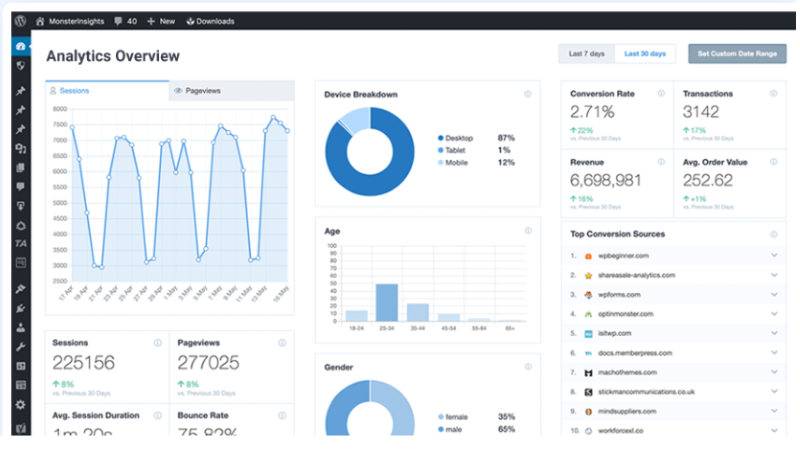
You can’t improve what you don’t measure. MonsterInsights is the leading Google Analytics plugin for WordPress, offering ecommerce-specific tracking that shows you exactly how customers interact with your store from first visit to completed purchase.
Key Features:
- One-click Google Analytics 4 setup (no coding)
- Enhanced ecommerce tracking for WooCommerce and Easy Digital Downloads
- Real-time stats dashboard in WordPress
- Customer journey tracking across sessions
- Popular products and conversion rate reports
| Pros | Cons |
|---|---|
| Makes Google Analytics accessible to non-technical users | Full ecommerce tracking requires Pro plan |
| Ecommerce reports directly in WordPress dashboard | Another subscription cost on top of your stack |
| Tracks the metrics that matter for online stores | Some advanced features require GA4 knowledge |
| EU compliance features built-in |
Best for: Any ecommerce business serious about understanding customer behavior and optimizing based on data.
For more on tracking what matters, read my guide to digital marketing analytics.
15. FunnelKit Automations
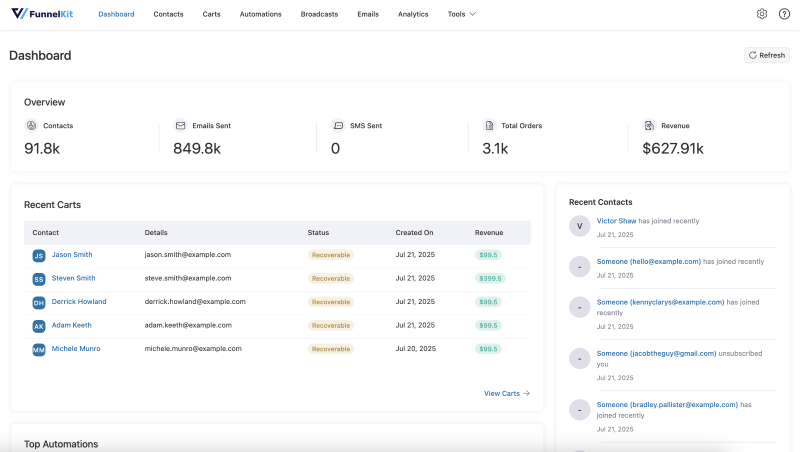
FunnelKit Automations (formerly Autonami) brings marketing automation directly into WordPress. Instead of paying for expensive external tools like Klaviyo or ActiveCampaign, you can run sophisticated email and SMS campaigns right from your WordPress dashboard with powerful API connections to your other tools.
Key Features:
- Visual automation builder for email sequences
- Abandoned cart recovery campaigns
- Post-purchase follow-ups and review requests
- Customer segmentation based on purchase behavior
- SMS marketing integration
- CRM functionality built-in
Pricing: Free version available with basic features. Pro plans start at $249.50/year (Basic), with higher tiers for additional features.
| Pros | Cons |
|---|---|
| Replace expensive SaaS marketing tools | Requires learning curve for automation strategy |
| Deep WooCommerce integration | Best paired with FunnelKit’s funnel builder |
| Own your customer data (no platform lock-in) | Email deliverability depends on your setup |
| Powerful segmentation capabilities |
Best for: WooCommerce store owners who want powerful marketing automation without expensive monthly SaaS fees.
If you’re building out your email strategy, my guide to email marketing content covers what actually works.
Which WordPress Ecommerce Plugin Should You Choose?
With 15 options covered, here’s a quick guide based on your specific situation:
| Your Situation | Best Plugin(s) |
|---|---|
| Selling physical products | WooCommerce, BigCommerce, Ecwid |
| Selling digital downloads | Easy Digital Downloads, SureCart |
| Memberships & courses | MemberPress |
| Already on Shopify | Shopify Buy Button |
| Simple payment collection | WP Simple Pay, WPForms |
| Budget-conscious small business | WP EasyCart, SureCart (free) |
| Need better site search | SearchWP |
| High-converting landing pages | SeedProd |
| Optimizing checkout/upsells | CartFlows |
| Analytics & tracking | MonsterInsights |
| Marketing automation | FunnelKit Automations |
For more platform comparisons, check out my article on the best ecommerce marketplaces if you’re considering selling beyond your own site.
Frequently Asked Questions About WordPress Ecommerce Plugins
WooCommerce is the best starting point for most beginners due to its massive community, extensive documentation, and free core plugin. However, if you’re only selling digital products, Easy Digital Downloads is simpler and more focused. For the fastest setup with zero learning curve, Ecwid lets you add a store in minutes.
The core WooCommerce plugin is free, but most stores need paid extensions for features like subscriptions, advanced shipping, or premium themes. Plan for $100-500/year in extensions for a typical small business. You’ll also pay payment processor fees (2.9% + $0.30 per transaction with WooPayments).
Yes, and most successful stores do. You might use WooCommerce as your foundation, then add SearchWP for better product discovery, CartFlows for checkout optimization, MonsterInsights for analytics, and FunnelKit for email automation. Just be selective. Each plugin adds complexity.
Self-hosted plugins (WooCommerce, Easy Digital Downloads) run entirely on your WordPress server. You control everything but handle security, updates, and performance. Hosted solutions (BigCommerce for WordPress, Ecwid) run their backend on external servers, reducing your maintenance burden but adding monthly fees.
Mobile cart abandonment rates are higher (approximately 79% versus desktop’s 68%). Choose a mobile-responsive theme, test your checkout on mobile devices, enable mobile wallets (Apple Pay, Google Pay), and keep your checkout forms short. Plugins like CartFlows include mobile-optimized templates.
Build Your Ideal WordPress Ecommerce Stack
Most entrepreneurs I know use a combination of these WordPress ecommerce plugins to create their ideal stack. You might start with WooCommerce or Easy Digital Downloads as your foundation, then add SearchWP for better product discovery, CartFlows for optimized checkouts, and MonsterInsights for tracking performance.
The beauty of WordPress is this flexibility. You’re not locked into one platform’s limitations. You can mix and match tools to build exactly what your business needs.
The key is starting with the right foundation for your product type (physical vs. digital vs. memberships), then layering on specialized tools as you grow. Just remember: every plugin adds some complexity, so only add what genuinely moves the needle for your business.
Whatever you choose, make sure the plugin is actively maintained, well-reviewed, and fits your current needs while allowing room to scale. The last thing you want is to migrate platforms six months from now because you outgrew your tools.
Ready to take your ecommerce marketing to the next level? Start with my comprehensive guide to ecommerce marketing strategies for a complete playbook on driving traffic and sales to your new store. Or feel free to contact me if I can be of any help!
Actionable advice for your digital / content / influencer / social media marketing.
Join 13,000+ smart professionals who subscribe to my regular updates.
