Think of it as a room filled with people who have come to hear you talk. If they like what they hear, they’ll stick around. Many will ask questions. A bunch will purchase your products or services. And a handful will turn into advocates who bring others into the room.
To fill your room, you typically have a signup form on your website. Visitors can enter their email list to subscribe to your content.
But what happens if you don’t have a website?
Don’t worry: You can still gather subscribers into the room without creating a website.
All you need is a hosted sign up form.
What is a hosted sign up form?
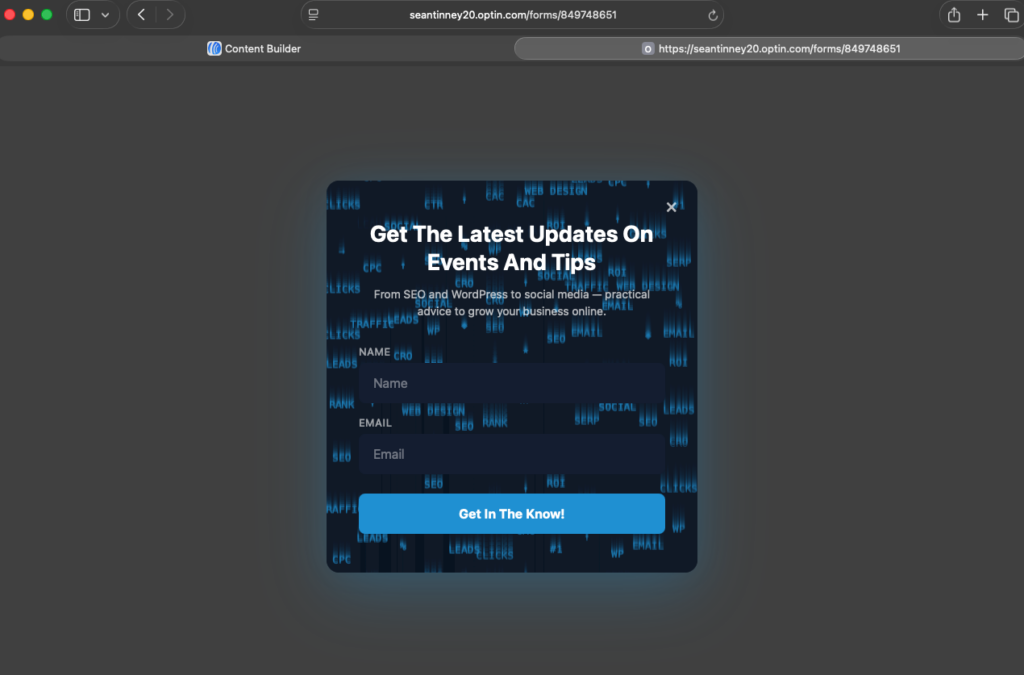
A hosted signup form lives on its own. It has a unique URL that you can share anywhere, on Facebook, Instagram, in a text message, or even printed on a business card. It’s a standalone page designed to do one thing: collect email addresses and add subscribers to your list.
Already have a website? A hosted signup form is still worth creating. If your site ever goes down, you have a backup. And when you want to share a direct link to your list (no navigation, no distractions), the hosted form is what you send.
How to create a hosted signup form
The easiest way to create a hosted signup form is with the AI Signup Form Builder inside AWeber. It generates a complete, hosted signup form from a single prompt. Describe your business, and the builder creates a form with a headline, description, and design that matches your brand.
Here’s how it works:
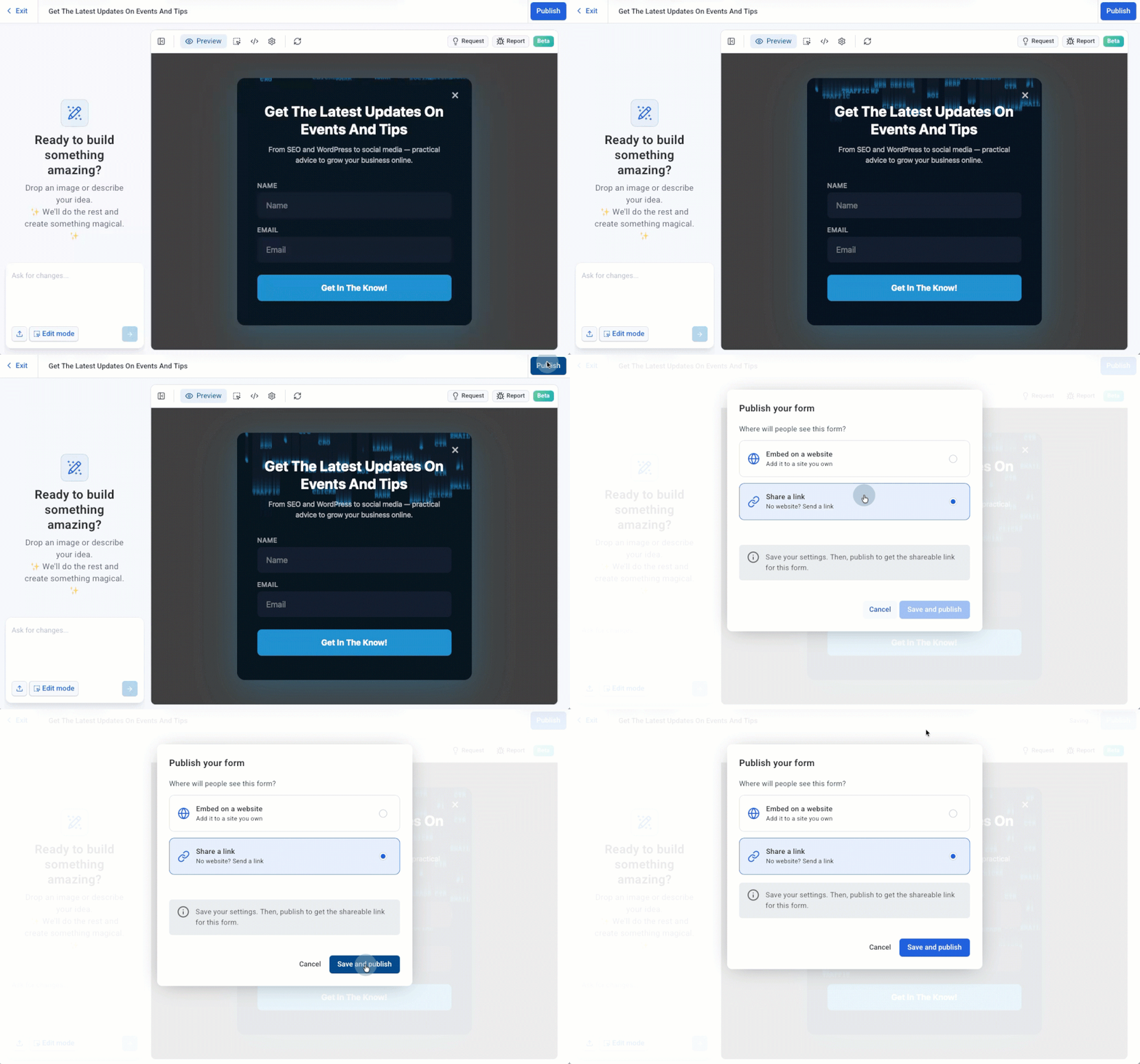
Step 1: Open the AI Signup Form Builder
Go to Pages & Forms and select AI Signup Forms in AWeber.
Step 2: Describe your business
Tell the builder what you want.
Step 3: Review and customize
The builder generates your form. Adjust the headline, colors, or layout if you want. Or leave it as-is and publish.
Step 4: Grab your hosted URL
Once published, AWeber gives you a unique link. That URL is your signup form. Share it anywhere people can click.
The entire process takes less than five minutes. No coding. No design decisions you have to make from scratch. The AI handles the first draft, and you refine from there.
Three ways to collect emails without a website
A hosted signup form gives you the tool. Now you need to put it where your audience already is.
Get your followers excited to sign up for your list by telling about all the great stuff they can expect to get in their inbox. If you write regular blog posts, tell them that by signing up, they’ll never miss a post from you.
1. Share it on social media
Post your signup form link directly on Facebook, Instagram, X, LinkedIn, or TikTok. But don’t just drop a link. Tell people what they’ll get for signing up.
“I send one email every Tuesday with a new recipe and a grocery list. No spam, no fluff. Sign up here:”
Put the link in your bio. Pin a post about it. Mention it in Stories. The more places your link appears, the more chances someone has to subscribe.
Here’s what it looks like when you share your AWeber hosted form link on Facebook: the form name you chose becomes the preview text. Make it count.
2. Include it in guest posts and collaborations
Guest blogging is an awesome way to grow your audience. If you write articles for someone else’s blog, include a link to your hosted form either within your blog post or in your signature. Let people know that if they want to see more content from you, all they have to do is sign up.
3. Collect emails in person
QR codes make this simple. Print your hosted signup form’s URL as a QR code and put it on business cards, flyers, product packaging, or event signage.
Someone at a farmer’s market scans your QR code, fills out your form on their phone, and they’re on your list before they walk away. No website involved.
When to upgrade to a website
A hosted signup form and a landing page can take you far. But at some point, you may want a website. Here’s when it makes sense:
You’re ready to publish long-form content like blog posts or guides. You want to sell products or services directly online. You need multiple pages (about, services, testimonials, contact). Your audience is searching for you by name and expects to find a site.
Until then, your hosted signup form and landing pages are your home base. They collect emails, deliver lead magnets, and trigger automated workflows. That’s everything you need to start building a real audience.
Learn more about creating sign up forms that get results
What are you waiting for? Log in to your AWeber account and create your hosted sign up form.
Your list is powerful.

Think of it as a room filled with people who have come to hear you talk. If they like what they hear, they’ll stick around. Many will ask questions. A bunch will purchase your products or services. And a handful will turn into advocates who bring others into the room.

To fill your room, you typically have a signup form on your website. Visitors can enter their email list to subscribe to your content.

But what happens if you don’t have a website?

Don’t worry: You can still gather subscribers into the room without creating a website.

All you need is a hosted sign up form.

What is a hosted sign up form?

A hosted signup form lives on its own. It has a unique URL that you can share anywhere, on Facebook, Instagram, in a text message, or even printed on a business card. It’s a standalone page designed to do one thing: collect email addresses and add subscribers to your list.

Already have a website? A hosted signup form is still worth creating. If your site ever goes down, you have a backup. And when you want to share a direct link to your list (no navigation, no distractions), the hosted form is what you send.

How to create a hosted signup form

The easiest way to create a hosted signup form is with the AI Signup Form Builder inside AWeber. It generates a complete, hosted signup form from a single prompt. Describe your business, and the builder creates a form with a headline, description, and design that matches your brand.

Here’s how it works:

Step 1: Open the AI Signup Form Builder

Go to Pages & Forms and select AI Signup Forms in AWeber.

Step 2: Describe your business

Tell the builder what you want.

Step 3: Review and customize

The builder generates your form. Adjust the headline, colors, or layout if you want. Or leave it as-is and publish.

Step 4: Grab your hosted URL

Once published, AWeber gives you a unique link. That URL is your signup form. Share it anywhere people can click.

The entire process takes less than five minutes. No coding. No design decisions you have to make from scratch. The AI handles the first draft, and you refine from there.

Three ways to collect emails without a website

A hosted signup form gives you the tool. Now you need to put it where your audience already is.

Get your followers excited to sign up for your list by telling about all the great stuff they can expect to get in their inbox. If you write regular blog posts, tell them that by signing up, they’ll never miss a post from you.

1. Share it on social media

Post your signup form link directly on Facebook, Instagram, X, LinkedIn, or TikTok. But don’t just drop a link. Tell people what they’ll get for signing up.

“I send one email every Tuesday with a new recipe and a grocery list. No spam, no fluff. Sign up here:”

Put the link in your bio. Pin a post about it. Mention it in Stories. The more places your link appears, the more chances someone has to subscribe.

Here’s what it looks like when you share your AWeber hosted form link on Facebook: the form name you chose becomes the preview text. Make it count.

2. Include it in guest posts and collaborations

Guest blogging is an awesome way to grow your audience. If you write articles for someone else’s blog, include a link to your hosted form either within your blog post or in your signature. Let people know that if they want to see more content from you, all they have to do is sign up.

3. Collect emails in person

QR codes make this simple. Print your hosted signup form’s URL as a QR code and put it on business cards, flyers, product packaging, or event signage.

Someone at a farmer’s market scans your QR code, fills out your form on their phone, and they’re on your list before they walk away. No website involved.

When to upgrade to a website

A hosted signup form and a landing page can take you far. But at some point, you may want a website. Here’s when it makes sense:

You’re ready to publish long-form content like blog posts or guides. You want to sell products or services directly online. You need multiple pages (about, services, testimonials, contact). Your audience is searching for you by name and expects to find a site.

Until then, your hosted signup form and landing pages are your home base. They collect emails, deliver lead magnets, and trigger automated workflows. That’s everything you need to start building a real audience.

Learn more about creating sign up forms that get results

What is an AI form builder (and how does it actually work)?

Any Form You Can Imagine, AI Signup Form Builder Can Create it

Email signup forms: how to get more subscribers from every page

Popup forms: how to capture subscribers without annoying visitors

What are you waiting for? Log in to your AWeber account and create your hosted sign up form.

Not an AWeber customer yet? Start your free trial today!

Additional contributions by Sean Tinney