


By Sean Tinney October 17, 2025
You’ve built a website with Replit’s AI-powered platform—now it’s time to turn those visitors into subscribers. Adding email marketing lets you capture leads, build relationships, and drive sales on autopilot. Here’s how to integrate a signup form and start growing your list in under 15 minutes.
Why Add Email Marketing to Replit
Your Replit site attracts visitors, but 98% will leave without taking action. Email marketing gives you a second chance to convert those visitors into customers.
Unlike social media algorithms that hide your content, email puts you directly in your audience’s inbox. You own the relationship, control the timing, and can automate follow-ups without lifting a finger.
With Replit’s conversational website builder and our email tools working together, you can capture leads while you focus on growing your business.
Step-by-Step Replit Email Integration Guide
Step 1: Create Your Signup Form in AWeber
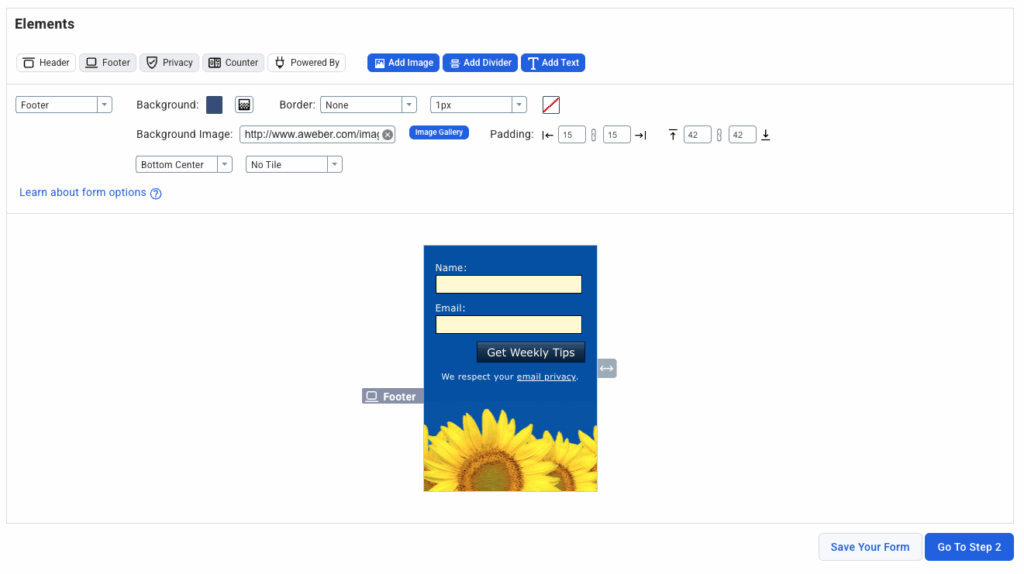
Start by designing your form in your email platform. We offer several form types including inline, pop-up, and slide-in options—but for Replit sites, inline forms work best since they embed directly into your page code.
Keep it simple: ask for just a name and email address. Research shows that reducing form fields from 4 to 3 can increase conversion rates by nearly 50%, so only request information you actually need.
Choose a template that matches your brand, customize the colors and copy, then craft a clear call-to-action. “Get Weekly Tips” beats “Subscribe” every time—tell people exactly what they’ll receive.
Step 2: Get Your Embed Code
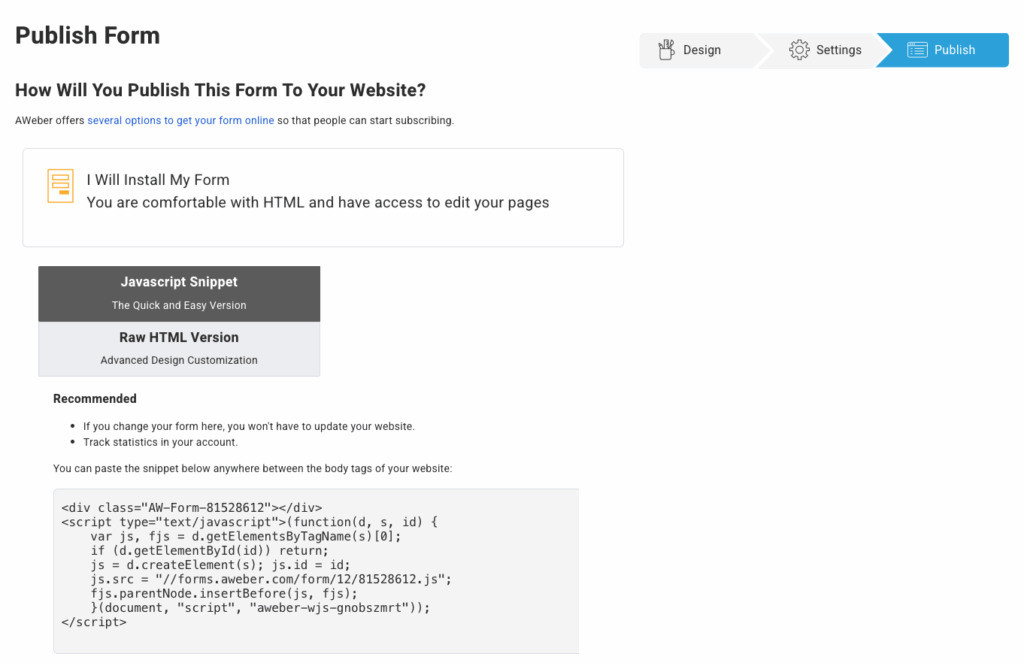
Once your form looks perfect, click the “Publish” or “Embed” button in your form builder. Select the JavaScript or HTML embed option, then copy the complete code snippet.
Don’t modify the code—you need the entire thing for the form to work properly. Our forms are automatically mobile-responsive, so they’ll look great on any device without extra work.
Step 3: Add the Form to Replit
Open your Replit project and locate the HTML file where you want the signup form to appear. This is typically index.html for your homepage or the relevant page file for other locations.
Find the exact spot in your code where the form should appear—common locations include:
- Below your hero section
- At the end of blog posts or article content
- In your footer (visible on every page)
Paste the embed code directly into your HTML. For example:
html
Save your changes and click “Run” to preview. Your form should appear exactly where you placed the code.
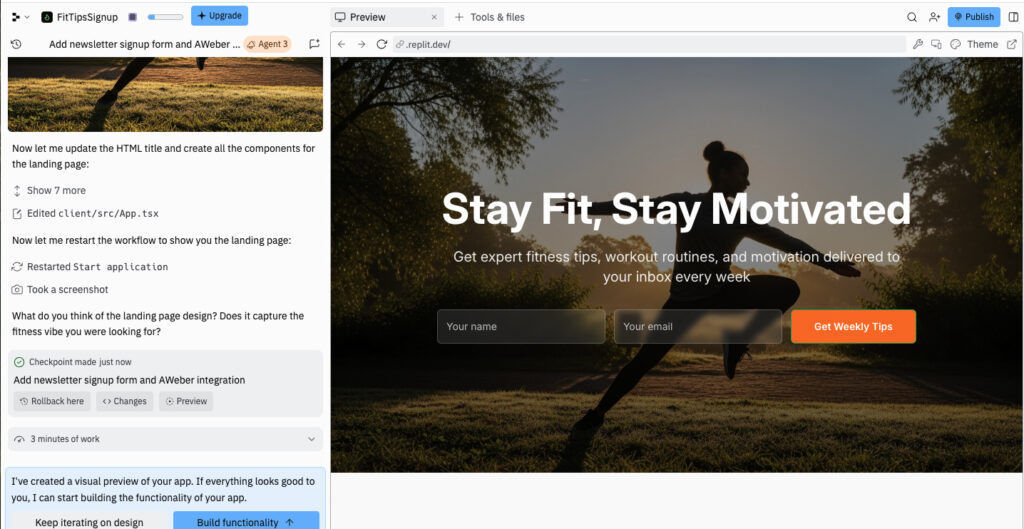
Pro tip: Ask Replit’s AI to help position the form if you’re not comfortable editing HTML directly. Just describe where you want it, and let the AI handle the implementation.
Step 4: Set Up Welcome Automation
Don’t just collect emails and forget about them. Welcome emails generate 320% higher revenue per email than promotional messages—this is your chance to make a powerful first impression.
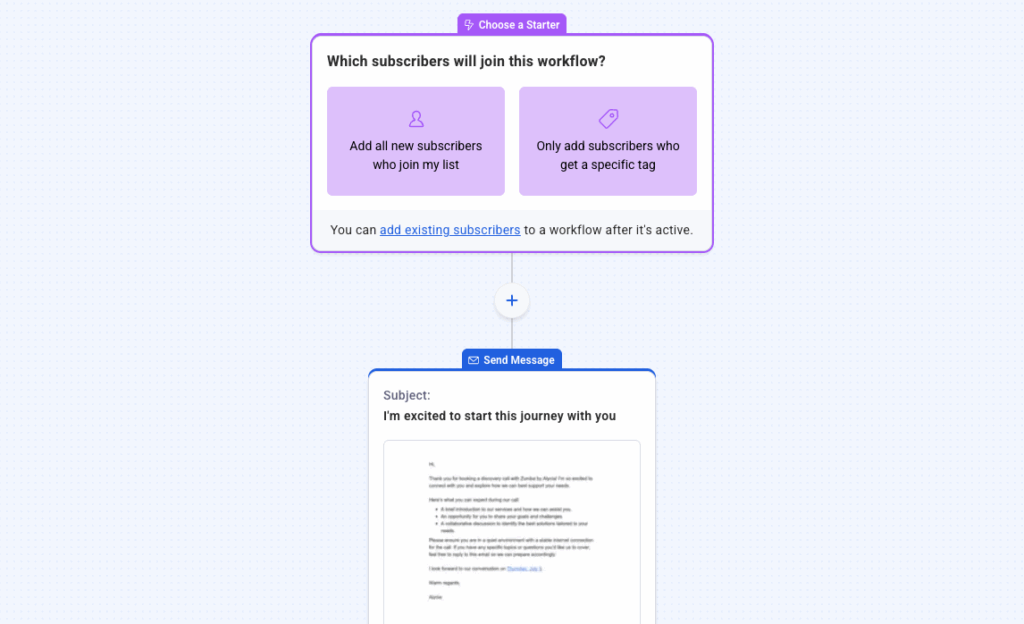
Build a simple three-email sequence using our visual automation builder:
Email 1 (Instant): Welcome new subscribers and deliver any promised content or incentive. Set expectations for future emails and invite them to reply with questions.
Email 2 (Day 2): Share your most popular content or best-selling product. Give them a reason to stay engaged with your list.
Email 3 (Day 4): Offer a special subscriber discount or bonus. Move them toward becoming a customer.
Our automation builder makes this incredibly simple—just drag and drop email blocks, set time delays, and activate. Your system runs 24/7 without any additional work.
Step 5: Test Your Form
Before announcing your new signup form, test it thoroughly. Fill it out yourself using multiple email addresses and different devices.
Check that:
- The form displays correctly on mobile and desktop
- Subscribers appear in your email list dashboard
- Welcome automation triggers immediately
- Confirmation emails arrive (if you’re using double opt-in)
Fix any issues before driving traffic to your site. A broken signup form means lost subscribers and wasted marketing effort.
Troubleshooting Common Issues
Form not appearing? Verify you pasted the complete embed code with no missing characters. Check that you placed it within the correct HTML tags—forms won’t display inside sections or commented-out code.
Subscribers missing? Confirm you’re checking the correct email list in your dashboard. If you have multiple lists, verify the form connects to the right one.
Mobile display problems? Most modern signup forms are automatically responsive. If issues persist, ask Replit to add the form within a mobile-friendly container or adjust the maximum width.
Form looks broken? Ensure your site’s CSS isn’t overriding the form styles. If conflicts exist, either adjust your site styles or customize the form design to match.
Best Practices for Replit Email Marketing
Place forms strategically: The most effective locations are your homepage below the hero section, at the end of valuable content, and in your footer. Consider adding multiple forms throughout your site—different placements capture different visitor intents.
Offer clear value: Tell visitors exactly what they’ll get. “Join 5,000+ entrepreneurs receiving weekly growth tips” beats “Sign up for our newsletter” every time. Specific benefits drive more signups.
Keep it simple: Limit form fields to essentials. The data is clear—simpler forms convert better. You can always collect additional information later through segmentation surveys.
Test different approaches: Once your basic form works, experiment with timing (instant vs. delayed pop-ups), placement (top vs. bottom), and messaging. Our A/B testing capabilities make it easy to find what resonates with your audience.
Follow up immediately: Set up automated welcome emails that deliver on your signup promise and set expectations. Don’t waste this critical opportunity to build trust with new subscribers.
FAQs
What is a Replit website?
Replit is an AI-powered website builder that creates fully-functional sites from simple conversational prompts. You describe what you want, and Replit generates the complete code—HTML, CSS, and JavaScript—ready to publish. It’s designed for both non-coders who want quick prototypes and developers who need fast boilerplate for custom projects.
Do I need coding knowledge for Replit email integration?
Absolutely not. Both Replit and AWeber are designed for non-technical users. You can build complete email capture systems without writing code. Replit’s AI handles website implementation through conversation, while we provide ready-to-embed form code that works instantly.
Can I customize the form design in Replit?
Yes! Either customize the form in your email platform before embedding it, or ask Replit’s AI to adjust styling after it’s added. Replit can modify colors, fonts, spacing, and positioning through simple conversational requests.
Can I use the same form on multiple Replit sites?
Yes! Once you create a form, use the same embed code across unlimited websites. All signups flow into the same email list, making it easy to manage subscribers from multiple traffic sources.
Start Building Your Email List Today
Ready to turn your Replit visitors into email subscribers? Sign up for AWeber and get everything you need to start growing your list—drag-and-drop form builder, AI-powered writing tools, automated welcome sequences, and unlimited landing pages.
Our platform makes it simple to create professional email marketing systems even if you’ve never sent a marketing email before. Build your first signup form in minutes, set up automated welcome sequences, and start converting website traffic into customers.
Every subscriber is a potential customer waiting to hear from you. Don’t let your Replit visitors disappear—capture their email and build lasting relationships that drive real business results.
