Close Menu
Trendswave MediaTrendswave Media
  • Home
  • About Us
    • Contact Us
  • Services
  • Influencer Marketing
  • Marketing
  • SEO
  • Social Media
  • Web Design
  • Shop

Subscribe to Updates

Get the latest creative news from Trendswave about Marketing, SEO & Web Design.

Please enable JavaScript in your browser to complete this form.
Loading
What's Hot

The Many Faces Of September (2026 Wallpapers Edition) — Smashing Magazine

September 1, 2026

How to Use AI to Dramatically Improve Your Quality : Social Media Examiner

September 1, 2026

How We Earned 1,000+ Links For GEO/SEO

September 1, 2026
Facebook X (Twitter) Instagram
Trendswave MediaTrendswave Media
  • Home
  • About Us
    • Contact Us
  • Services
  • Influencer Marketing
  • Marketing
  • SEO
  • Social Media
  • Web Design
  • Shop
Trendswave MediaTrendswave Media
Home»Marketing»Your Email Links Automatically Show Up In Google Analytics
Marketing

Your Email Links Automatically Show Up In Google Analytics

adminBy adminJuly 11, 2026No Comments3 Mins Read
Facebook Twitter Pinterest LinkedIn Tumblr WhatsApp VKontakte Email
Your Email Links Automatically Show Up In Google Analytics
Share
Facebook Twitter LinkedIn Pinterest Email


By Dave Stys July 7, 2026

Send an email, get a click, make a sale. Now you can trace that sale back to the exact subject line that started it. AWeber automatically tags every link in every email with UTM parameters before your email goes out. Open Google Analytics and the data’s already waiting for you.

No manual setup.

Every link gets tagged automatically

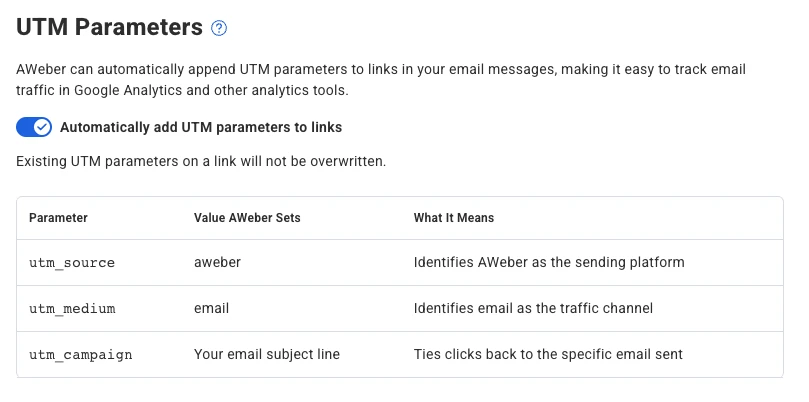
AWeber adds three UTM parameters to every link at send time.

  • utm_source is set to aweber
  • utm_medium is set to email
  • utm_campaign is set to your email’s subject line

Each email gets its own campaign label in Google Analytics, named after its subject line. You can compare performance across sends without touching a single URL.

Already adding your own parameters? Yours stay put

AWeber detects existing UTM parameters and leaves them alone. If you’ve already tagged a link with your own campaign values, AWeber won’t overwrite them. Your custom tracking stays intact.

See which emails actually move people to buy

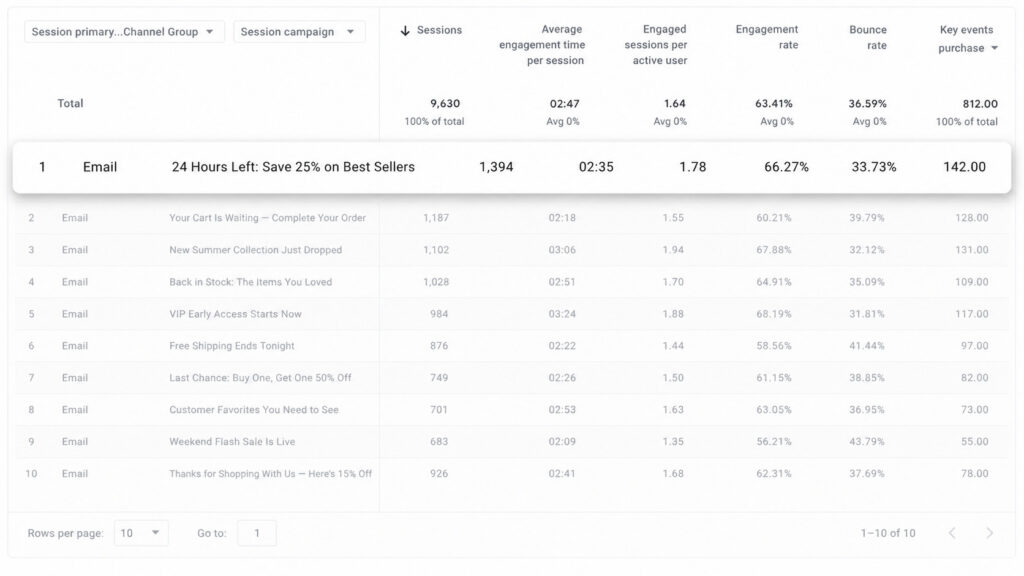
In Google Analytics, go to Acquisition > Traffic acquisition and filter by source/medium (aweber / email). Every email shows up as its own campaign.

Pull your last several sends. You’ll see which messages drove traffic, which drove conversions, and which fell flat.

Image from Google Analytics showing tracking from utm parametersImage from Google Analytics showing tracking from utm parameters

Turn it on or off from your list settings

This feature is on by default for every AWeber account. To adjust it for a specific list:

  1. Log in and go to your List Settings page
  2. Find the UTM Tracking toggle
  3. Flip it on or off

The setting takes effect on your next send.

Screenshot of list settings page in AWeber showing where to toggle utm tracking on and offScreenshot of list settings page in AWeber showing where to toggle utm tracking on and off

Send an email, get a click, make a sale. Now you can trace that sale back to the exact subject line that started it. AWeber automatically tags every link in every email with UTM parameters before your email goes out. Open Google Analytics and the data’s already waiting for you.

No manual setup.

Every link gets tagged automatically

AWeber adds three UTM parameters to every link at send time.

utm_source is set to aweber

utm_medium is set to email

utm_campaign is set to your email’s subject line

Each email gets its own campaign label in Google Analytics, named after its subject line. You can compare performance across sends without touching a single URL.

Already adding your own parameters? Yours stay put

AWeber detects existing UTM parameters and leaves them alone. If you’ve already tagged a link with your own campaign values, AWeber won’t overwrite them. Your custom tracking stays intact.

See which emails actually move people to buy

In Google Analytics, go to Acquisition > Traffic acquisition and filter by source/medium (aweber / email). Every email shows up as its own campaign.

Pull your last several sends. You’ll see which messages drove traffic, which drove conversions, and which fell flat.

Turn it on or off from your list settings

This feature is on by default for every AWeber account. To adjust it for a specific list:

Log in and go to your List Settings page

Find the UTM Tracking toggle

Flip it on or off

The setting takes effect on your next send.

Keep reading:Enhance Your Images in the AI BuilderPut Your Signup Form Exactly Where You Want It



Source link

Analytics Automatically Email Google Links Show
Share. Facebook Twitter Pinterest LinkedIn Tumblr WhatsApp Email
Previous ArticleFor Creators – How to Grow Your Social Media Following (Without Buying Followers) – GRIN
Next Article 20+ Exceptional Slanted Fonts in 2026
admin
  • Website

Related Posts

How to Use AI to Dramatically Improve Your Quality : Social Media Examiner

September 1, 2026

How We Earned 1,000+ Links For GEO/SEO

September 1, 2026

From exact match to AI Mode

August 31, 2026

Google is dynamically expanding AI Overviews for some queries

August 31, 2026
Leave A Reply Cancel Reply

  • Facebook
  • Twitter
  • Pinterest
  • Instagram
  • YouTube
  • Vimeo
Don't Miss
Web Design

The Many Faces Of September (2026 Wallpapers Edition) — Smashing Magazine

By adminSeptember 1, 20260

Could there be a better way to welcome the new month than with a new…

How to Use AI to Dramatically Improve Your Quality : Social Media Examiner

September 1, 2026

How We Earned 1,000+ Links For GEO/SEO

September 1, 2026

24 Glitch Effect Photoshop Actions & Layer Styles

August 31, 2026

Subscribe to Updates

Get the latest creative news from Trendswave about Marketing, SEO & Web Design.

Please enable JavaScript in your browser to complete this form.
Loading
About Us

Trendswave is an Influencer Marketing Agency with access to one of the largest influencer networks in the Poland, connecting brands and agencies to only the best influencers and social media thought leaders.

Our Picks

The Many Faces Of September (2026 Wallpapers Edition) — Smashing Magazine

September 1, 2026

How to Use AI to Dramatically Improve Your Quality : Social Media Examiner

September 1, 2026
Quicklinks
  • Influencer Marketing
  • Marketing
  • SEO
  • Social Media
  • Web Design
  • About Us
  • Contact Us
  • Disclaimer
  • Privacy Policy
  • Terms and Conditions
© 2026 Trendswave.All Rights Reserved

Type above and press Enter to search. Press Esc to cancel.