


You have a post that used to bring in traffic every month. It still ranks. You have not touched it. And the visits keep sliding anyway, a little at a time. Then one day you look at the chart and realize the page lost half its audience while you were busy publishing new things.
That slow bleed is content decay, and it is the least dramatic problem in search. Nobody sends you an email about it. There is no penalty notice, no red banner in Search Console, no obvious day when it started. It just quietly takes back the traffic you already paid for.
I have been running this site since 2008, and I have been dealing with decay at a scale most people never have to. My blog peaked at roughly 1,600 posts in 2020, when I migrated maximizesocialbusiness.com into this site. I cut it to about 400, then built it back to roughly 700, and that shape matters more than either number on its own. Getting here took five years, several bad quarters, and a lot of decisions I would make differently now. I work as a Fractional CMO and wrote Digital Threads about building a digital-first strategy on a small budget, and cleaning up my own library has taught me more about search than any client engagement.
This is the part of the job nobody sells you a course on. Let me show you what it actually looks like.
Key Takeaways
✅ Content decay is a slow, page-level decline in traffic and rankings, and it looks nothing like an algorithm hit, which arrives fast and site-wide
✅ Falling clicks have at least four different causes, and a refresh only fixes one of them
✅ I stopped deleting old posts and started demoting them instead, because a demotion can be undone the moment the data changes
✅ Reversibility just might matter more than any single refresh tactic, because you will be wrong about which pages are worth keeping
✅ My blog went from roughly 1,600 posts to about 400, then back up to roughly 700 as I built out newer topics, because the goal is a set I can maintain rather than a smaller one
What Is Content Decay?
Content decay is the gradual decline in a page’s organic traffic and rankings after it peaks. It happens over months rather than days, it hits individual pages rather than whole sites, and it happens without anybody doing anything wrong. The page did not get worse. The world around it changed.

The lifecycle is well documented. Animalz describes content moving through five phases: spike, trough, growth, plateau, and decay. A new post earns an early burst from promotion, dips, climbs as it gets indexed and ranked, levels off, then slides. Their 2018 analysis of AdEspresso data put the average weekly erosion at 1.21%.
That number sounds tiny. Run it across a hundred posts for two years and it stops sounding tiny.
What decay is not: a penalty. A manual action or a bad core update shows up as a sharp, site-wide drop you can date to a specific week. Decay shows up as a handful of pages drifting downward on their own schedule while the rest of the site holds steady. If three posts are sliding and the other forty are fine, you are looking at decay.
The reason people miss it is that no single month looks alarming. A page goes from 2,000 visits to 1,700, then 1,400, then 900. Every step is defensible. The sum is not.
So the first job is telling decay apart from the other things that pull a graph down.
What Actually Causes Content Decay?
Four things, and they need four different responses. A competitor came after your ranking and won it. Search intent moved and your format no longer matches. Demand for the topic fell. Or the click got absorbed by an answer sitting above you on the results page. Only the first of those is fixed by rewriting the post.
Competition is not bad luck
Start with the competitor, because it is the one people treat as bad luck when it is closer to a targeted attack. Somebody ran a report, found your post ranking, and set out to beat it. That is the whole premise of the skyscraper technique: find the page winning a term, build something longer and better sourced, then go get links pointed at it. Your post did not age into second place. It got pushed.
They also start with an advantage you cannot match by trying harder. A post written this month has this month’s data, this month’s screenshots, and this year’s version of the product. Yours has whatever was true when you hit publish. On any topic where the facts move, the newer post wins on freshness before anybody judges the writing.
Which is why genuinely durable posts are so rare. Kevin Kelly’s 1,000 True Fans is the example people reach for, and it earns it. But read his own note at the top: he rewrote the 2008 original to strip out details that had gone out of date. Even the canonical evergreen essay needed maintenance to stay evergreen. If that one did, yours does.
The click that never arrives
That fourth cause is the newest and the one that breaks the old playbook. In the first four months of 2026, SparkToro and Similarweb found that 68% of Google searches ended without a click, up from 60.45% in 2024 and around 45% a decade ago. You can hold your ranking, hold your impressions, and still watch clicks fall off, because the searcher got what they needed without leaving Google.
Search Engine Land’s breakdown of the four types of content decay makes the same split and pairs each one with the pattern it leaves in your data. It is the sharpest treatment of the diagnosis question I have read this year.
Here is how I think about the four when I am looking at one of my own pages.
| Cause | What you see in Search Console | Does a rewrite fix it? |
|---|---|---|
| A competitor came after it | Clicks, impressions and position all falling together | Yes, if you add something they cannot copy |
| Intent moved | Position roughly holding, but the results page now favors video, forums or product pages | Only if you change the format, not the wording |
| Demand fell | Clicks and impressions down while your position holds or improves | No. The searches stopped |
| The answer got absorbed | Impressions flat or rising, position steady or better, clicks down | No. You did not lose the ranking, you lost the click |
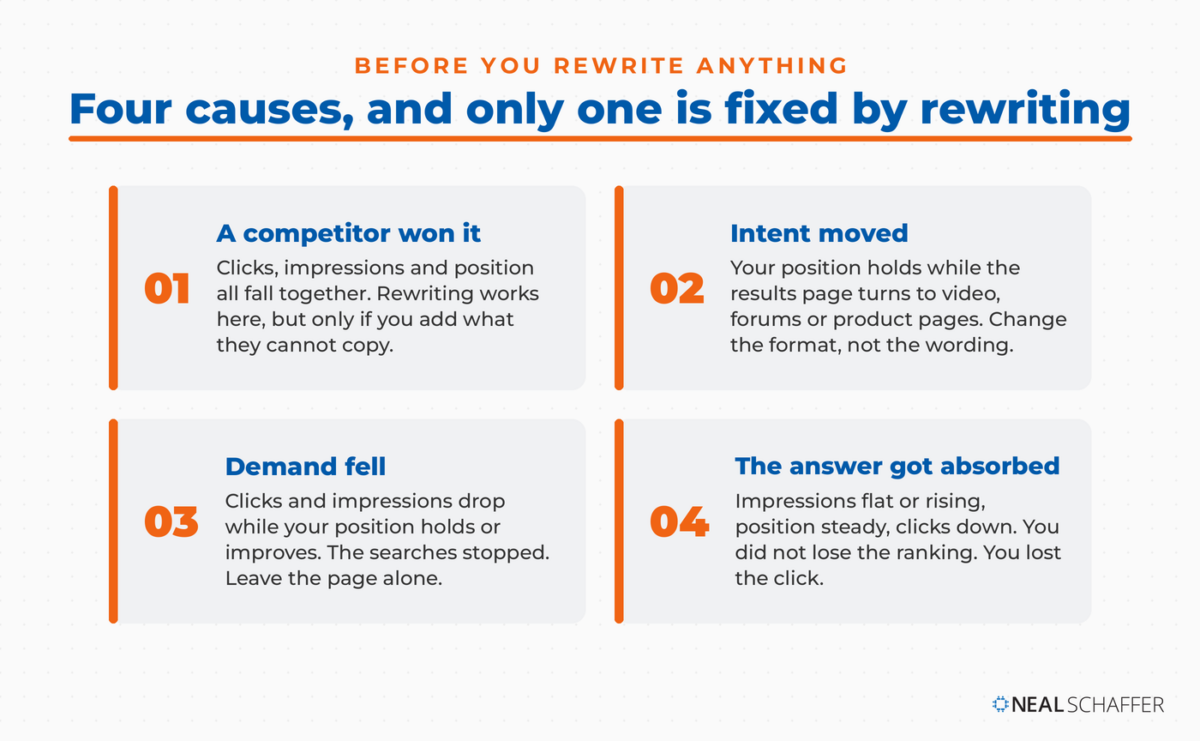
The demand case wastes the most effort. The page looks like it is failing, when really it is doing fine at a job nobody is asking for anymore.
Knowing which of the four you have takes about twenty minutes per page, and the tools are free.
How Do You Diagnose Content Decay in Search Console?
Open Search Console, set the date range to 16 months, and compare your last three months against the same three months a year earlier. Read clicks, impressions and average position together rather than one at a time. The way those three move relative to each other tells you which of the four causes you are dealing with.
Is LinkedIn Actually Bringing You Business?
My latest book helps professionals, entrepreneurs, and business owners turn LinkedIn from a static profile into a real source of clients and growth.
Maximizing LinkedIn for Business Growth gives you clear, practical steps to build a profile that gets noticed and a network that actually sends business your way.
Grab your copy on Amazon and put it to work this week. Click the cover or the button below to get started.

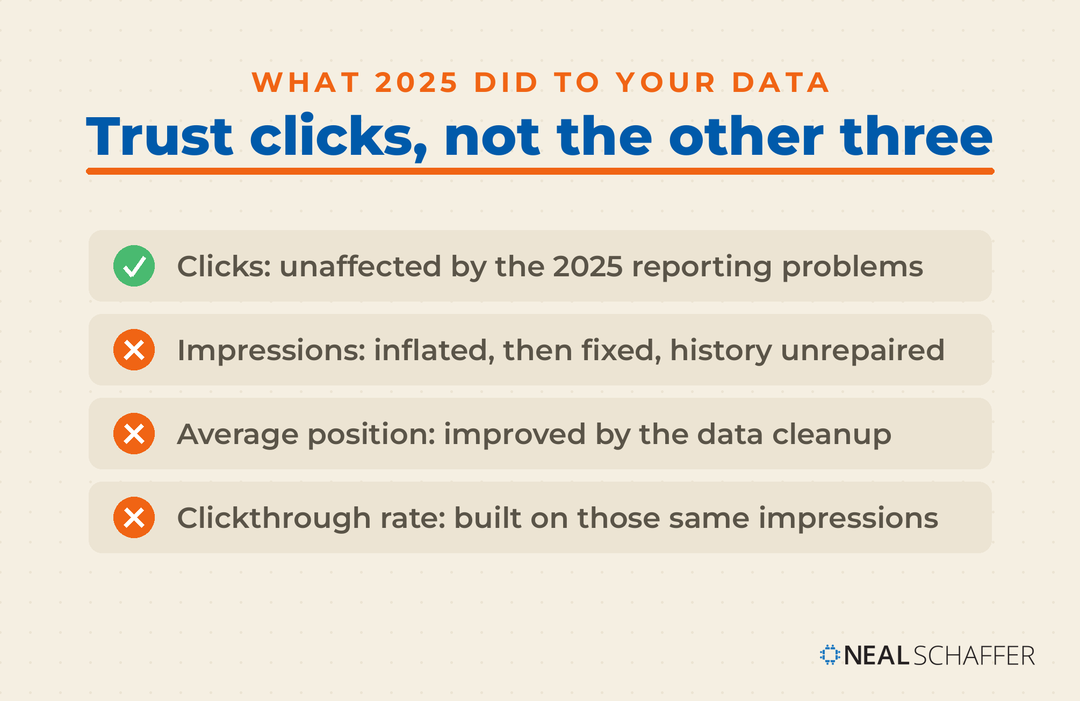
Google’s own guide to debugging drops in Search traffic walks through this and is worth reading in full before you touch anything. Before you start, know which of the four numbers you can actually trust right now.
| Metric | Trust it? | Why |
|---|---|---|
| Clicks | Yes | Unaffected by the 2025 reporting problems |
| Impressions | Not across 2025 | Inflated earlier, then corrected without repairing the history |
| Average position | Not across 2025 | Improves on its own once inflated deep-position impressions are removed |
| Clickthrough rate | Not across 2025 | Calculated against those same impressions, so it moves for the wrong reason |
Here is the sequence I run.
- Set the date filter to Last 16 months. Per the Google guide above, that is the longest range Search Console keeps. It is also the only way to see whether this same dip happened last year at the same time.
- Use the Compare tab, and pick “Compare last 3 months year over year.” That comparison is named in the same Google guide. Three months smooths out weekly randomness and a year-over-year view cancels out seasonality, which is what makes it the most useful screen in the tool.
- Click through the Pages tab and sort by Clicks Difference. You are looking for whether the drop is site-wide, a cluster of pages, or one important page. Those are three different problems.
- Turn on Average position above the chart. Google’s guidance is that you should not obsess over absolute position, but a dramatic and persistent drop is worth acting on.
- Check the query in Google Trends. If interest in the topic itself is falling everywhere, you have demand decay and no rewrite will bring it back.
- Open the live results page and look at it. This is the step people skip. It is the only way to catch an intent shift or an AI answer sitting above you, because the numbers will not tell you the results page grew a video carousel.
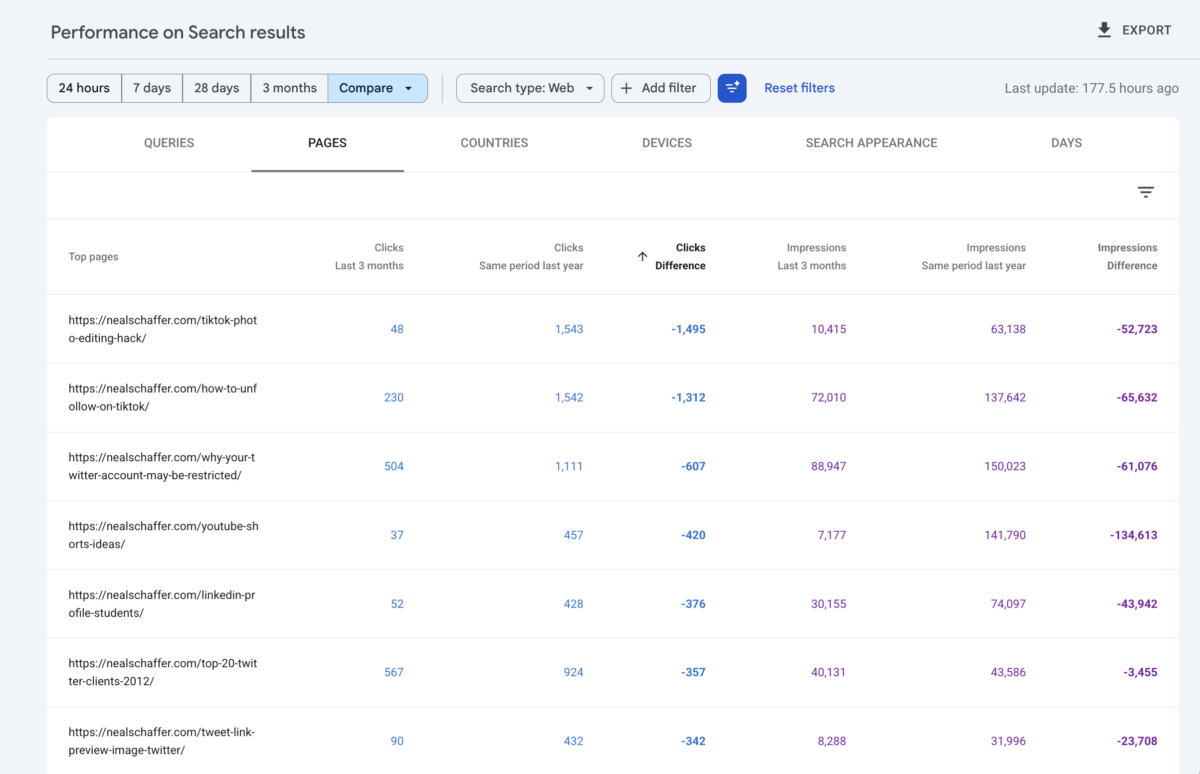
Step six matters more than it looks, because of the table above. If impressions cannot be trusted across 2025, then demand decay and zero-click capture become hard to tell apart on the numbers alone, and only the live results page separates them. An AI answer sitting above you settles it in five seconds.
Run that on ten pages and you will have a diagnosis. Run it on seven hundred and you will have a project, which is roughly where I found myself.
What Content Decay Looks Like Across 700 Posts
At scale, decay stops being a page problem and becomes a portfolio problem. My library peaked at roughly 1,600 posts, and by late 2020 I had cut it to about 400. It sits at roughly 700 today because I spent the years since adding on purpose: influencer marketing first, then AI marketing and TikTok, which barely existed as topics when I made the cut, then digital marketing and ecommerce. The cut was deliberate and so was the rebuild. Neither ran on a schedule, and I am still doing both.

The migration that created the problem
The 1,600 was never the output of one blog publishing recklessly. It was two archives stacked on top of each other, mine and the one I brought over from maximizesocialbusiness.com. From what I saw going through them, much of the migrated half was already aging on the day it arrived. Nobody plans a decay problem. You acquire one.
Working through it, I stopped thinking of a blog as a collection of posts and started thinking of it as a maintained set with a size limit. The limit is not a number Google publishes. It is however many pages you can actually keep current with the people you have.
What happened to traffic, and what I cannot prove
The pruning ran over months, and a site migration ran alongside it. Traffic roughly doubled in 2022 against the prior year. Going through the annual numbers on my podcast Your Digital Marketing Coach in January 2024, I reported that search traffic rose about 30% in 2023 against 2022, with total traffic up 28.4%.
I am not going to tell you the pruning caused that. Two large changes ran at the same time, my old analytics property is gone, and there is no clean before-and-after to compare. What I can tell you is the sequence: I cut a lot of pages, and the two years that followed were the best two years the site has had.
Then Google’s helpful content work landed on me. On that same episode I put it this way:
“For whatever reason, Google decided that my site was not as helpful as maybe some other sites and I have pivoted and I’m starting to see things stabilize a little.”
And my clicks over the last three months came in at roughly half what the same three months earned a year earlier. Down again, on the site where I do this for a living, after everything above.
That comparison also shows why you cannot read the other columns at face value. Over the same window my average position improved from 52.9 to 34.6 and my clickthrough rate doubled. Neither is a win. The same Search Engine Land analysis explains why: Google stripped a mass of bot-inflated impressions from deep positions during 2025, and removing those mechanically improves an average position and lifts a rate calculated against a smaller denominator. The clicks are the only number in that comparison I trust, and the clicks halved.
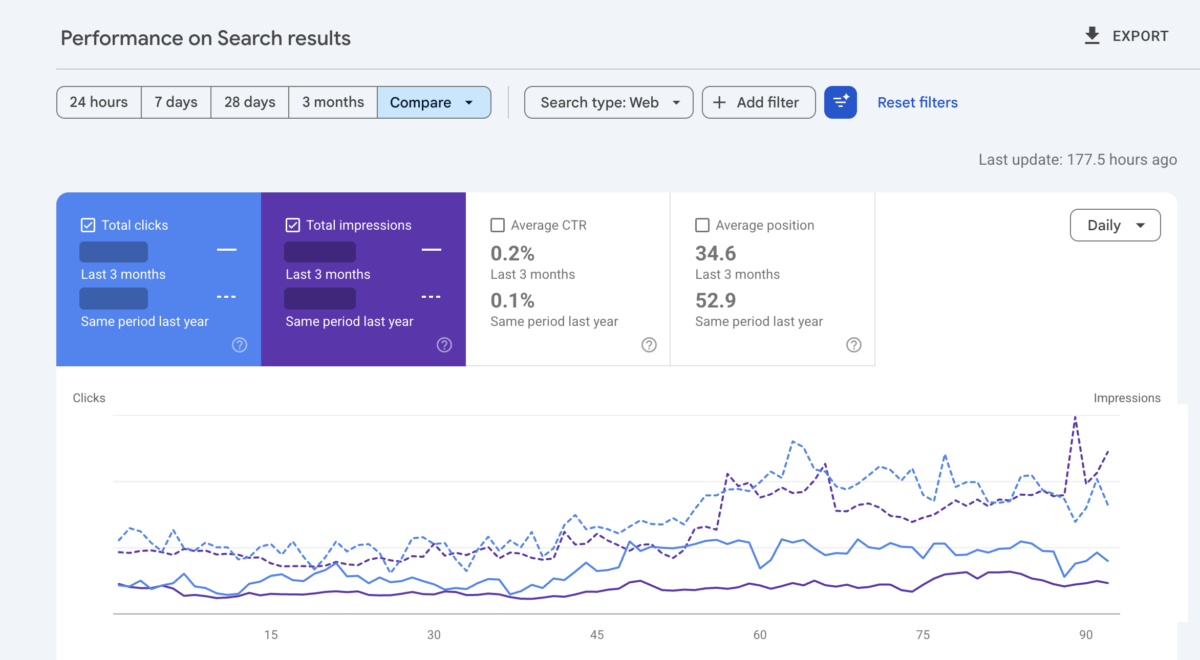
Which is the actual lesson in all of this. Decay is not a thing you fix once and file away. It is a standing cost of having a library, and the bill comes every quarter whether or not you have the budget.
What the library looks like today
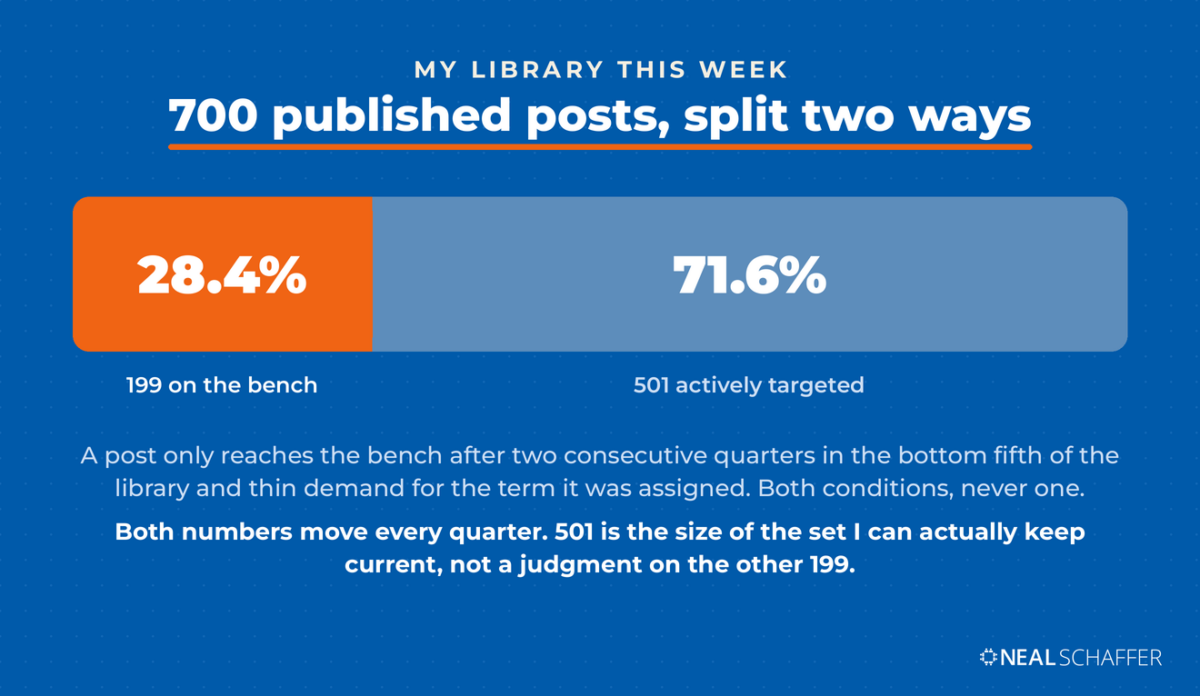
Seven hundred published posts. As of this week, 501 of them are mapped to a keyword I am actively targeting. The other 199 are not.
That second group is the part worth understanding, because it is not a graveyard. Those posts are live, indexed, and still earning from search, from direct visits and from AI assistants. What they lost is my attention. No keyword assigned, no refresh scheduled, no internal links pointed at them on purpose.
Some of them come back. Trends move, a results page gets reshuffled, and a post I stopped targeting last year starts making sense again. Others eventually go, once demand is gone and the page has had a fair run at proving otherwise. The default is neither of those. The default is waiting.
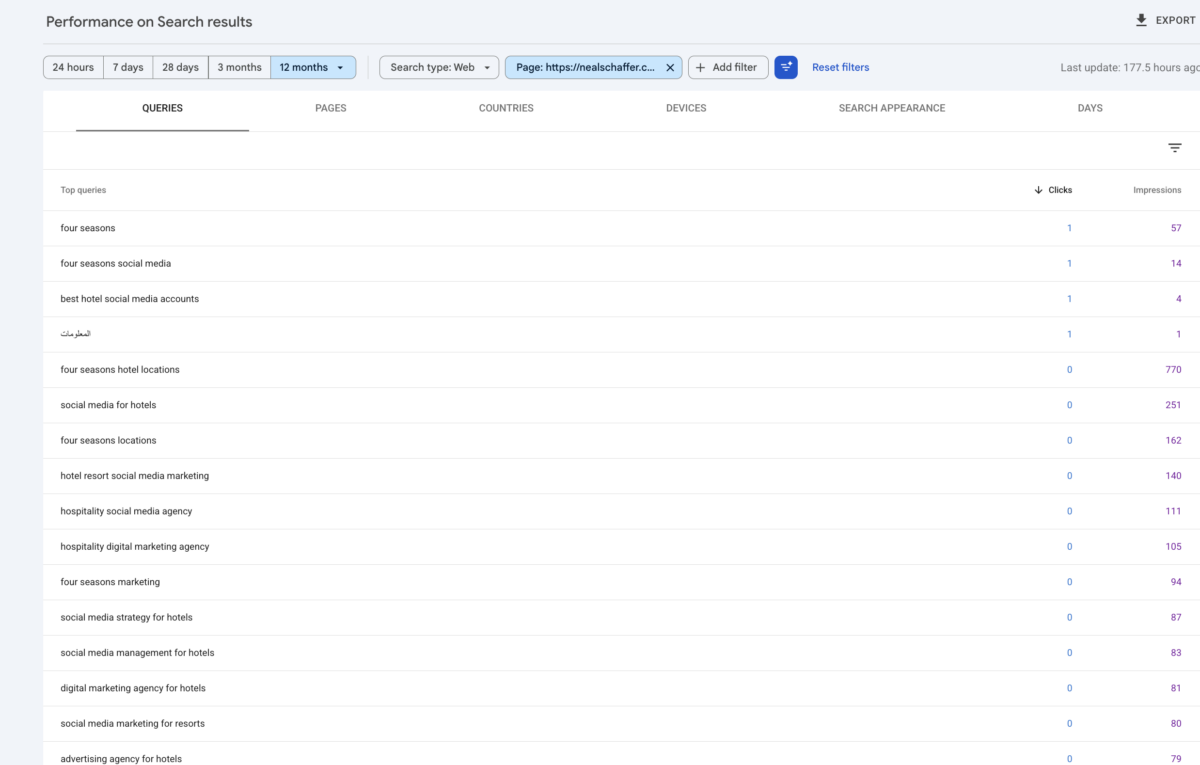
One rule keeps posts on that bench longer than a keyword tool would. If a page still brings traffic, it stays, even when the term I assigned it shows almost no volume. Sometimes those visits arrive on a neighbouring phrase I never targeted, which no volume check on the assigned keyword will ever show you. So I check what a page actually earns before I check what its keyword is supposed to be worth.
Be ready for the answer to be dull. When I pulled a benched post to test this while writing, it had spent a year drawing steady impressions across sixteen hotel and hospitality queries and had converted four clicks. Not dying fast enough to delete, not earning enough to justify a rebuild. That is what most of the bench looks like.
Why Deleting Old Posts Is Usually the Wrong Fix
Because Google says it does not work. Its guidance on creating helpful, people-first content names removing a lot of older content mainly to make your site seem fresh as a warning sign that you are writing for search engines, and answers the question itself: no, it will not help your rankings.
The same list flags changing a page’s date to look fresh when the content has not meaningfully changed. From what I have seen, both moves come from treating the archive as a lever to pull on Google rather than as something a reader uses.
Read that next to the average pruning advice and the conflict is hard to miss. Deleting posts as a ranking tactic is on Google’s list of things that do not work. Deleting posts because they are wrong, outdated, or actively unhelpful to a reader is a different act with a different motive, and that one I do support.
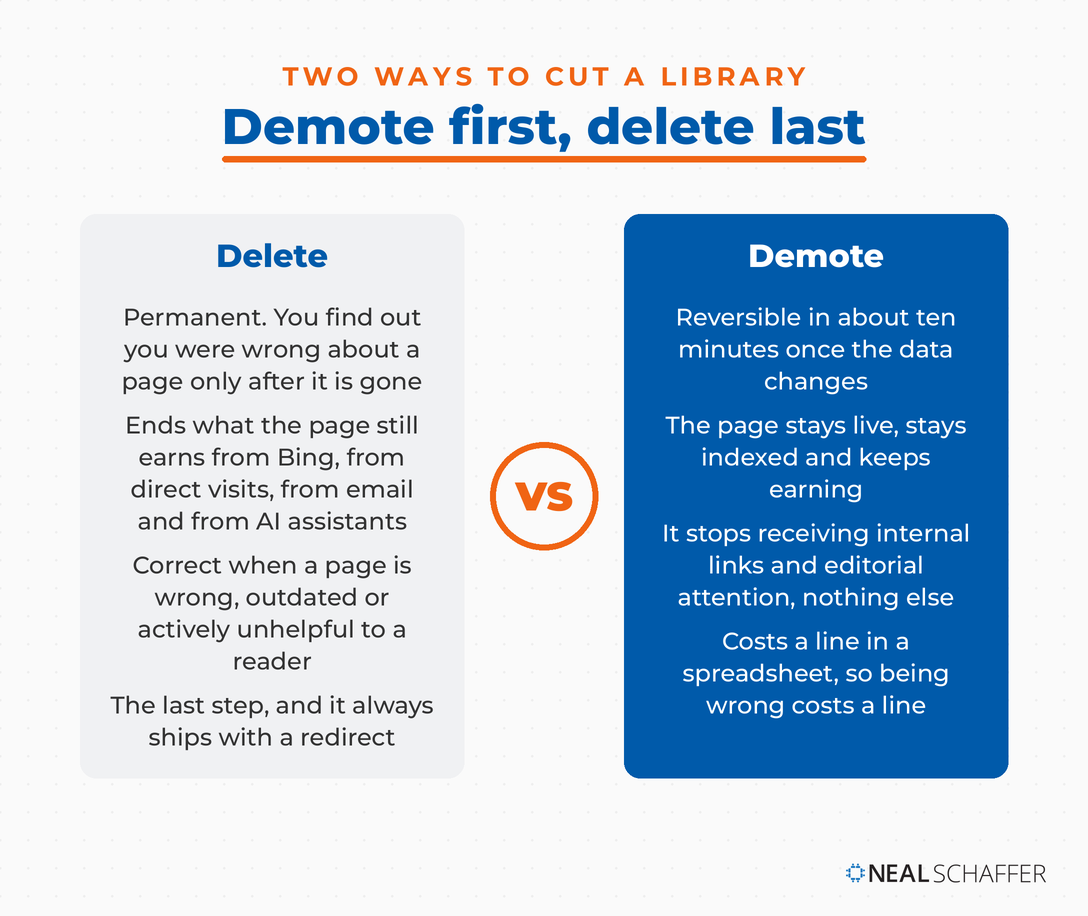
So I stopped deleting first and started demoting first. Every post I target sits on a spreadsheet that decides which pages get internal links and editorial attention. Coming off that list means a page stops receiving link equity and stops getting maintained. It stays live. It keeps earning from Bing, from direct traffic, from email, and from AI assistants, none of which care what Google thinks of it. That is how 199 of my 700 posts can be off the target list without a single one of them being gone.
The difference between those two verbs just might matter more than it sounds. Demotion is a bet you can unwind in ten minutes when the data changes. Deletion is permanent, and you will only find out you were wrong about a page after it is gone. Given how often I have been wrong about which pages matter, I would argue the reversible version is worth the small amount of extra bookkeeping it costs.
Deletion still has a place. It is the last step, not the first, and it always ships with a redirect to the closest surviving page.
The clearest case I have found is guest contributions. I have been cutting posts written by other people, not because they were badly written, but because they carry no experience of mine and I cannot stand behind what is in them the way I can with my own. Google’s self-assessment questions ask whether content shows first-hand expertise and whether it was outsourced across a lot of creators without much attention or care. Read those two together and a large guest archive stops looking like volume and starts looking like a liability.
How Do You Decide What to Refresh, Merge, or Retire?
Match the action to the diagnosis, then rank by what the page is worth to your business rather than by how much traffic it lost. A page that lost 5,000 visits and never produced a lead is worth less of your weekend than a page that lost 200 visits and brings you enquiries.
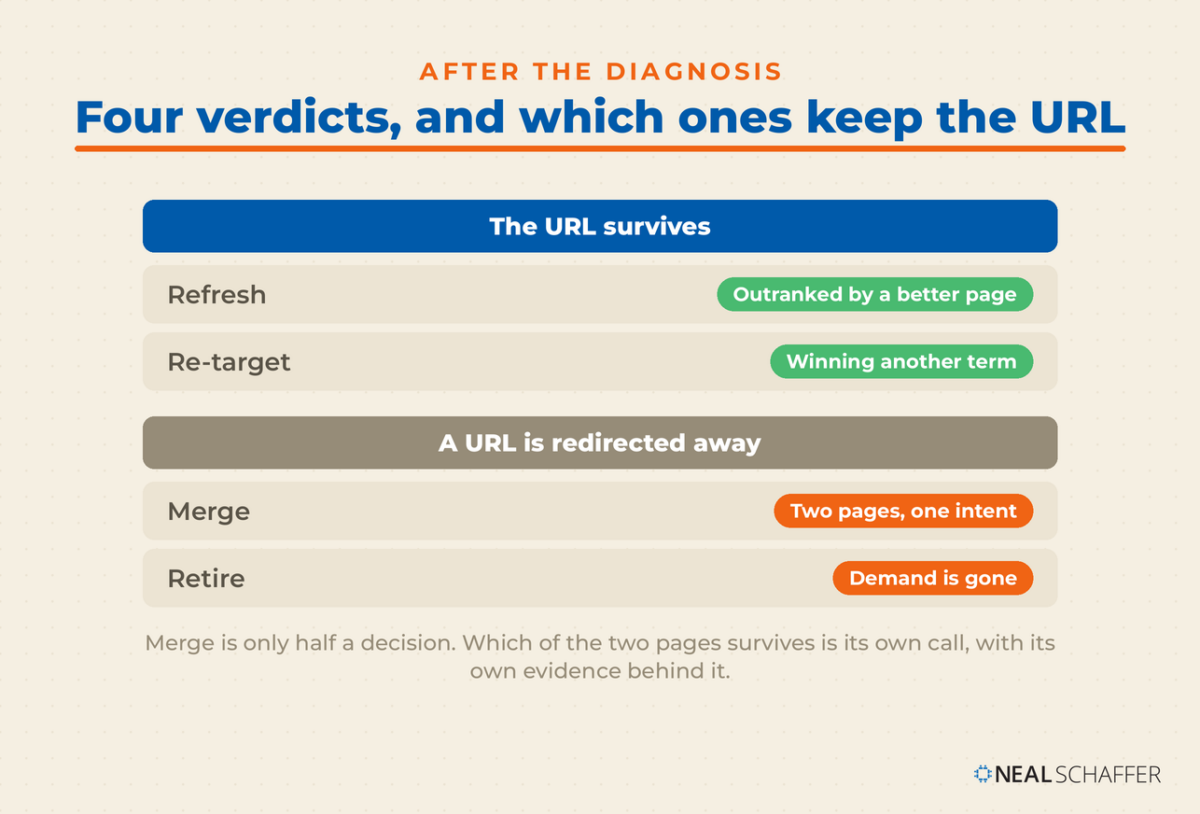
Four verdicts cover almost everything.
| Verdict | Use it when | What you actually do |
|---|---|---|
| Refresh | The page still ranks, still has links, and lost ground to somebody better | Add what the winners have and you do not: original data, a real example, the follow-up question nobody answers |
| Re-target | The page earns clicks or impressions on a term you never targeted | Rewrite around the term it is actually winning, and keep the URL |
| Merge | Two or more of your pages split the same intent | Fold the best of both into the stronger page and redirect the weaker one |
| Retire | Nothing works and nobody searches for it anymore | Redirect to the nearest relevant page |
Two rules make this go faster.
Work category by category rather than fixing whichever post annoys you most this week, and start with the categories closest to what you sell. The reason is not tidiness. Working in clusters lets you merge cannibalizing pages and rebuild internal linking across the group in one pass. Starting near the money means you find out whether the method works on the pages that pay for it in month two, not in year two.
Second, pull the actual query data for the page before you decide. Search Console’s query view will sometimes show a page ranking for something quite different from the keyword you assigned it, and the evidence usually arrives in the impressions column long before it arrives in the clicks.
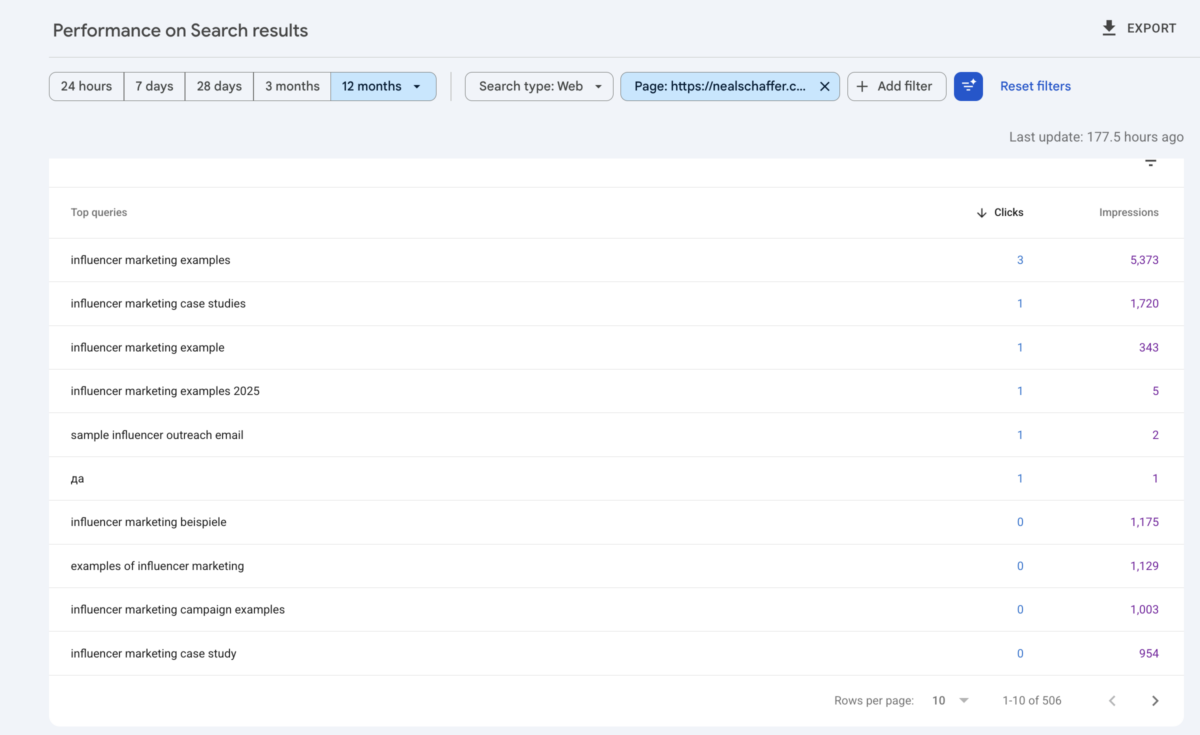
One of my own posts sits at a URL ending in case-studies. Over twelve months the phrase in that slug drew 1,720 impressions and one click, while the phrase I never assigned it drew 5,373 and three. Three clicks is not a mandate. Five thousand impressions is, so that page is now being rebuilt around the term it was already winning, and the URL stays exactly where it is. Wait for a click threshold on a site with my clickthrough rate and you will wait forever.
My own experience keeps pointing the same direction: long-tail keywords with modest volume outperform the heads I originally chased.
One thing this section deliberately does not resolve. Where two of your own pages compete for the same term, merging is only part of the answer. Picking which page survives is its own decision, with its own evidence behind it.
What Does Fixing Content Decay Actually Cost?
Less than it used to, and less than most people assume. My quarterly analysis once took a virtual assistant 20 to 30 hours of pulling exports and reconciling them against my tracking sheet. The same analysis now takes me about an hour, because everything except the judgment is scripted.
That change is what makes any of this sustainable. When the audit costs thirty hours, you run it once a year, you find twelve months of damage, and half of it is unrecoverable. When it costs an hour, you run it monthly and catch pages while they are down 15% instead of 80%.
The cadence I settled on is a monthly pass that only flags and a quarterly pass that decides. Nothing moves on one bad month, because a single month of movement is usually a coincidence. A post only comes off the target list after two consecutive quarters in the bottom fifth of my library and thin demand for the term it was assigned. Both conditions, not either one.
It is also worth asking whether your decay is a content problem at all. Cyrus Shepard classified more than 400 winning and losing sites and found that proprietary assets, task completion and a tight topical focus separated them. Proprietary assets showed up on 92.9% of winners against 57.1% of losers. He is careful to say the findings are correlational and cannot establish cause, and that caveat is worth keeping. But if your pages only tell people things, no refresh cadence saves you. That is a business model question wearing a content costume.
Which is why the pages I now protect hardest are the ones carrying something nobody else has, starting with my running SEO statistics collection and the posts built on my own numbers.
Frequently Asked Questions About Content Decay
Longer than you want. Google’s guidance on debugging Search traffic drops says some changes take effect in a few days while others take several months, and that its systems may need months to determine a site is producing helpful content over the long term. I would plan on a quarter before you judge a refresh. Resist touching the page again in the meantime, because a second edit destroys your ability to attribute the result to the first one.
Only when the content genuinely changed. Google lists changing dates to look fresh without substantially changing the content as a warning sign that you are writing for search engines instead of readers. A real rewrite earns a new date. Swapping the year in the title does not.
No. A penalty or a core update hits fast and usually across the whole site, and you can date it to a specific week. Decay is gradual and page-level, and it happens without any rule being broken. If your whole site dropped on one day, stop reading about decay and go check the Manual Actions report in Search Console.
Yes, and separately. A page can hold its Google position while quietly dropping out of AI-generated answers, which is a second decline curve running on its own schedule. That is a different measurement problem from ranking. I worked through both in my post on AEO vs GEO and in twelve months of my own AI search engine optimization data.
Monthly to flag, quarterly to decide, if you can get the analysis down to an hour. If each audit still costs you a day of work, twice a year beats never, and your first priority is making the audit cheaper rather than making it more frequent.
Start With Ten Pages, Not Seven Hundred
Open Search Console, set the range to 16 months, and compare the last three months year over year. Sort the Pages tab by clicks lost and take the top ten. That is your entire first pass, and it costs an afternoon.
For each of those ten, write down which of the four causes you think it is, then open the live results page and check whether you were right. You will be wrong on at least two, and the two you were wrong about are the ones that would have wasted the most time.
Then fix only the pages where the diagnosis says fixing will work. Leave the demand-decay pages alone. Re-target the ones ranking for something you never intended. Merge the ones fighting each other.
Put a recurring reminder in your calendar for ninety days out, because the whole point is catching the next one earlier than you caught this one. The foundations these audits sit on top of are covered in my post on blog SEO.
And if you would rather have somebody build this into a plan across search, email and social at once, that is the work I do as a Fractional CMO. You can also grab a free preview of Digital Threads and start with the strategy layer instead.
DIY your digital marketing with AI.
Practical advice on social, content, influencer, and search marketing, plus the AI tools that make each one easier. Join thousands of founders and business owners who read it.
