Close Menu
Trendswave MediaTrendswave Media
  • Home
  • About Us
    • Contact Us
  • Services
  • Influencer Marketing
  • Marketing
  • SEO
  • Social Media
  • Web Design
  • Shop

Subscribe to Updates

Get the latest creative news from Trendswave about Marketing, SEO & Web Design.

Please enable JavaScript in your browser to complete this form.
Loading
What's Hot

Run Your Email Marketing From Claude With AWeber’s New Claude Connector

August 16, 2026

From Family Recipe to $87 Million Brand

August 16, 2026

How to pick the right host for your site • Yoast

August 15, 2026
Facebook X (Twitter) Instagram
Trendswave MediaTrendswave Media
  • Home
  • About Us
    • Contact Us
  • Services
  • Influencer Marketing
  • Marketing
  • SEO
  • Social Media
  • Web Design
  • Shop
Trendswave MediaTrendswave Media
Home»Marketing»Enhance Your Images in the AI Builder
Marketing

Enhance Your Images in the AI Builder

adminBy adminJuly 2, 2026No Comments3 Mins Read
Facebook Twitter Pinterest LinkedIn Tumblr WhatsApp VKontakte Email
Enhance Your Images in the AI Builder
Share
Facebook Twitter LinkedIn Pinterest Email


By Dave Stys June 30, 2026

A single product shot can now become whatever the moment calls for. A different scene, your branding, a fixed flaw, a promotional overlay.

AWeber’s AI image editing is now live in the AI Signup Form Builder, and it’s coming soon to the AI Landing Page Builder and AI Email Builder.

Improve any image with a text prompt

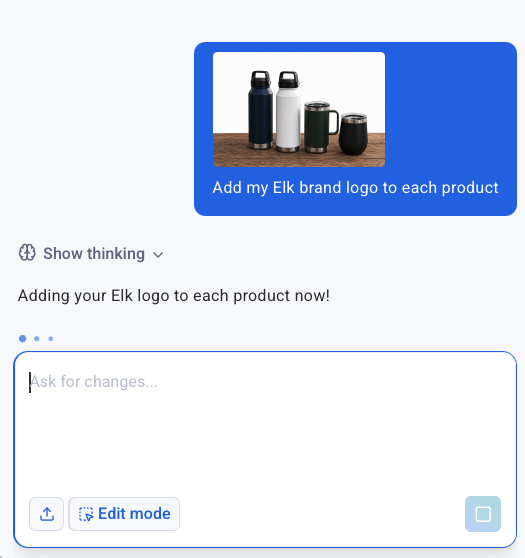
Add your branding

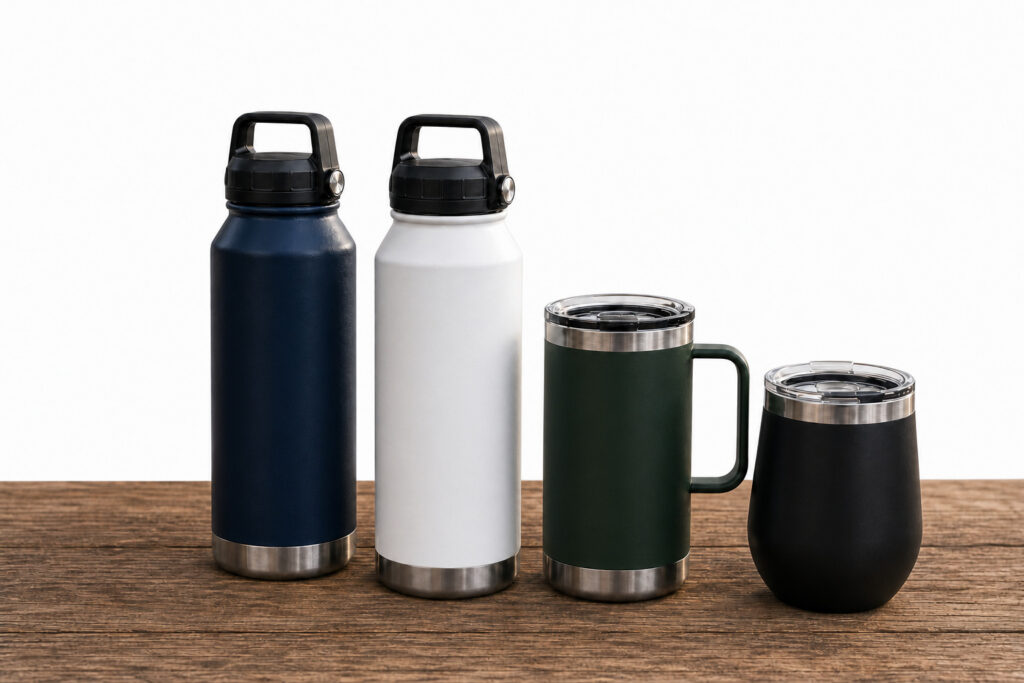
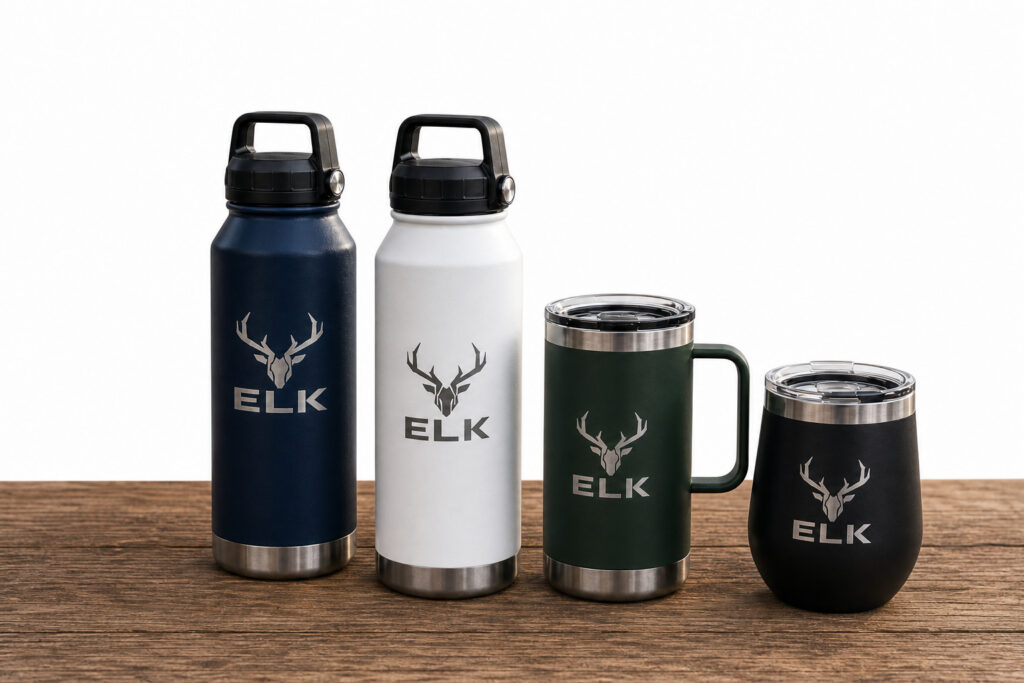
Stock photos and basic product shots rarely come with a logo already on them. Describe what you want added, and now they do.

Photo of tumblers
Photo of branded Tumblers

Put your product in a scene it was never photographed in

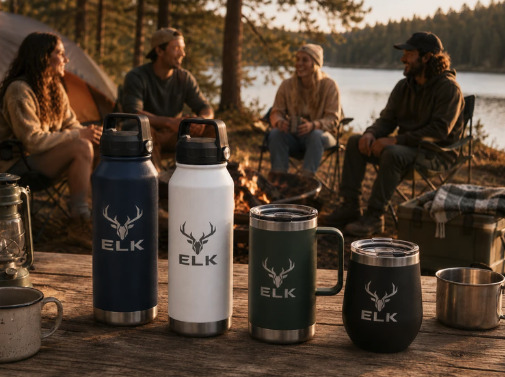
Take a plain studio shot and place it somewhere that sells the lifestyle: a campsite, a kitchen counter, a desk setup. Describe the scene, and the same product appears in it.

Photo of branded Tumblers
Photo of branded tumblers on scenic background

Fix what’s wrong with the photo

Bad lighting, a busy background, an awkward crop. Instead of redoing the shoot, describe the fix.

Add a text overlay that looks designed

Drop in a promo code, a callout, or a headline styled to match the scene, not just placed on top of it.

Each edit saves as its own file, and the original stays in the library too. So testing a new direction never means starting over if it doesn’t work.

How it works

1. Add an image to the AI Signup Form Builder

2. Describe the change you want

The more specific the prompt, the better the result.

Prompt adding a brand logo to a plain product imagePrompt adding a brand logo to a plain product image

Start with a brand-new image

Image generate skips the photo entirely. Describe what you want and the AI builds it from scratch.

Try it in your account now

This is live in the AI Signup Form Builder right now. It’s coming soon to the AI Landing Page Builder and AI Email Builder. too.

A single product shot can now become whatever the moment calls for. A different scene, your branding, a fixed flaw, a promotional overlay.

AWeber’s AI image editing is now live in the AI Signup Form Builder, and it’s coming soon to the AI Landing Page Builder and AI Email Builder.

Improve any image with a text prompt

Add your branding

Stock photos and basic product shots rarely come with a logo already on them. Describe what you want added, and now they do.

Put your product in a scene it was never photographed in

Take a plain studio shot and place it somewhere that sells the lifestyle: a campsite, a kitchen counter, a desk setup. Describe the scene, and the same product appears in it.

Fix what’s wrong with the photo

Bad lighting, a busy background, an awkward crop. Instead of redoing the shoot, describe the fix.

Add a text overlay that looks designed

Drop in a promo code, a callout, or a headline styled to match the scene, not just placed on top of it.

Each edit saves as its own file, and the original stays in the library too. So testing a new direction never means starting over if it doesn’t work.

How it works

1. Add an image to the AI Signup Form Builder

2. Describe the change you want

The more specific the prompt, the better the result.

Start with a brand-new image

Image generate skips the photo entirely. Describe what you want and the AI builds it from scratch.

Try it in your account now

This is live in the AI Signup Form Builder right now. It’s coming soon to the AI Landing Page Builder and AI Email Builder. too.

Keep reading:Put Your Signup Form Exactly Where You Want ItDraft, Send, and Analyze. All From ChatGPT



Source link

Builder enhance Images
Share. Facebook Twitter Pinterest LinkedIn Tumblr WhatsApp Email
Previous Article18 Best Strategies to Rank Your Products
Next Article How to Use Reddit for SEO (The Right Way)
admin
  • Website

Related Posts

Run Your Email Marketing From Claude With AWeber’s New Claude Connector

August 16, 2026

Week of Aug 3 Cable News Ratings: CNN Has Across-the-Board Gains

August 14, 2026

Why Your AI Images Look Like Everyone Else’s (and How to Fix It) : Social Media Examiner

August 13, 2026

The Target bidding apocalypse and how we’ve been here before

August 12, 2026
Leave A Reply Cancel Reply

  • Facebook
  • Twitter
  • Pinterest
  • Instagram
  • YouTube
  • Vimeo
Don't Miss
Marketing

Run Your Email Marketing From Claude With AWeber’s New Claude Connector

By adminAugust 16, 20260

By Sean Tinney August 10, 2026 You can now manage your AWeber account without leaving…

From Family Recipe to $87 Million Brand

August 16, 2026

How to pick the right host for your site • Yoast

August 15, 2026

How To Make Your WordPress Website AI-Friendly — Speckyboy

August 15, 2026

Subscribe to Updates

Get the latest creative news from Trendswave about Marketing, SEO & Web Design.

Please enable JavaScript in your browser to complete this form.
Loading
About Us

Trendswave is an Influencer Marketing Agency with access to one of the largest influencer networks in the Poland, connecting brands and agencies to only the best influencers and social media thought leaders.

Our Picks

Run Your Email Marketing From Claude With AWeber’s New Claude Connector

August 16, 2026

From Family Recipe to $87 Million Brand

August 16, 2026
Quicklinks
  • Influencer Marketing
  • Marketing
  • SEO
  • Social Media
  • Web Design
  • About Us
  • Contact Us
  • Disclaimer
  • Privacy Policy
  • Terms and Conditions
© 2026 Trendswave.All Rights Reserved

Type above and press Enter to search. Press Esc to cancel.