
Close Menu
Trendswave MediaTrendswave Media
  • Home
  • About Us
    • Contact Us
  • Services
  • Influencer Marketing
  • Marketing
  • SEO
  • Social Media
  • Web Design
  • Shop

Subscribe to Updates

Get the latest creative news from Trendswave about Marketing, SEO & Web Design.

Please enable JavaScript in your browser to complete this form.
Loading
What's Hot

The Most Profitable Service Your Agency Isn’t Selling — Speckyboy

November 16, 2026

Your holiday gift guide – Blog

November 16, 2026

What is a pillar page & how to create one (+ examples)

November 16, 2026
Facebook X (Twitter) Instagram
Trendswave MediaTrendswave Media
  • Home
  • About Us
    • Contact Us
  • Services
  • Influencer Marketing
  • Marketing
  • SEO
  • Social Media
  • Web Design
  • Shop
Trendswave MediaTrendswave Media
Home»Marketing»Share Your New Landing Page Anywhere in One Click
Marketing

Share Your New Landing Page Anywhere in One Click

adminBy adminSeptember 27, 2026No Comments4 Mins Read
Facebook Twitter Pinterest LinkedIn Tumblr WhatsApp VKontakte Email
Share Your New Landing Page Anywhere in One Click
Share
Facebook Twitter LinkedIn Pinterest Email


By Sean Tinney September 25, 2026

A landing page can’t grow your list until people see it. Yours is ready to share before you leave the publish screen.

Post it to Facebook, LinkedIn, or X in one click. Or download a QR code for anything you print. Every visitor who signs up on your page joins your email list.
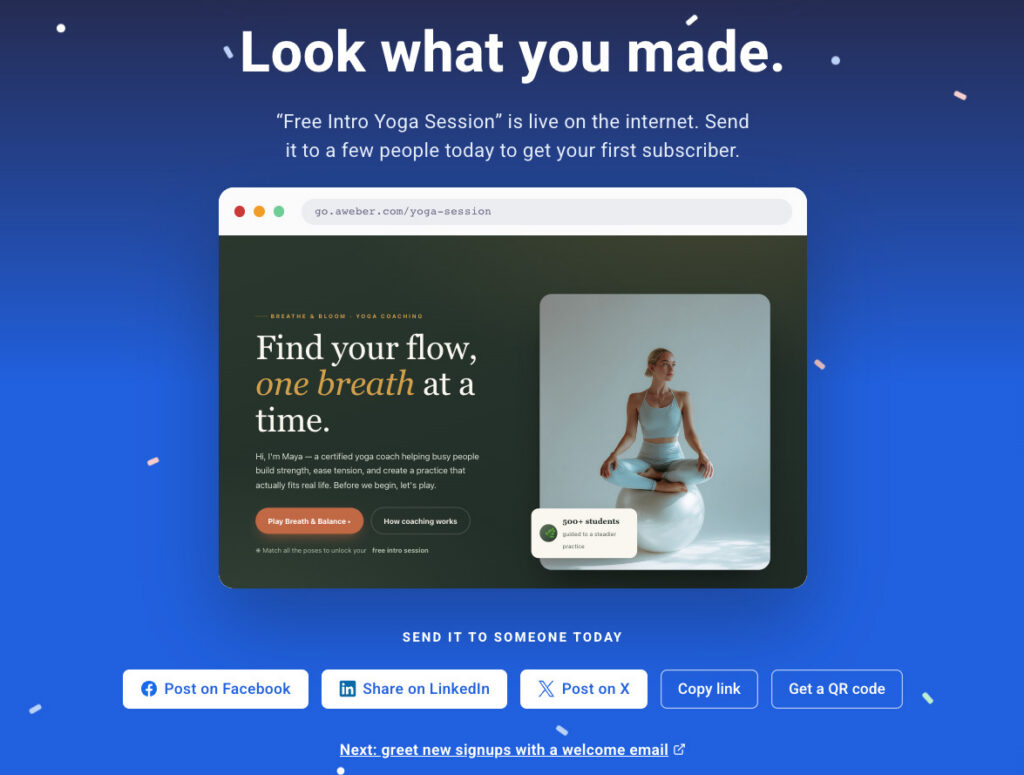
Publish landing page dashboard in AWeber

Post to your socials in one click

Click Facebook, LinkedIn, X, and the post window opens with your page already attached. Your page image and title show up as a preview, so people see what they’ll get before they click. Add a line about your offer and hit post.

The publish screen stays open until you close it. Post to one channel, then the next, and you’re on every channel in a few clicks.
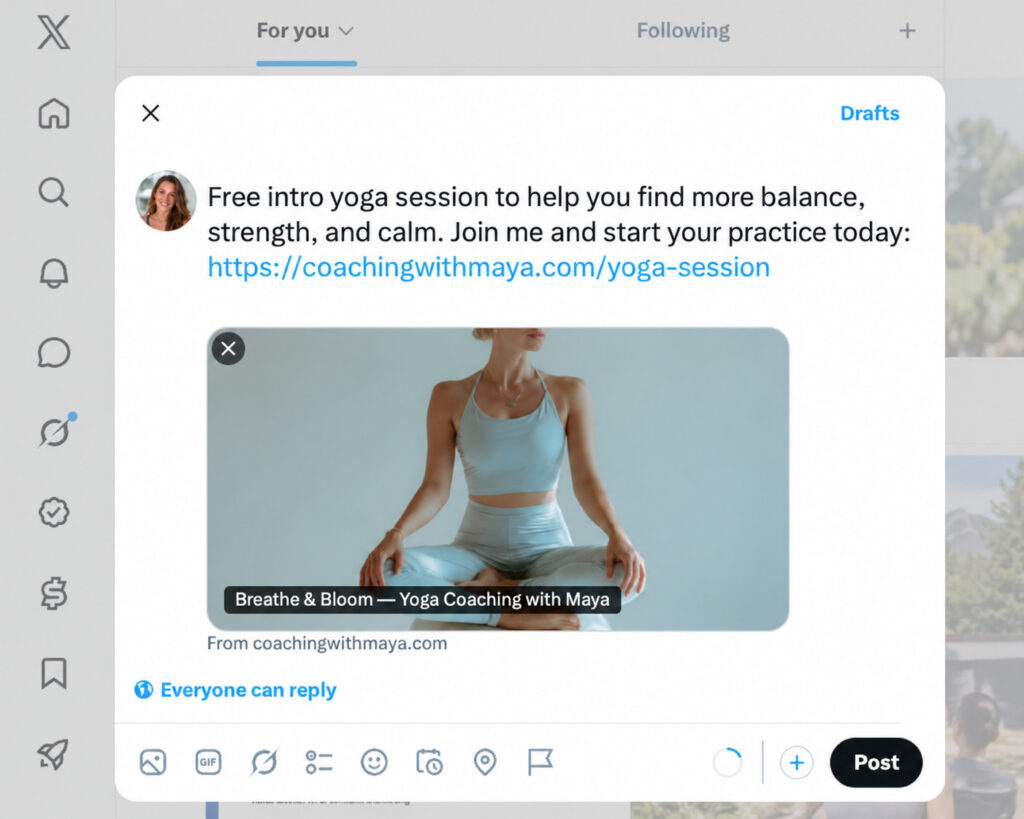
Social media post after clicking share landing page

Put your page in print

Click Get a QR code, and a high-resolution PNG of your page’s QR code downloads. Anyone who scans it lands right on your page.

Get a QR code CTA in publish landing page dashboardGet a QR code CTA in publish landing page dashboard

Put it wherever people see you in person:

  • Flyers and posters for classes, workshops, and events
  • Business cards so every handoff leads to your list
  • Table signs and counters at pop-ups, markets, and storefronts
  • Packaging and receipts so customers can join after they buy
  • The last slide of a talk so your audience can sign up before they leave

Take your link anywhere else

Copy link grabs your page URL for your profile bio, a DM, a text, or your email signature. Your page stays one tap away wherever people find you.

Greet every new subscriber

Right below the share buttons, one click opens Workflows in a new tab. Set up a welcome email, and every new subscriber from your posts or QR code hears from you right after they join.

greet new signups with welcome email CTAgreet new signups with welcome email CTA

Share your new landing page

Sharing is built into every publish, so there’s nothing to set up. Build a page with the AI Landing Page Builder, click Publish, and pick where to post it.

A landing page can’t grow your list until people see it. Yours is ready to share before you leave the publish screen.

Post it to Facebook, LinkedIn, or X in one click. Or download a QR code for anything you print. Every visitor who signs up on your page joins your email list.

Post to your socials in one click

Click Facebook, LinkedIn, X, and the post window opens with your page already attached. Your page image and title show up as a preview, so people see what they’ll get before they click. Add a line about your offer and hit post.

The publish screen stays open until you close it. Post to one channel, then the next, and you’re on every channel in a few clicks.

Put your page in print

Click Get a QR code, and a high-resolution PNG of your page’s QR code downloads. Anyone who scans it lands right on your page.

Put it wherever people see you in person:

Flyers and posters for classes, workshops, and events

Business cards so every handoff leads to your list

Table signs and counters at pop-ups, markets, and storefronts

Packaging and receipts so customers can join after they buy

The last slide of a talk so your audience can sign up before they leave

Take your link anywhere else

Copy link grabs your page URL for your profile bio, a DM, a text, or your email signature. Your page stays one tap away wherever people find you.

Greet every new subscriber

Right below the share buttons, one click opens Workflows in a new tab. Set up a welcome email, and every new subscriber from your posts or QR code hears from you right after they join.

Share your new landing page

Sharing is built into every publish, so there’s nothing to set up. Build a page with the AI Landing Page Builder, click Publish, and pick where to post it.


Source link

Click Landing page Share
Share. Facebook Twitter Pinterest LinkedIn Tumblr WhatsApp Email
Previous ArticleField Notes: A week on the Uinta Highline with Gabe Chez – Blog
Next Article How AI Can Help You Document Your WordPress Projects — Speckyboy
admin
  • Website

Related Posts

What is a pillar page & how to create one (+ examples)

November 16, 2026

Election Advertising Drove 10% of Viewers to Seek Ad-Free Options

November 14, 2026

What’s Next for Facebook? 4 Changes Businesses Can’t Ignore : Social Media Examiner

November 13, 2026

Google Ads API Version 26.2 Now Out

November 12, 2026
Leave A Reply Cancel Reply

  • Facebook
  • Twitter
  • Pinterest
  • Instagram
  • YouTube
  • Vimeo
Don't Miss
Web Design

The Most Profitable Service Your Agency Isn’t Selling — Speckyboy

By adminNovember 16, 20260

There’s a moment every freelancer and small agency knows. The site launches, the invoice clears,…

Your holiday gift guide – Blog

November 16, 2026

What is a pillar page & how to create one (+ examples)

November 16, 2026

8 Keyword Research Tools I Actually Use in 2026

November 15, 2026

Subscribe to Updates

Get the latest creative news from Trendswave about Marketing, SEO & Web Design.

Please enable JavaScript in your browser to complete this form.
Loading
About Us

Trendswave is an Influencer Marketing Agency with access to one of the largest influencer networks in the Poland, connecting brands and agencies to only the best influencers and social media thought leaders.

Our Picks

The Most Profitable Service Your Agency Isn’t Selling — Speckyboy

November 16, 2026

Your holiday gift guide – Blog

November 16, 2026
Quicklinks
  • Influencer Marketing
  • Marketing
  • SEO
  • Social Media
  • Web Design
  • About Us
  • Contact Us
  • Disclaimer
  • Privacy Policy
  • Terms and Conditions
© 2026 Trendswave.All Rights Reserved

Type above and press Enter to search. Press Esc to cancel.