
Close Menu
Trendswave MediaTrendswave Media
  • Home
  • About Us
    • Contact Us
  • Services
  • Influencer Marketing
  • Marketing
  • SEO
  • Social Media
  • Web Design
  • Shop

Subscribe to Updates

Get the latest creative news from Trendswave about Marketing, SEO & Web Design.

Please enable JavaScript in your browser to complete this form.
Loading
What's Hot

Ways Community Can Help Your SEO

July 5, 2026

For Creators – How to Pitch Brands (And Actually Hear Back) – GRIN

July 5, 2026

Web 2.0 (Blogging) Sites

July 4, 2026
Facebook X (Twitter) Instagram
Trendswave MediaTrendswave Media
  • Home
  • About Us
    • Contact Us
  • Services
  • Influencer Marketing
  • Marketing
  • SEO
  • Social Media
  • Web Design
  • Shop
Trendswave MediaTrendswave Media
Home»Web Design»They Need Seamless Integrations — Smashing Magazine
Web Design

They Need Seamless Integrations — Smashing Magazine

adminBy adminJuly 4, 2026No Comments4 Mins Read
Facebook Twitter Pinterest LinkedIn Tumblr WhatsApp VKontakte Email
They Need Seamless Integrations — Smashing Magazine
Share
Facebook Twitter LinkedIn Pinterest Email


A closer look at why users don’t need more tools in their daily lives. What they need are seamless integrations of useful features to match already existing, established mental models. Brought to you by Design Patterns For AI Interfaces, friendly video course on UX and design patterns by Vitaly.

We often hear about shiny new tools that change everything (yet again). But in practice, most people don’t need more tools to deal with in their daily lives. What we actually need are better integrations of useful capabilities that neatly align with our existing and established mental models.

Users don’t get excited about shiny new “smart” workflows, or navigating Terminal commands, or jumping between endless back-and-forth chat interactions. They need seamless integrations of useful features to address problems with high severity, high frequency, and a high level of frustration.
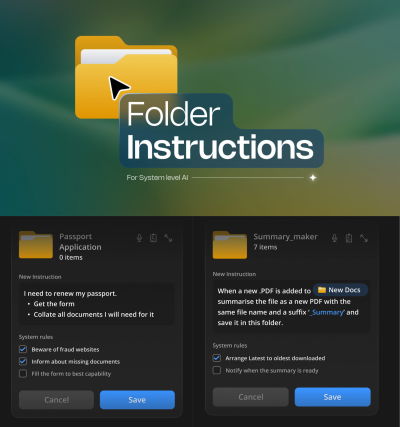
A screenshot shows a document management interface titled Folder Instructions for System-level AI, with two detailed folder instruction examples.
Now, that’s useful: seamless integration of AI features when creating new folders. By Karthikeya GS. (Large preview)

1. AI-First vs. Quiet AI

I’ve always been puzzled by the notion of “AI-first” products. They might speed up production, but we need to know really well first what we actually want to build. AI-first often doesn’t account for years of small and big design decisions that have shaped expectations and mental models over the years.
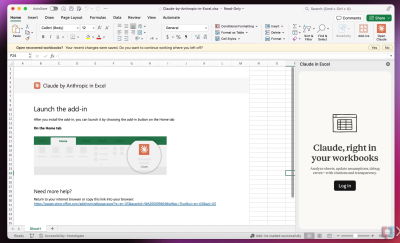
A neat Claude Excel integration
A neat Claude Excel integration, with users studying specific rows or columns, instead of switching between tools all the time. (Large preview)

I love the notion of “Quiet AI”. These are tools that are mostly invisible, sit in the background, and do small tasks on the user’s behalf. They never scream for attention but happily assist in repetitive, frustrating tasks that can easily be automated or assisted with a smart helper.

Excellent examples of Quiet AI include Claude’s integration within Microsoft Excel, PowerPoint, and Word, providing assistance in context without disrupting the user’s workflow.

2. Folder Instructions For AI Actions

So no wonder that I absolutely love the idea of folder instructions! There, users can define what a folder is supposed to do, based on the purpose they created it for. It sounds much more complicated than it actually is.
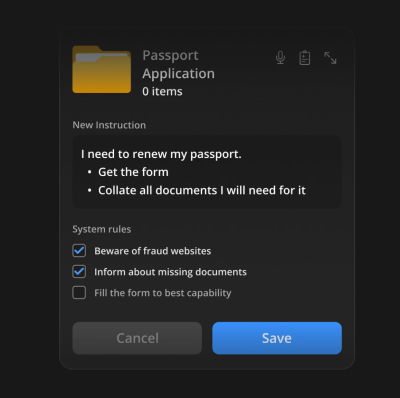
A dark-themed digital interface showing a folder labeled Passport Application, with instructions and system rules for a passport renewal process.
Users define instructions, choose system rules, and the system takes care of the task. (Large preview)

The instructions define what the folder is for, how files should be organized, how sub-folders should behave, and what actions can happen inside. Instead of manually maintaining a folder, you set its intent once and let the system follow it.

It’s a seamless integration of AI helpers just when and where users want and need it. With permissions and actions locally scoped to that specific folder on the user’s machine, unless the user extends access, permissions, or system rules on their own.
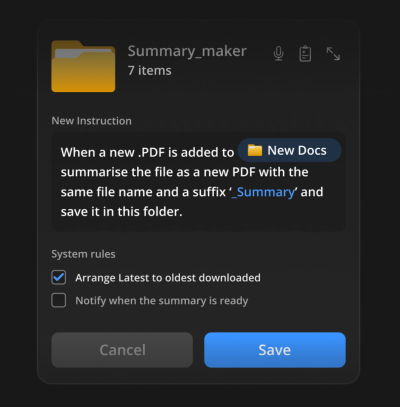
A dark-themed software interface showing a file management setup for summarizing PDFs. It displays instructions and system rules.
Users could automate tasks where the work actually happens, e.g., generating summaries on the fly. (Large preview)

Here are some useful examples:

  • For a passport renewal, get the form and collect all the documents I need for it. Inform about missing documents, and fill out the form to the best of your abilities.
  • When new invoices are added to the folder, rename them according to the sequence, sort them by invoice number, and organize them in folders by client.
  • When a new PDF is added to the folder, generate a summary, send it to my pocket, and send me a notification via email.

Note: For a deeper dive into this concept, you can jump to Karthikeya GS’s wonderful post “Folder Instructions: Instructions For System-Level AI”.

Wrapping Up

User’s value doesn’t emerge from users having to juggle between multiple applications, views, and sources every few minutes. That’s when they are slowed down, and that’s when they make mistakes.

It comes from helping users do the work they need to do — by reducing frustrations, slowdowns and mistakes, and taking care of tasks that otherwise would take too much time and too much effort to complete well.

Yet again, seamless integrations — a very underused but incredibly impactful way to deliver value fast, without adding the burden of installing and learning yet another tool.

Meet “Design Patterns For AI Interfaces”

Meet Design Patterns For AI Interfaces, Vitaly’s new video course with 100s of real-life examples and UX guidelines to design AI features that people actually use — with a live UX training later this year. Jump to a free preview.

Design Patterns For AI Interfaces promo picture
Meet Design Patterns For AI Interfaces, Vitaly’s video course on interface design & UX.

Smashing Editorial
(yk)


Source link

Integrations Magazine Seamless Smashing
Share. Facebook Twitter Pinterest LinkedIn Tumblr WhatsApp Email
Previous ArticleStop Calling It SEO: 12 Strategies To Dominate AI Search in 2026
Next Article Web 2.0 (Blogging) Sites
admin
  • Website

Related Posts

20+ Recommended Product Launch PowerPoint Templates

July 3, 2026

Why Accessibility Is An Operational Capability, Not A Feature — Smashing Magazine

July 1, 2026

20+ Handpicked Medical Fonts for Healthcare Documents & Forms

June 30, 2026

185Free Fonts for Designers 2026 (Serif, Script & Sans Serif)

June 28, 2026
Leave A Reply Cancel Reply

  • Facebook
  • Twitter
  • Pinterest
  • Instagram
  • YouTube
  • Vimeo
Don't Miss
Marketing

Ways Community Can Help Your SEO

By adminJuly 5, 20260

So I’ve heard a lot of folks kind of starting down here and saying, “Community…

For Creators – How to Pitch Brands (And Actually Hear Back) – GRIN

July 5, 2026

Web 2.0 (Blogging) Sites

July 4, 2026

They Need Seamless Integrations — Smashing Magazine

July 4, 2026

Subscribe to Updates

Get the latest creative news from Trendswave about Marketing, SEO & Web Design.

Please enable JavaScript in your browser to complete this form.
Loading
About Us

Trendswave is an Influencer Marketing Agency with access to one of the largest influencer networks in the Poland, connecting brands and agencies to only the best influencers and social media thought leaders.

Our Picks

Ways Community Can Help Your SEO

July 5, 2026

For Creators – How to Pitch Brands (And Actually Hear Back) – GRIN

July 5, 2026
Quicklinks
  • Influencer Marketing
  • Marketing
  • SEO
  • Social Media
  • Web Design
  • About Us
  • Contact Us
  • Disclaimer
  • Privacy Policy
  • Terms and Conditions
© 2026 Trendswave.All Rights Reserved

Type above and press Enter to search. Press Esc to cancel.