
Close Menu
Trendswave MediaTrendswave Media
  • Home
  • About Us
    • Contact Us
  • Services
  • Influencer Marketing
  • Marketing
  • SEO
  • Social Media
  • Web Design
  • Shop

Subscribe to Updates

Get the latest creative news from Trendswave about Marketing, SEO & Web Design.

Please enable JavaScript in your browser to complete this form.
Loading
What's Hot

Ads of the Week: 10 Campaigns That Caught Our Eye, From On to KFC

October 2, 2026

Facebook Content Monetization: What It Really Pays

October 2, 2026

How Quince Turns Creator Product Reviews Into a Scalable Marketing Strategy

October 2, 2026
Facebook X (Twitter) Instagram
Trendswave MediaTrendswave Media
  • Home
  • About Us
    • Contact Us
  • Services
  • Influencer Marketing
  • Marketing
  • SEO
  • Social Media
  • Web Design
  • Shop
Trendswave MediaTrendswave Media
Home»Marketing»Run Your Email Marketing From Claude With AWeber’s New Claude Connector
Marketing

Run Your Email Marketing From Claude With AWeber’s New Claude Connector

adminBy adminAugust 16, 2026No Comments4 Mins Read
Facebook Twitter Pinterest LinkedIn Tumblr WhatsApp VKontakte Email
Run Your Email Marketing From Claude With AWeber’s New Claude Connector
Share
Facebook Twitter LinkedIn Pinterest Email


By Sean Tinney August 10, 2026

You can now manage your AWeber account without leaving Claude.

We’re is live in Claude’s connector directory. Search for AWeber, click Connect, and authenticate your account. That’s the entire setup.

From there, ask Claude to draft a broadcast, add a subscriber, or pull your open and click rates. It happens right in the conversation, using your real AWeber data.

What You Can Do From Claude

Once connected, start creating better content and making more informed decisions.

Check broadcast performance

Ask how your last broadcast performed, or how several stack up against each other, and get open and click stats back in a table or chart.
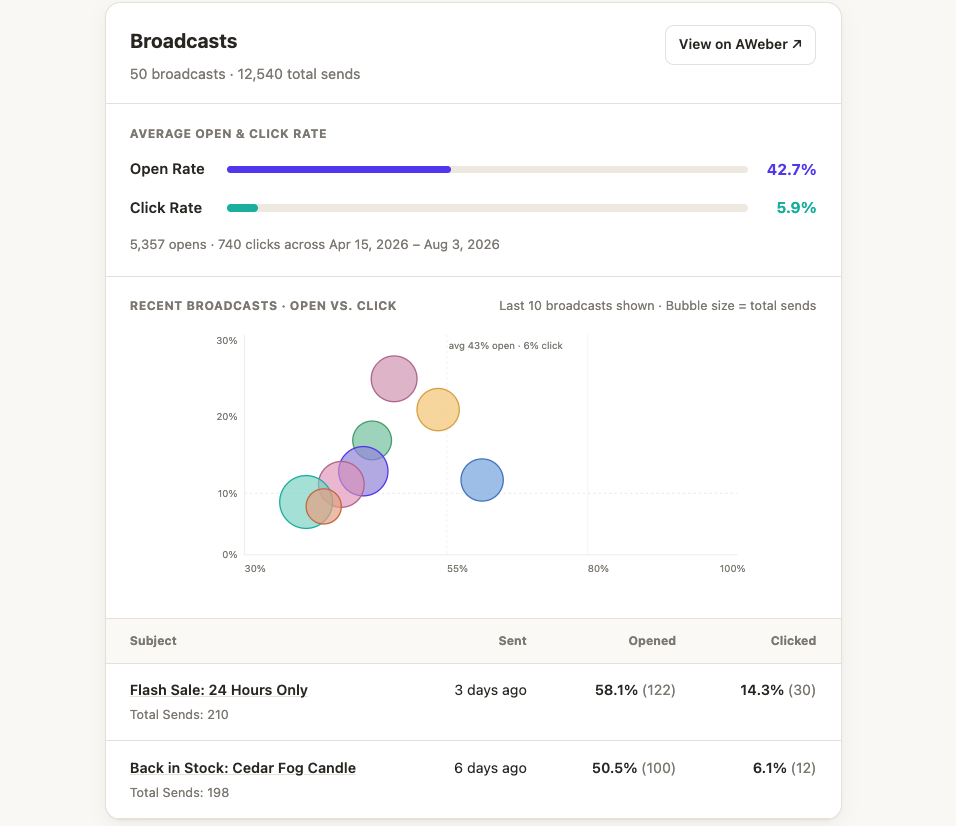
Screenshot email marketing performance graph from Claude

Plus a recap of what worked and what didn’t. Which subject line pulled the most clicks. Which send underperformed relative to its size. Whether a particular type of email consistently does better with your list.
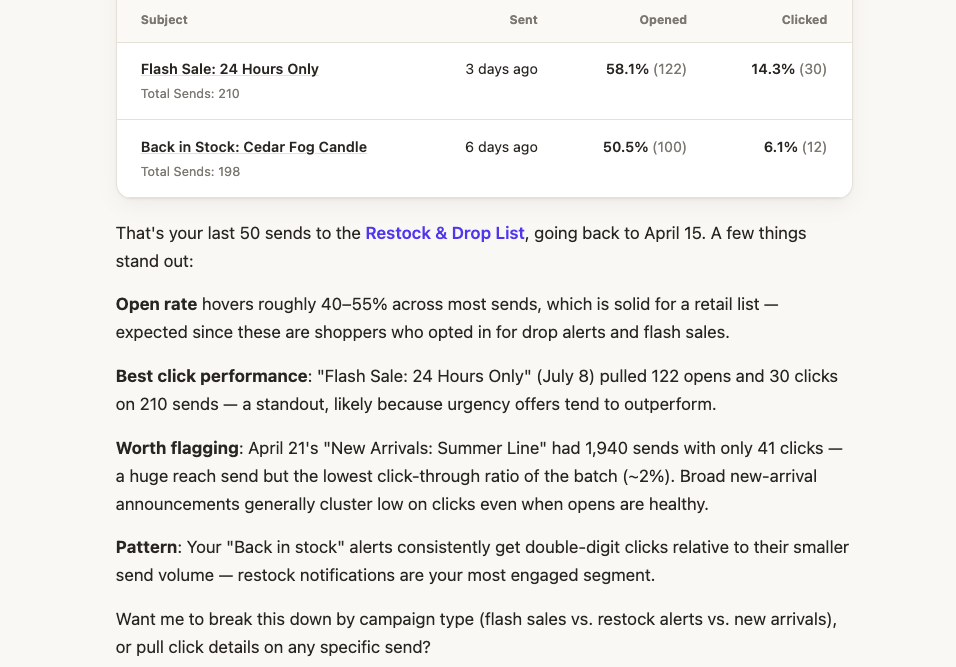
Screenshot showing email analysis from ClaudeScreenshot showing email analysis from Claude

Draft and review broadcasts

Ask Claude to write a newsletter for a specific list, in the tone of your recent sends. It writes the copy and saves it to your account as a draft, ready for you to review and send.
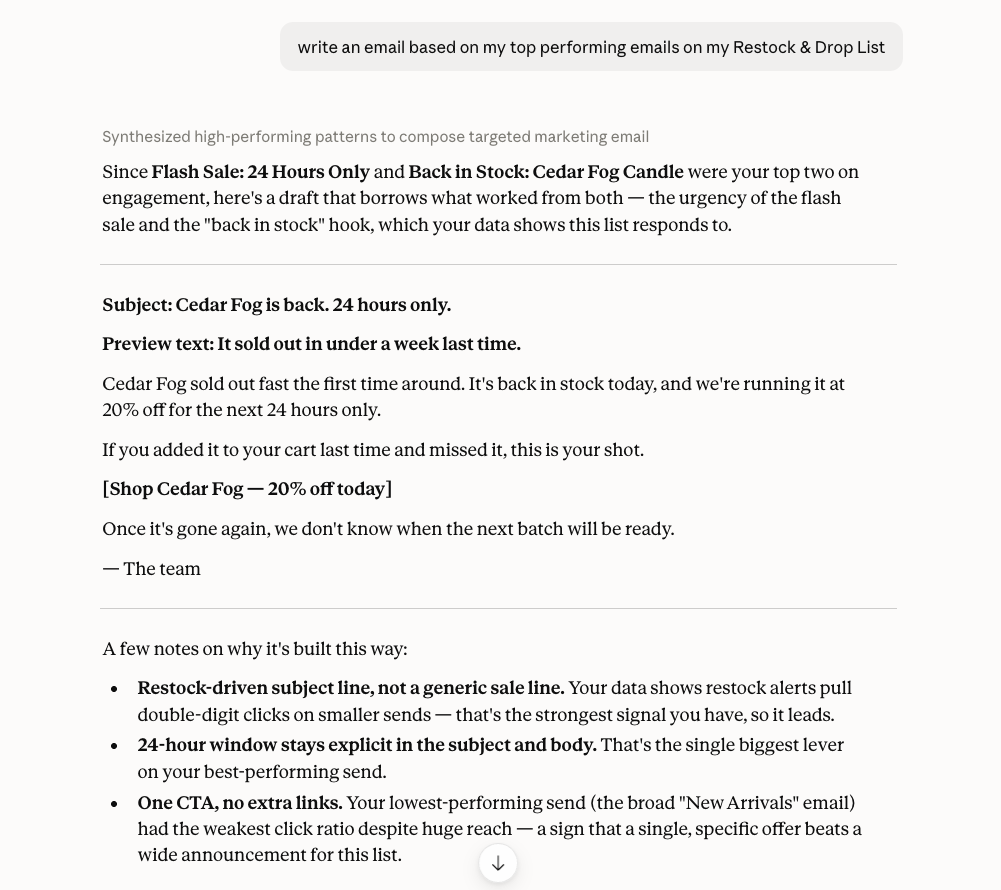
Screenshot showing email draft in ClaudeScreenshot showing email draft in Claude

Manage subscribers

Look up, add, update, or move subscribers between lists. Search by tag, sign-up date, or activity.
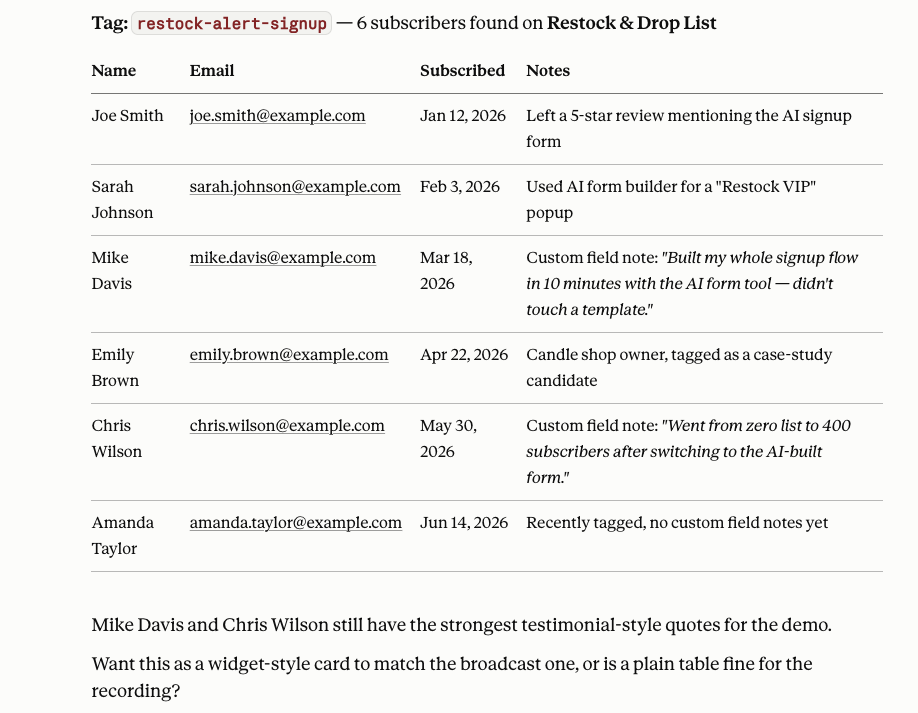
Screenshot showing subscriber managementScreenshot showing subscriber management

Manage lists and tags

Ask which of your lists is largest, or what the most common tag is on a specific list. Claude pulls the answer straight from your account.
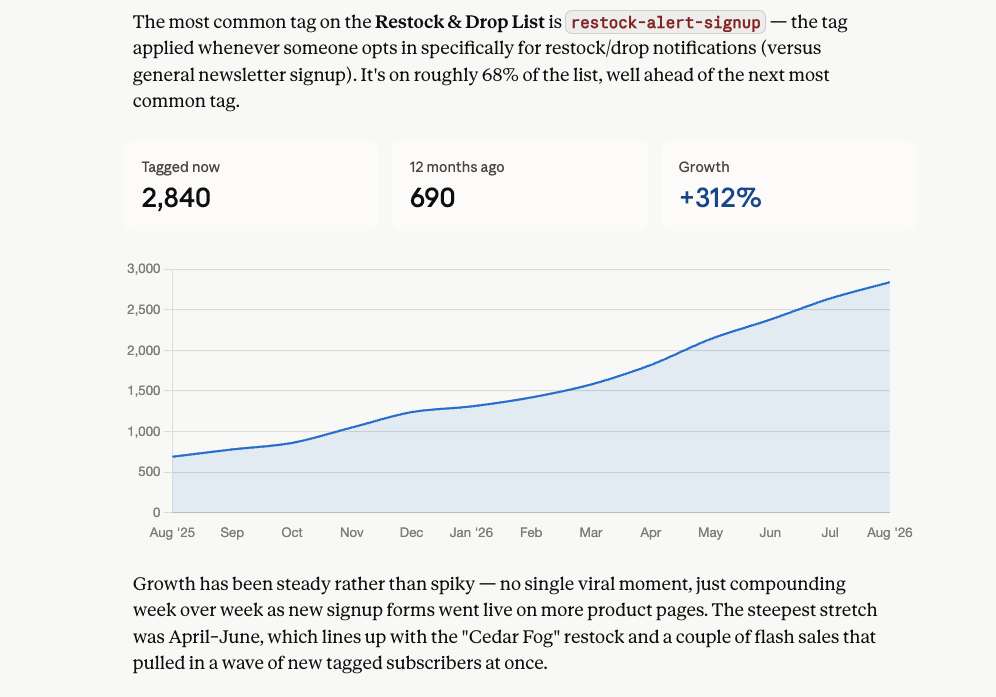
Screenshot showing subscriber growth chartScreenshot showing subscriber growth chart

Build signup forms

Ask Claude to create a signup form for a specific list, with the fields, tags, and placement you want. It creates the form, ready to drop into your site.

GIF of signup form created in ClaudeGIF of signup form created in Claude

Connect your account

→ Open Claude
→ Go to Settings → Connectors
→ Search “AWeber” and click Connect
→ Authenticate your account
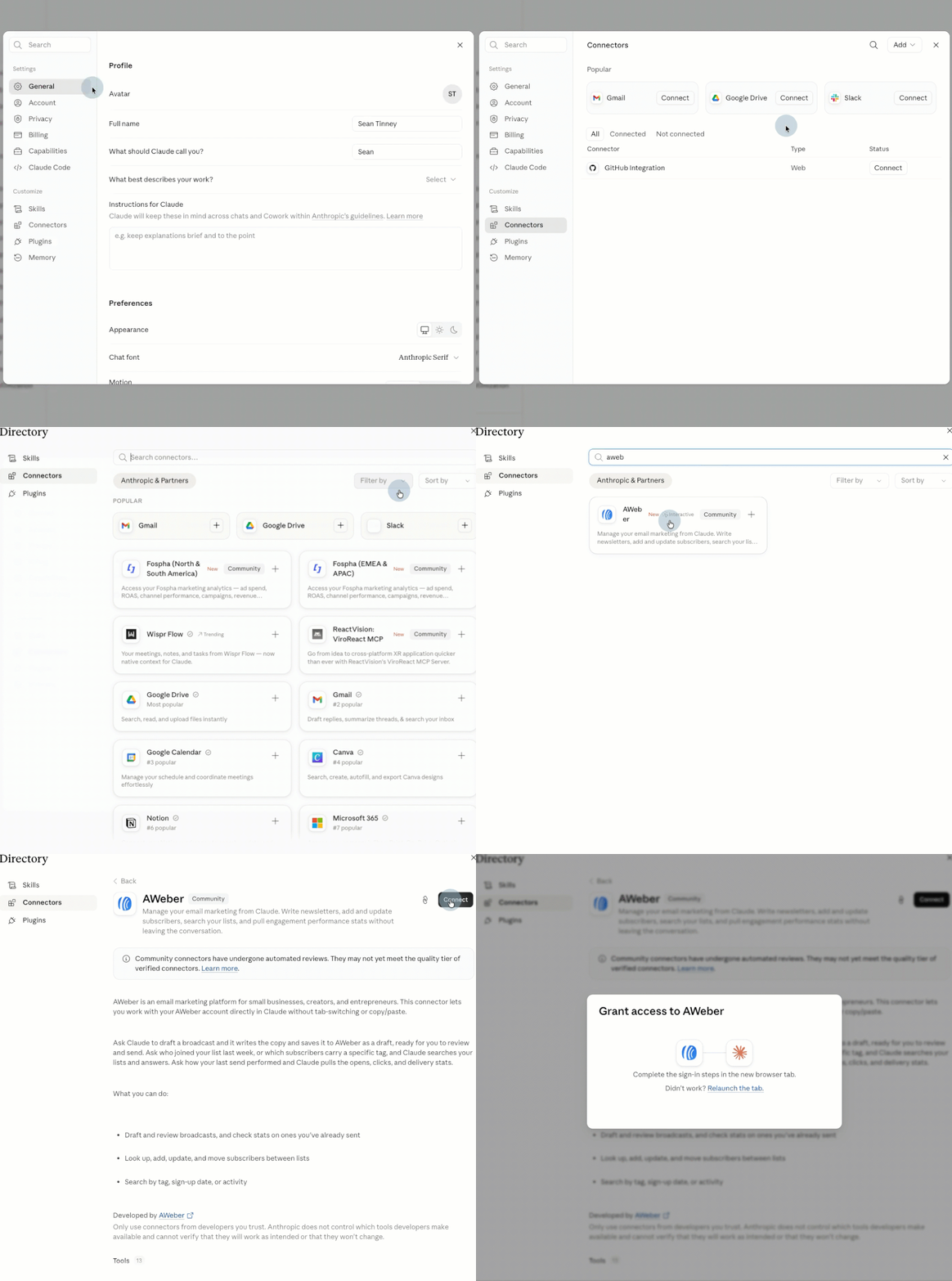
GIF showing how to connect AWeber to ClaudeGIF showing how to connect AWeber to Claude

Start a new chat and ask Claude something like “Who is the latest subscriber on [list name] in AWeber?” You’ll get a real answer pulled straight from your list.

You can now manage your AWeber account without leaving Claude.

We’re is live in Claude’s connector directory. Search for AWeber, click Connect, and authenticate your account. That’s the entire setup.

From there, ask Claude to draft a broadcast, add a subscriber, or pull your open and click rates. It happens right in the conversation, using your real AWeber data.

What You Can Do From Claude

Once connected, start creating better content and making more informed decisions.

Check broadcast performance

Ask how your last broadcast performed, or how several stack up against each other, and get open and click stats back in a table or chart.

Plus a recap of what worked and what didn’t. Which subject line pulled the most clicks. Which send underperformed relative to its size. Whether a particular type of email consistently does better with your list.

Draft and review broadcasts

Ask Claude to write a newsletter for a specific list, in the tone of your recent sends. It writes the copy and saves it to your account as a draft, ready for you to review and send.

Manage subscribers

Look up, add, update, or move subscribers between lists. Search by tag, sign-up date, or activity.

Manage lists and tags

Ask which of your lists is largest, or what the most common tag is on a specific list. Claude pulls the answer straight from your account.

Build signup forms

Ask Claude to create a signup form for a specific list, with the fields, tags, and placement you want. It creates the form, ready to drop into your site.

Connect your account

→ Open Claude→ Go to Settings → Connectors→ Search “AWeber” and click Connect→ Authenticate your account

Start a new chat and ask Claude something like “Who is the latest subscriber on [list name] in AWeber?” You’ll get a real answer pulled straight from your list.


Source link

AWebers Claude Connector Email Marketing Run
Share. Facebook Twitter Pinterest LinkedIn Tumblr WhatsApp Email
Previous ArticleFrom Family Recipe to $87 Million Brand
Next Article 20+ Handpicked Church Flyer Templates for Community Events
admin
  • Website

Related Posts

Ads of the Week: 10 Campaigns That Caught Our Eye, From On to KFC

October 2, 2026

How Quince Turns Creator Product Reviews Into a Scalable Marketing Strategy

October 2, 2026

How to Use AI on LinkedIn While Sounding Human : Social Media Examiner

October 1, 2026

Daily Search Forum Recap: September 29, 2026

September 30, 2026
Leave A Reply Cancel Reply

  • Facebook
  • Twitter
  • Pinterest
  • Instagram
  • YouTube
  • Vimeo
Don't Miss
Marketing

Ads of the Week: 10 Campaigns That Caught Our Eye, From On to KFC

By adminOctober 2, 20260

On, KFC, Reebok, Chili’s, the Washington Post, and more are behind the week’s most notable…

Facebook Content Monetization: What It Really Pays

October 2, 2026

How Quince Turns Creator Product Reviews Into a Scalable Marketing Strategy

October 2, 2026

Introducing Yoast SEO AI+ for Shopify • Yoast

October 2, 2026

Subscribe to Updates

Get the latest creative news from Trendswave about Marketing, SEO & Web Design.

Please enable JavaScript in your browser to complete this form.
Loading
About Us

Trendswave is an Influencer Marketing Agency with access to one of the largest influencer networks in the Poland, connecting brands and agencies to only the best influencers and social media thought leaders.

Our Picks

Ads of the Week: 10 Campaigns That Caught Our Eye, From On to KFC

October 2, 2026

Facebook Content Monetization: What It Really Pays

October 2, 2026
Quicklinks
  • Influencer Marketing
  • Marketing
  • SEO
  • Social Media
  • Web Design
  • About Us
  • Contact Us
  • Disclaimer
  • Privacy Policy
  • Terms and Conditions
© 2026 Trendswave.All Rights Reserved

Type above and press Enter to search. Press Esc to cancel.