Close Menu
Trendswave MediaTrendswave Media
  • Home
  • About Us
    • Contact Us
  • Services
  • Influencer Marketing
  • Marketing
  • SEO
  • Social Media
  • Web Design
  • Shop

Subscribe to Updates

Get the latest creative news from Trendswave about Marketing, SEO & Web Design.

Please enable JavaScript in your browser to complete this form.
Loading
What's Hot

The Many Faces Of September (2026 Wallpapers Edition) — Smashing Magazine

September 1, 2026

How to Use AI to Dramatically Improve Your Quality : Social Media Examiner

September 1, 2026

How We Earned 1,000+ Links For GEO/SEO

September 1, 2026
Facebook X (Twitter) Instagram
Trendswave MediaTrendswave Media
  • Home
  • About Us
    • Contact Us
  • Services
  • Influencer Marketing
  • Marketing
  • SEO
  • Social Media
  • Web Design
  • Shop
Trendswave MediaTrendswave Media
Home»Influencer Marketing»Product News – June 2026
Influencer Marketing

Product News – June 2026

adminBy adminJuly 17, 2026No Comments3 Mins Read
Facebook Twitter Pinterest LinkedIn Tumblr WhatsApp VKontakte Email
Product News – June 2026
Share
Facebook Twitter LinkedIn Pinterest Email


Product news - June 2026

We are delighted to announce a new enhancement to our Newsletter module—one of the most requested features from our users.

This update is designed to give you even more efficient control over your recipient lists, while providing greater visibility into the quality and health of your contact databases.

From the Recipients tab, you can now access a dedicated recipient management interface by clicking on a list.
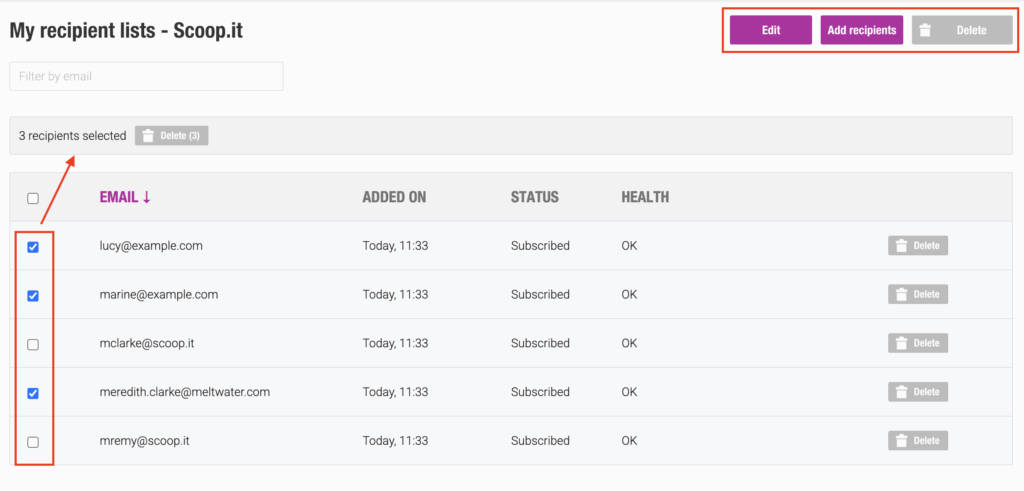
The following actions are available:

  • Edit – Modify the list name, existing contacts, and subscription preferences (including allowing unsubscribes).
  • Add Recipients – Add new recipients without affecting the existing contact list.
  • Delete – Permanently delete the list.
  • Bulk Actions – Select multiple recipients and perform bulk operations such as delete, re-subscribe, or reactivate.

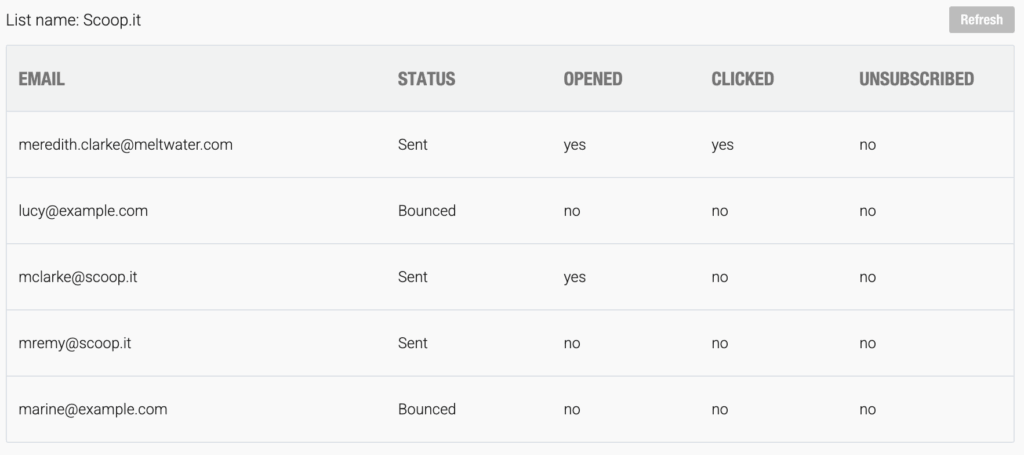
After sending a newsletter using the Create Campaign option, the recipient list displayed on the left side of the statistics dashboard (“Number of Recipients”) now includes several delivery statuses that help you monitor distribution progress:

  • Pending
  • Sending
  • Sent
  • Delayed
  • Bounced
  • Expired

Status Definitions

Bounced
The email could not be delivered to the recipient. A bounce may be either temporary (soft bounce) or permanent (hard bounce).

Delayed
A waiting period during which the system continues attempting delivery before determining whether the failure should be classified as a soft bounce.

To help you better understand the overall health of your recipient lists from the Recipients tab, three list statuses are now available:
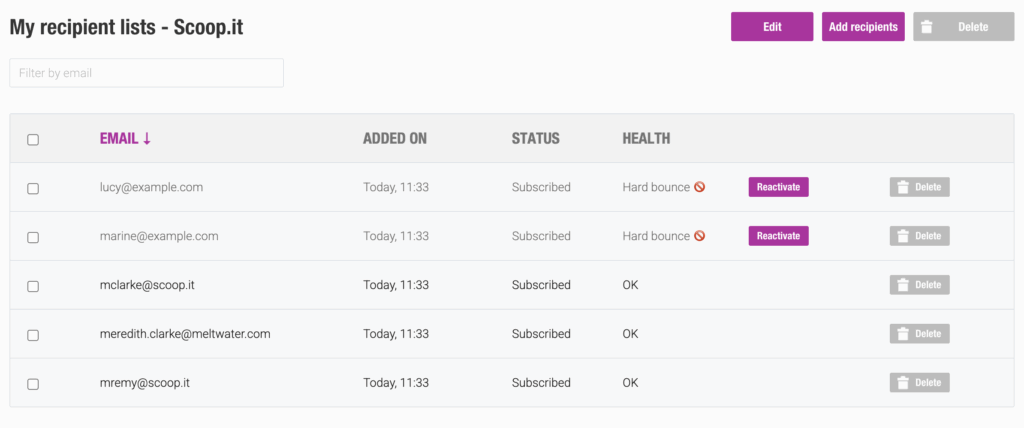
  • OK
  • Hard Bounce
  • Soft Bounce

The last two statuses are displayed only after three consecutive failed delivery attempts.

This rule helps prevent valid email addresses from being removed prematurely, as some email servers may temporarily reject a newsletter or classify it as spam during one or two delivery attempts before accepting it on a subsequent send.

When a hard or soft bounce status is confirmed, the email address is automatically removed from the recipient list.

Of course, it remains possible to reactivate a previously disabled email address at any time.

Understanding Bounce Types

Hard Bounce
A permanent delivery failure. The recipient’s email address is invalid or no longer exists.

Soft Bounce
A temporary delivery failure. The email address is valid, but the message could not be delivered due to a temporary issue.

Common causes include:

  • Full mailbox
  • Recipient server unavailable or overloaded
  • Message size too large
  • Temporary connection issue

Thanks to these new indicators, you will be able to make more informed decisions regarding your mailing lists and maximize the impact of your newsletters.

Please note that these new data points are available for campaigns sent from June 4, 2026, onward.

Loading…


Source link

June News Product
Share. Facebook Twitter Pinterest LinkedIn Tumblr WhatsApp Email
Previous ArticleGemini 3.5 Pro Delayed Over Coding, Bloomberg Reports
Next Article 20+ Awesome Desert Fonts for Wild Aesthetic Designs
admin
  • Website

Related Posts

From exact match to AI Mode

August 31, 2026

Google is dynamically expanding AI Overviews for some queries

August 31, 2026

Always-On Creator Campaigns: Why Brands Are Moving to Self-Service Influencer Marketing Platforms

August 30, 2026

How Happy V Uses Creators to Make Vaginal Health Easier to Discuss

August 28, 2026
Leave A Reply Cancel Reply

  • Facebook
  • Twitter
  • Pinterest
  • Instagram
  • YouTube
  • Vimeo
Don't Miss
Web Design

The Many Faces Of September (2026 Wallpapers Edition) — Smashing Magazine

By adminSeptember 1, 20260

Could there be a better way to welcome the new month than with a new…

How to Use AI to Dramatically Improve Your Quality : Social Media Examiner

September 1, 2026

How We Earned 1,000+ Links For GEO/SEO

September 1, 2026

24 Glitch Effect Photoshop Actions & Layer Styles

August 31, 2026

Subscribe to Updates

Get the latest creative news from Trendswave about Marketing, SEO & Web Design.

Please enable JavaScript in your browser to complete this form.
Loading
About Us

Trendswave is an Influencer Marketing Agency with access to one of the largest influencer networks in the Poland, connecting brands and agencies to only the best influencers and social media thought leaders.

Our Picks

The Many Faces Of September (2026 Wallpapers Edition) — Smashing Magazine

September 1, 2026

How to Use AI to Dramatically Improve Your Quality : Social Media Examiner

September 1, 2026
Quicklinks
  • Influencer Marketing
  • Marketing
  • SEO
  • Social Media
  • Web Design
  • About Us
  • Contact Us
  • Disclaimer
  • Privacy Policy
  • Terms and Conditions
© 2026 Trendswave.All Rights Reserved

Type above and press Enter to search. Press Esc to cancel.