


You need a video for your business. You know that much. What you probably do not know is which one. “Brand video” covers a company story film, a two minute explainer, a customer testimonial, and a thirty second thing your competitor posted last week that you cannot stop thinking about.
Picking wrong is expensive. Not because production costs a fortune, and I will show you real numbers on that later. It is expensive because a video built for the wrong stage of the buying process sits on your homepage doing nothing for two years.
I have been a Fractional CMO since 2010, and I have commissioned brand videos for my own business and watched clients commission plenty more. I also teach social media marketing to executives at Rutgers Business School. The pattern is always the same. The companies that get value from video decided what job the video had to do before anyone turned on a camera.
So that is how I have organized this. The ten types and what each one is actually for. The ten examples I keep coming back to. And the two decisions that trip people up most, which are animation versus real people, and which video to make first.
Key Takeaways
✅ A brand video is an investment in future business. It builds awareness and an emotional connection that becomes brand trust, and brand trust is what brand equity is made of.
✅ Production quality is a trust signal, not vanity. 89% of consumers say video quality affects how much they trust a brand, according to Wyzowl’s 2026 report of 266 respondents.
✅ Pick the type by funnel stage, not by what looks impressive. A company story video and a process explainer do completely different jobs, and most businesses need both.
✅ Real people beat animation for anything about who you are. Animation wins for anything abstract, invisible, or too expensive to film.
✅ Brand video costs split into two tiers. Agency-produced films like the examples below are a real investment, while a talking-head shoot runs roughly $150 to $250 per finished video in my market. For most businesses that second tier is the sensible place to start.
What Is a Brand Video?
A brand video is a video whose job is to make people feel something about your company rather than to close a sale today. It introduces who you are, what you stand for, or how you help, and it earns attention from people who are not ready to buy yet.

That last part is the whole definition, and it is where most businesses go wrong. They brief a brand video and then judge it on conversions in the first thirty days.
Here is how I think about it. You are investing in your future business by increasing brand awareness and building a stronger emotional bond, which produces greater brand trust, and therefore greater brand equity. Every one of those steps takes time.
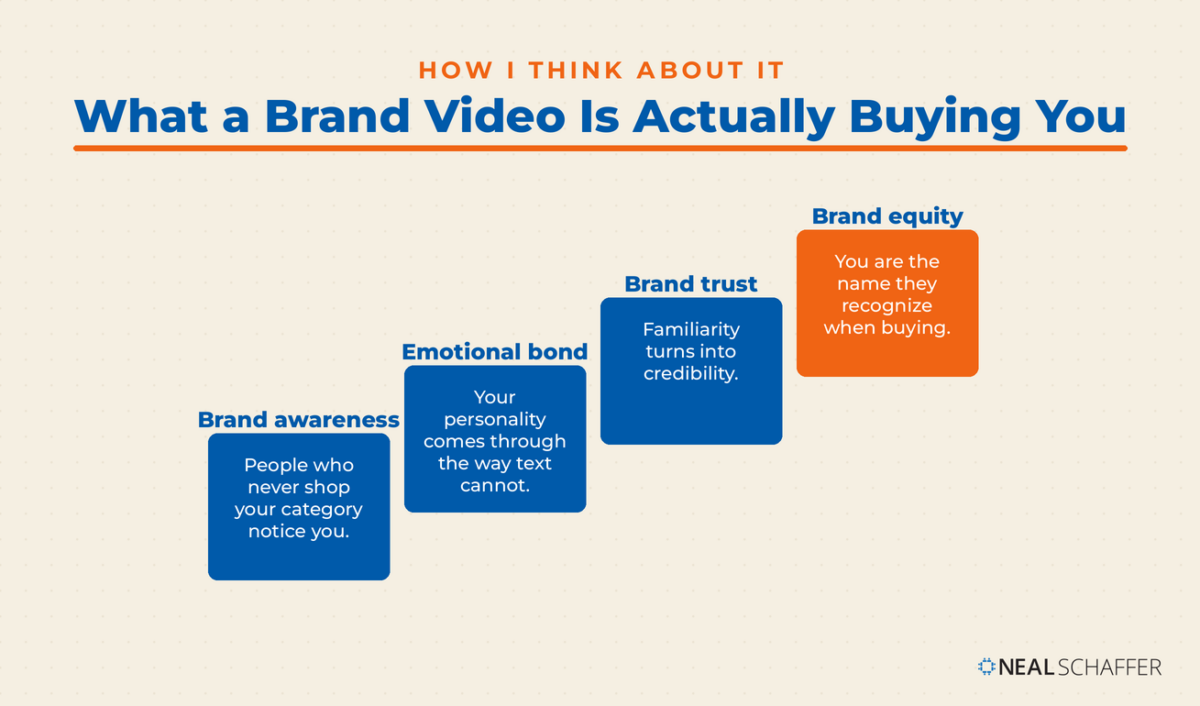
Brand videos also carry your personality in a way text cannot. Some brands are quirky and let it show. Coca-Cola has a personality of fun and family without much overt humor. Whatever your brand actually is, video is the fastest way to transmit it.
And quality matters more than it used to, because viewers now compare you against everything else in their feed.
That is the what. The more useful question is why a video aimed at people who will not buy today is worth paying for at all.
Why Do Brand Videos Work?
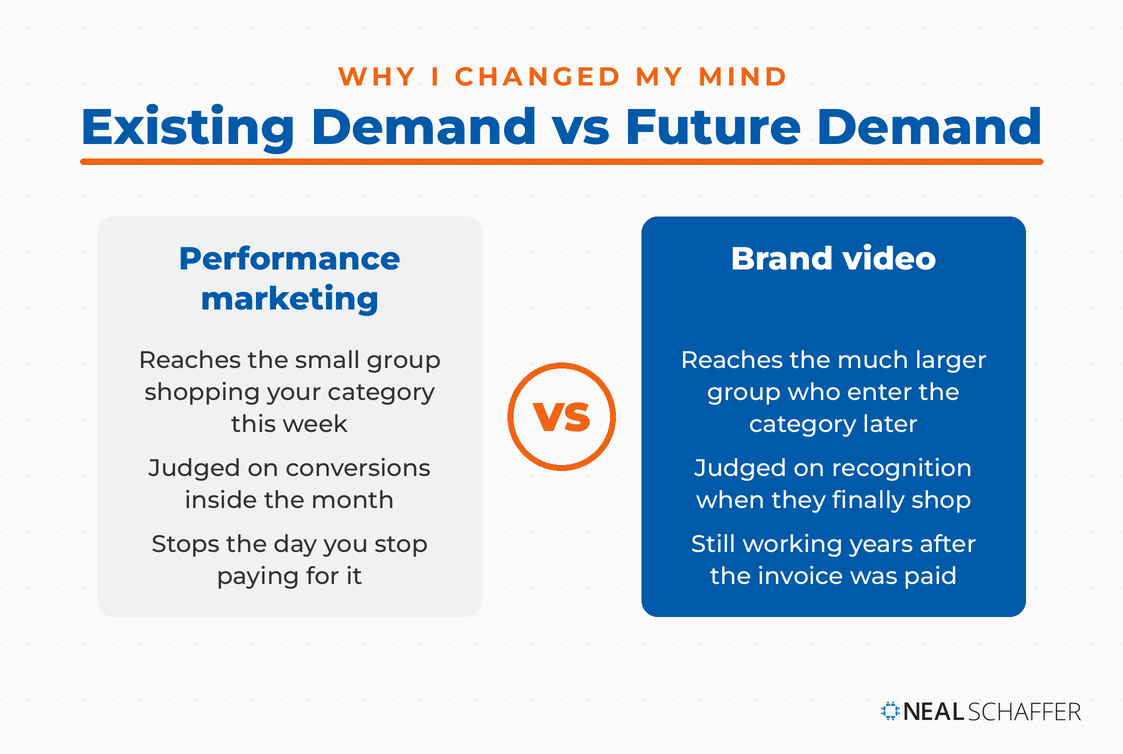
Brand videos work because familiarity drives buying decisions. Most of your future customers are not shopping your category today, and they will gravitate toward the company they already recognize when they finally are. A brand video reaches that group early, at a moment when a sales message would be ignored.
I used to treat brand awareness as a nice-to-have. A conversation on my podcast with James Hurman, founder of the New Zealand innovation studio Previously Unavailable, changed my mind on that permanently.
“Companies don’t do brand advertising because they’re big. They’re big because they did brand advertising.” That is James, speaking on my podcast Your Digital Marketing Coach.
His framing has stuck with me. In any market there is existing demand, the small group ready to buy right now, and future demand, the much larger group who will enter the category later. Performance marketing captures the first group. Only brand work reaches the second.
James also gave me the single most useful structure I have found for a company story video, borrowed from screenwriting. Act one is why you started the business. Act two is the product or service. Act three is what changes for your customer.
Most company videos are all act two. They open with what the product does and end with a call to action. Show someone only act two of a film and they will follow the plot but feel nothing about it.
Which brings us to the practical question: of the ten kinds of brand video you could make, what is each one actually for?
What Are the 10 Types of Brand Video?
There are ten common brand video types, and they sort into four groups by what they put on screen: your company, your product, your customers, or an experience. None is better than another. They answer different questions at different points in the buying process, and picking by group first makes the choice much easier.
| # | Type | What it puts on screen | Best used for |
|---|---|---|---|
| 1 | Company story | Your founding, your values, your people | Homepage, About page, first impression |
| 2 | Brand profile | One brand within a larger portfolio | Helping buyers choose between your own brands |
| 3 | Product video | What a product is and what it includes | Category and product pages |
| 4 | Explainer | How the product is used and why it matters | Anything complicated or unfamiliar |
| 5 | How-to, demo, or training | Step by step usage | Onboarding, reducing support tickets |
| 6 | Testimonial | A customer, in their own words | Consideration stage, social proof |
| 7 | Interview | A longer conversation with a customer | Long-form campaigns, clip harvesting |
| 8 | Case study | A client result with actual numbers | Late-stage evaluation |
| 9 | Event video | A trade show, seminar, or launch | Recap, reach beyond attendees |
| 10 | Behind the scenes | Your operations and your employees | Advertising and recruiting at once |
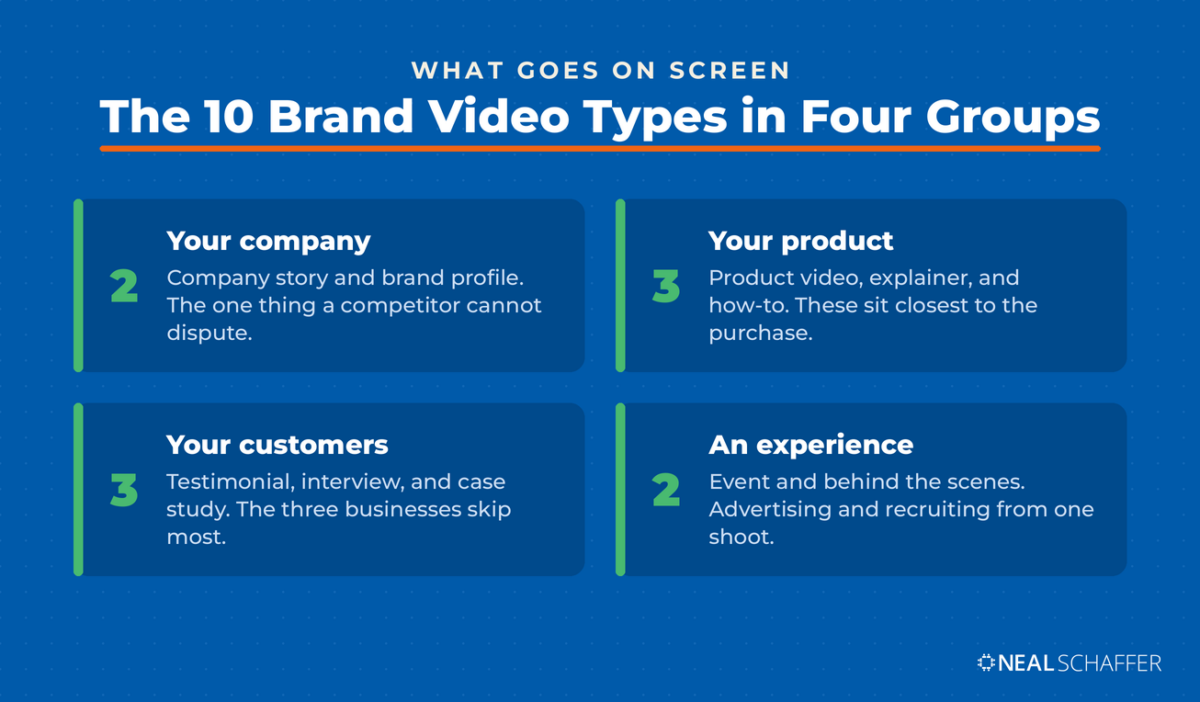
Videos about your company, types one and two, are not focused on products so much as what kind of company you are. They let you stand out on ground a competitor cannot dispute, because nobody else lived your history.
Types three through five sit closer to the purchase. Notice that product videos and explainers are related but not the same thing. A product video describes what something is, while an explainer teaches how it gets used. Computer accessories are a good example: an explainer can make the case for a mobile hotspot in a way a spec list never will. If your business runs on individual product pages, that ground belongs to product videos rather than here.
The LinkedIn Playbook for Real Business Growth
My latest book helps professionals, entrepreneurs, and business owners turn LinkedIn from a static profile into a real source of clients and growth.
Maximizing LinkedIn for Business Growth gives you clear, practical steps to build a profile that gets noticed and a network that actually sends business your way.
Grab your copy on Amazon and put it to work this week. Click the cover or the button below to get started.

Types six through eight put your customers on screen, and they are the ones businesses skip most often. Testimonials work as branded YouTube Shorts, TikToks, or Reels, not just as long website assets. Interviews can be cut into shorter testimonials or transcribed into blog posts. Case studies belong on video too, and if it is a case study, include the actual numbers.
Experiential videos, types nine and ten, remain useful long after the event itself. Behind-the-scenes footage does double duty: it is good advertising and it is very good recruiting, because putting a human face on your company helps people picture themselves working there.
One type deserves more than a row in a table, because it is the video almost every company asks for first and gets wrong.
How Do You Make a Company Introduction Video That Doesn’t Look Like Everyone Else’s?
A company introduction video is the video that lives on your homepage and introduces your business to a first-time visitor. Most of them are interchangeable. You could swap in a different company name and the script would still work, which is the clearest sign that nobody decided what the video was for.
That sameness has a cause. Most companies make this video because a web designer recommended it or the CEO asked for one. It becomes a task to complete rather than a job to do.
The fix is to treat it as a sales video instead of an introduction. It is one piece of a series that moves someone toward a decision. That reframe changes the script immediately, because a sales video has to earn the next click rather than simply exist.
Apply the three-act structure I described earlier and the sameness problem solves itself, because act one is the part your competitor cannot copy. They did not live it. Most homepage videos skip past it entirely and open on the product.
A video on your homepage can also help your search performance, mostly by increasing time on page. Treat that as a side effect rather than the reason.
If you publish it to YouTube as well, set it as your channel trailer. YouTube shows the trailer to visitors on your channel home tab and stops showing it once someone has watched it, so it works as an introduction rather than a repeat. Getting more from that channel is a separate discipline, and it starts with video SEO.
Once you know what the video needs to say, the next argument starts: who or what should be on screen.
Should You Use Animation or Real People?
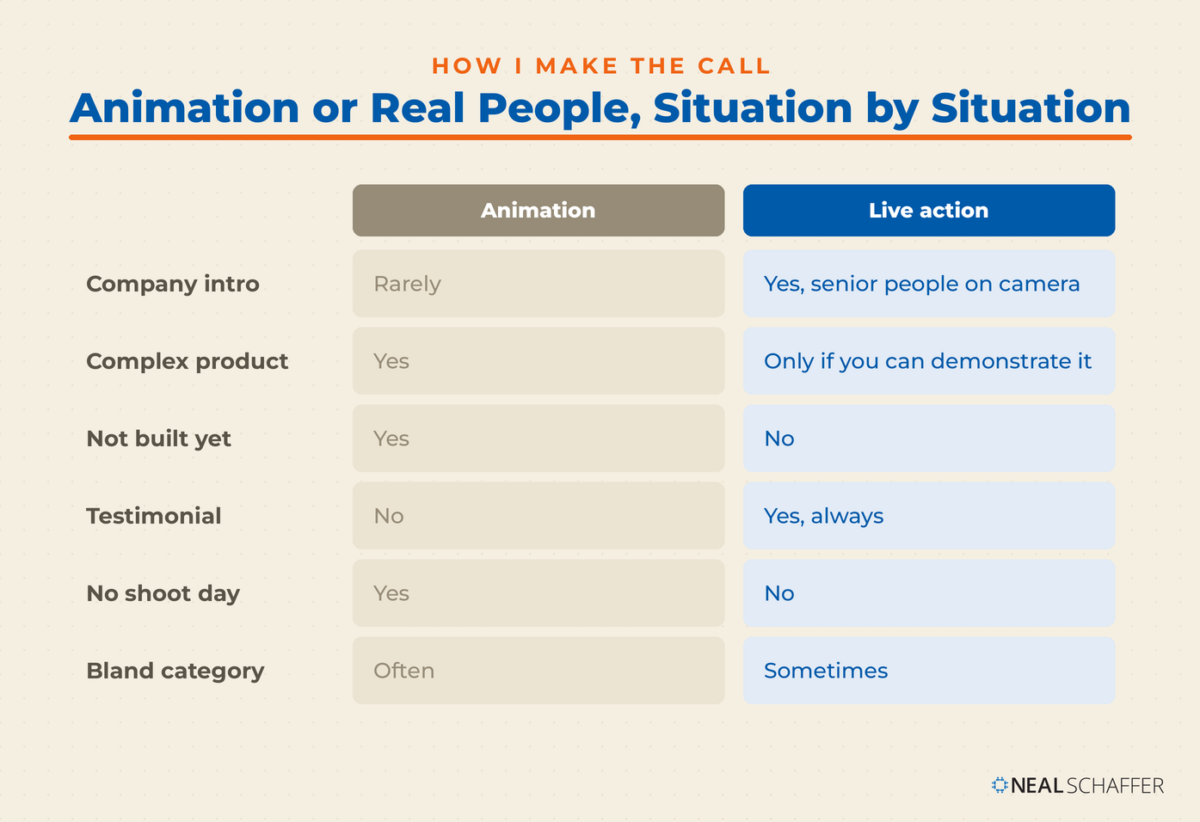
Use real people whenever the video is about who your company is, and use animation whenever the subject is abstract, invisible, or impractical to film. Live action builds trust because people connect emotionally with other people. Animation earns its keep by making complicated or non-existent things understandable.
The market has already voted on this. 51% of video marketers mostly create live action video, against 23% for animation and 19% for screen recordings, per Wyzowl’s 2026 data. Animation is the minority choice, which also makes it a way to look different in a category where everyone films the same conference room.
| Situation | Go live action | Go animated |
|---|---|---|
| Introducing the company | Yes, ideally senior people on camera | Rarely |
| Explaining something complex | Only if you can demonstrate it | Yes |
| The thing does not exist yet | No | Yes |
| Customer testimonial | Yes, always | No |
| Tight turnaround, no shoot day | No | Yes |
| Wanting to look different in a bland category | Sometimes | Often |
Two-dimensional figures cannot represent a living company made of real people. That is the argument for putting humans on screen, and I find it holds. Animation can carry emotion, but it cannot carry recognition.
Animation also has a quality floor problem. Cheap animation looks like fifty other videos, and whiteboard animation in particular has been worn out by years of low-effort versions. If you cannot afford animation done properly, live action at a modest budget will serve you better.
If you go with real people, you do not need professional actors. Executives and employees on camera build rapport that hired talent cannot. Their nerves are normal, and there is a reliable way around them: shoot it as an interview. A question and answer format feels more natural than a memorized monologue, and it makes the video feel like a conversation answering the viewer’s questions.
Scripts read to camera are where this usually falls apart. I have watched employees stiffen the moment they were handed one.
If you do hire actors, pay them properly. SAG-AFTRA publishes its commercial session fees as minimums that performers can negotiate above, and those figures are a fair reference point even for a non-union shoot. Underpaying talent because neither side knows the going rate is common and avoidable.
One more thing about being on camera, and it applies to you as much as your employees. In Digital Threads I wrote about the feedback I got on wearing a t-shirt for my YouTube videos instead of the suit and blue shirt from my publicity photos. It made me more approachable. After all, who wears a suit in their home office?
Knowing the format is only half the decision. The harder question is sequencing.
Which Brand Video Should You Make First?
Make the video that matches where your prospects actually get stuck. For most businesses that is a company story video, because strangers need a reason to care before they will evaluate anything. Then build outward: what you offer, then how working with you actually goes.
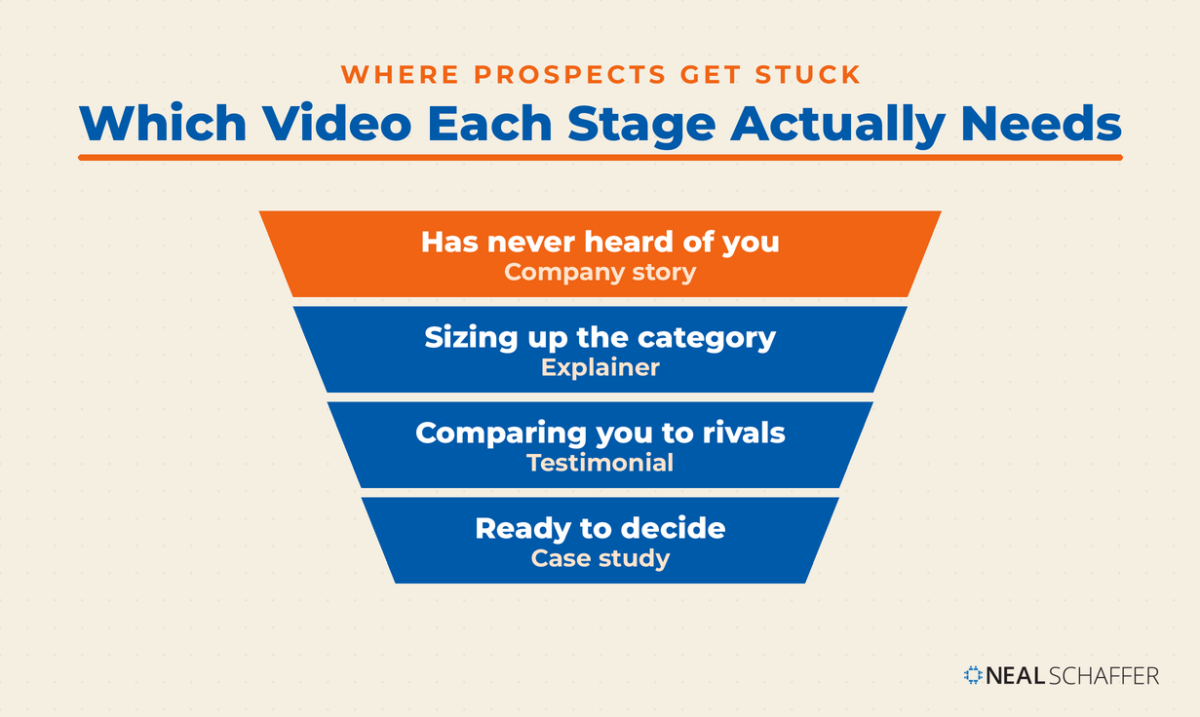
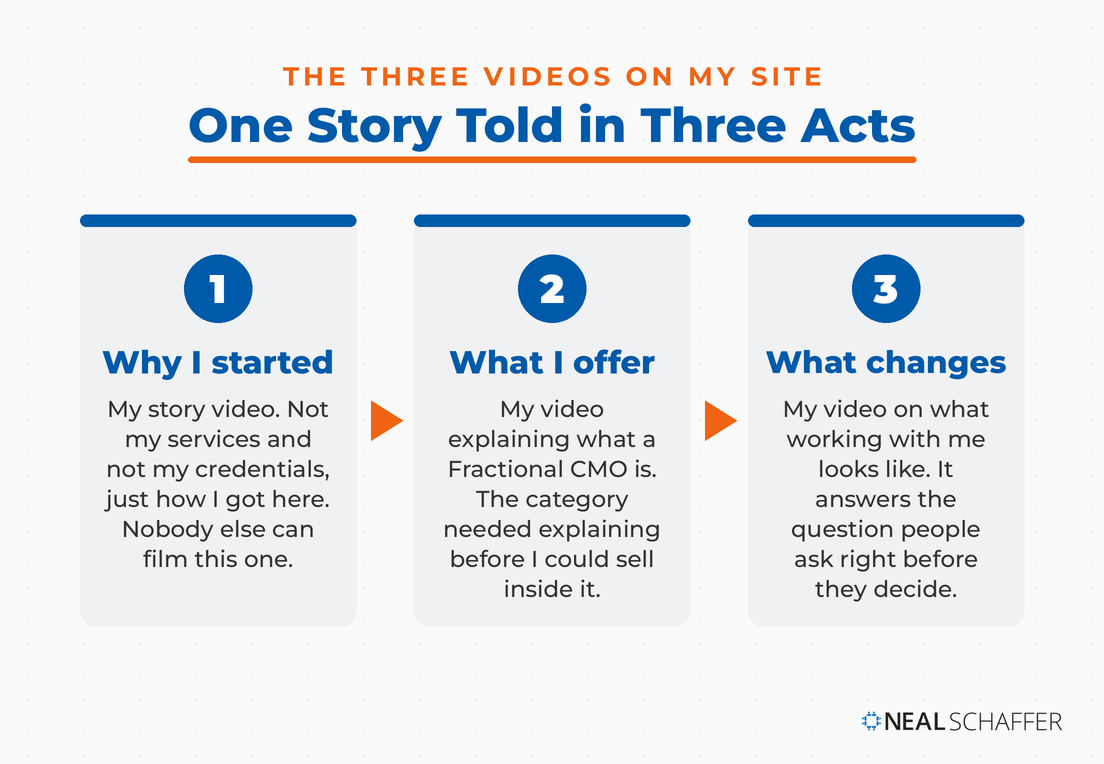
I can show you this rather than describe it, because it is what I run on my own site.
The first is my story. Not my services, not my credentials, just how I got here and why I do this work. It is act one, and it is the video I point people to when they ask who I am.
The second explains what a Fractional CMO is. It sits at the top of my Fractional CMO services page and it exists because the category itself needed explaining before I could sell anything inside it. That is act two.
The third covers what the process of working with me actually looks like. It sits further down the same page and it answers the question people ask right before they decide. That is act three.
That is one sequence covering three different jobs. The videos live on my blog posts, my landing pages, and the Featured section of my LinkedIn profile. They are part of my brand and marketing infrastructure rather than a campaign that ran once and ended.
None of them is trying to close a sale on its own. That is the point. Each one hands the viewer to the next stage, which is why they still work years after I paid for them.
If you only have budget for one, make the story video. It is the one nobody else can make.
Sequencing settled, the examples are worth studying for how they execute.
10 Brand Video Examples Worth Studying
These ten videos each show a different type doing its job well. Watch them with the type in mind rather than as a highlight reel. The useful lesson in each is structural: what the video left out, and who it was made for.
The video works by showing how thoroughly Google sits inside ordinary life, without ever arguing the point directly. There is no pitch in it. The brand simply turns up wherever the moments people remember were happening, and the association does the selling.
Dove Soap
A training video that adds value and doesn’t directly sell their products. Here, a doula is teaching new moms how to give their babies their first bath. Sure, Dove sells soap. But other than pictures of their products being used during the bath, you don’t see salesy stuff.
Zendesk
A customer testimonial that reads as the customer’s video rather than Zendesk’s, which is the hardest thing to pull off in this format. The customer walks through their own business challenges and where the product fits, then closes with specific numbers instead of general praise. Those numbers are what separate a testimonial from a compliment.
Coca Cola
It’s hard to define what type of video this is, other than that it focuses on the story and the good feelings it brings without describing the product whatsoever. No spoken words are necessary to get the point across, which is that Coca-Cola helps get a party started and keep it going.
LEGO
A behind-the-scenes video aimed squarely at people who already love both properties, which is a large audience before the video does any work at all. Watching how the thing gets made becomes its own reason to want the finished product. The LEGO-styled graphics carry the storytelling, and they land the same way whether the viewer is eight years old or remembers being eight.
Slack
Call this a brand profile video. Slack aligns itself with distributed work without ever claiming to be the hero of the story. Simple graphics and unscripted-sounding conversation carry the concept, and the product turns up as the thing that made the arrangement workable rather than the thing the video is about. That restraint is what keeps it from reading as an ad.
Match
A product video that sells the experience rather than the feature set, and does it as comedy. The joke works because it names a frustration the audience recognizes instantly, then positions the service as the way out of it. Humor buys attention here that a straight product walkthrough would never earn.
Dissolve
A hilarious parody of on-brand videos that actually makes no sense until the end, so you’ll have to watch the whole thing to figure this one out. In one sense, the video jumps from one concept to another. But then, it all ties together by demonstrating how you can use the Dissolve product.
Code.org
This is the case study handed to someone else to deliver. Rather than telling its own story, Code.org lets recognizable public figures tell it, which is influencer marketing applied to a nonprofit mission. The trade-off is real: you give up control of the framing in exchange for credibility you could not manufacture on your own.
Bark
This video shows how to tell your company history in a way that is authentic, full of happy customers, and instantly makes a fan of the company out of anyone who is a fan of dogs. After all, Bark is all about the furry members of “upper management,” and the humans that won’t live life without them. The video builds a connection, even as it sells products.
Every one of those had a real budget behind it. Yours does not need one, and the numbers are less frightening than most people expect.
What Does a Brand Video Actually Cost?
Brand video cost splits into two tiers that have almost nothing to do with each other. The examples above were made by agencies with crews, locations, actors, and licensed music, and they cost what you would expect. One person speaking to camera costs a fraction of that, and for most businesses it is the better place to start.
I am not going to put a number on the first tier, because it does not have one. A piece like the LEGO behind-the-scenes film or the Coca-Cola spot involves a production company, a crew, a location budget, and rights clearance. It runs from several thousand dollars to whatever the client is willing to spend. If that is genuinely your brief, get quotes from production companies rather than from freelancers, and expect the conversation to start with your objective rather than with a day rate.
The second tier is where this post can actually help, and it is where I operate. One person to camera, one location, scripts on a teleprompter, several videos batched into a single session. That is how two of the three videos I showed you earlier were made. None of them needed a crew, and between them they cover an explainer and a process walkthrough, which is two of the ten types on this page.
None of that makes the second tier a consolation prize. A founder talking straight to camera about why the business exists carries a kind of credibility that a polished agency film cannot buy, and you can publish one this month.
Within that second tier, the day rate you get quoted is still never the real number. Filming, editing, and studio space are three separate line items, often from three separate people, and two quotes at the same price frequently cover very different work.
Cost is also the objection I hear most often from clients who have not started yet, and it is almost always based on a guess rather than a quote.
So here are real numbers from my own sourcing. My original brand videos were made by Jayson Duncan of Miller Farm Media, a filmmaker here in Orange County who also wrote for this blog for years. He knew my brand, and I love his work. I am now moving to a more regular shooting cadence, so I posted the job on Upwork and worked through it with five videographers.
I asked all five the same questions, which is what makes the answers comparable. Half day rate, what that rate covers, whether they own a teleprompter, and whether they had a budget studio they had actually shot in.
Four gave a usable half day number. Two landed at $650 and one at $600. The lowest came in at $250, and it came with the least equipment and the most caveats about scope. That clustering is the useful part. Around $650 is the going rate for a half day of talking-head production in Orange County, California, where I live and where I wanted to shoot. Quotes well below it usually mean something is missing rather than something is a bargain.
| Half day quote | What the rate covers | Teleprompter | Budget studio they had used |
|---|---|---|---|
| $250 | Filming plus a simple edit, scope dependent | Does not own one | None identified |
| $600 | Filming and raw file handoff only | Rig in front of the lens, they run it | None identified |
| $650 | Filming plus a time-cut edit | Brings crew to run it | None identified |
| $650 | Filming plus a dead-space edit | Owns it, operates it himself | None identified |
Read that table across rather than down. The $600 quote is the most expensive of the four in real terms, because it is the only one that hands you unedited footage. One full day quote came in at $1,200, held at that rate for a recurring monthly booking.
The right-hand column is the finding I did not expect. I asked every one of them for a studio in the $25 to $50 an hour range within thirty minutes of Irvine, the tier I had found listed on Peerspace. Not one had a specific space they had shot in before. If you are planning this, budget four hours of space at $100 to $200 and expect to find it yourself.
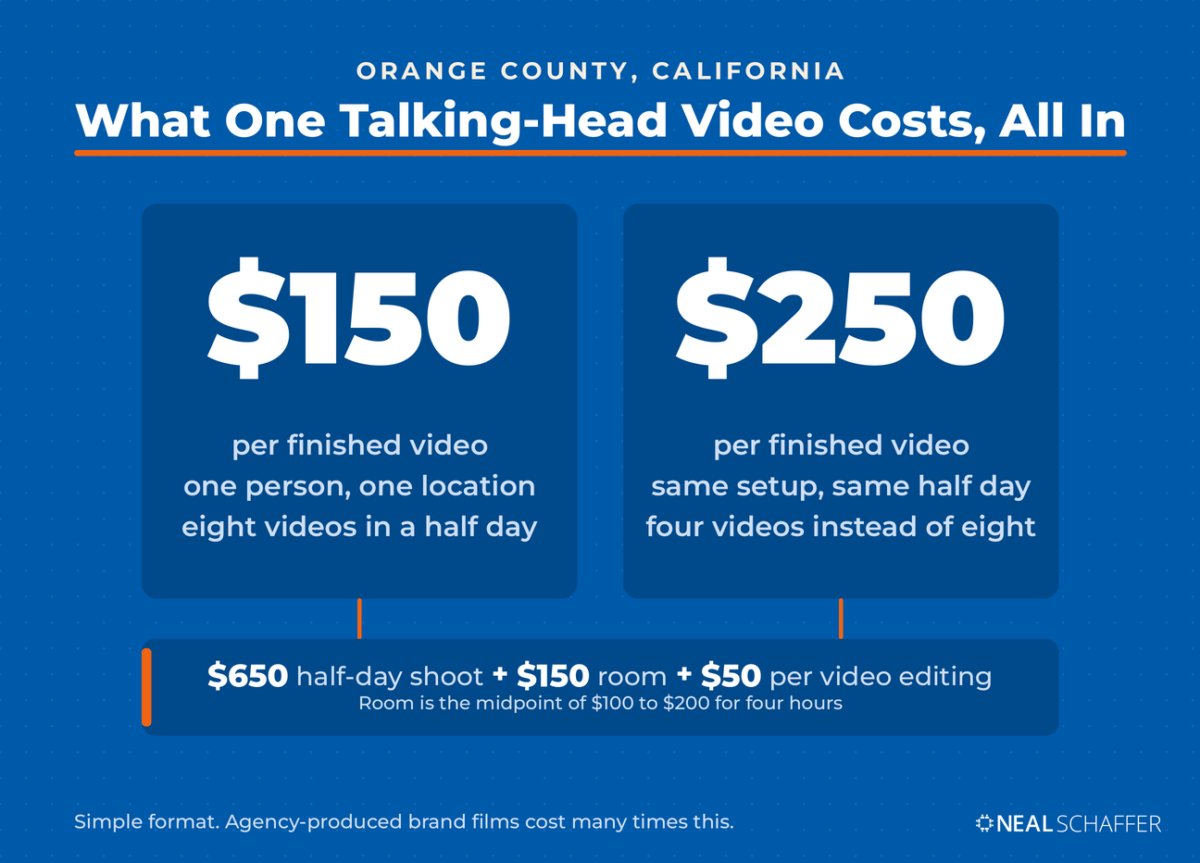
So the honest all-in number for one half day session here is roughly $750 to $850 before a single frame is edited. That is the $650 shoot plus the room to shoot it in. The day rate is the beginning of the bill, not the end of it.
I deliberately did not ask any of them for editing prices. I wanted to know what the shoot alone costs, because that is the number nobody publishes and the one every quote buries inside a bundle. Editing I already had covered. I send the stylistic pass to an editor on Fiverr and pay about $50 per finished video.
Put those together and the figure that actually matters comes out. A session yielding four videos lands near $250 each. A session yielding eight lands near $150. Call it $150 to $250 per finished talking-head video, all in, which is a long way from the number most business owners have in their heads.
There is a second path worth pricing. Most videographers will handle the edit too, for more money. That premium buys you one vendor instead of three, one invoice instead of three, and nobody to chase when the raw files and the editor do not connect. I chose to run the pieces separately because I wanted the shoot cost visible. If you would rather not project manage your own video production, paying the single-vendor premium is a defensible trade rather than an upsell.
Treat those figures as a method rather than a price list. Production rates track the local cost of living and the depth of the local crew pool. A dense media market like Los Angeles or New York runs higher than mine, and a smaller market runs lower. What does travel is the approach. Post the job, ask every applicant the same four questions, and compare what each rate actually covers before you compare the rates themselves.
Expected output was the answer nobody would give me. Only one of the five put a number on it, four to eight finished videos in a half day, and even he caveated it heavily. Everyone else said the same thing in different words. It depends on how well you know your scripts and how many takes each one needs.
Two practical implications follow. First, batch. If a half day yields six videos, the per-video cost of a shoot day is trivial compared to booking six separate ones. Second, rehearse. Every person I spoke to independently named script preparation as the thing that decides the day, which makes it the cheapest lever you have on the whole budget.
Check the teleprompter before you book, because it is not standard. Two of the five owned a rig with the display in front of the lens, which is what lets you read while looking straight into the camera. One brought crew to operate it and one did not own one at all. If you have ever wondered how people deliver a clean two minute piece without stumbling, that is usually how.
If you would rather keep the edit in house, one of the best video editing apps will handle a talking-head cut without much of a learning curve. AI video tools have also taken a real bite out of the cost of assembling simpler pieces. That is the third path, and it trades money for your own time rather than for coordination.
Length affects cost too, and shorter is both cheaper and better. Vidyard’s benchmark data shows that 65% of viewers finish a video under one minute, while only 20% finish one over twenty minutes. There is no budget argument for the long version.
Money spent is wasted if the finished video does not look like it came from your company, which is where most first attempts fall down.
How Do You Keep a Brand Video On Brand?
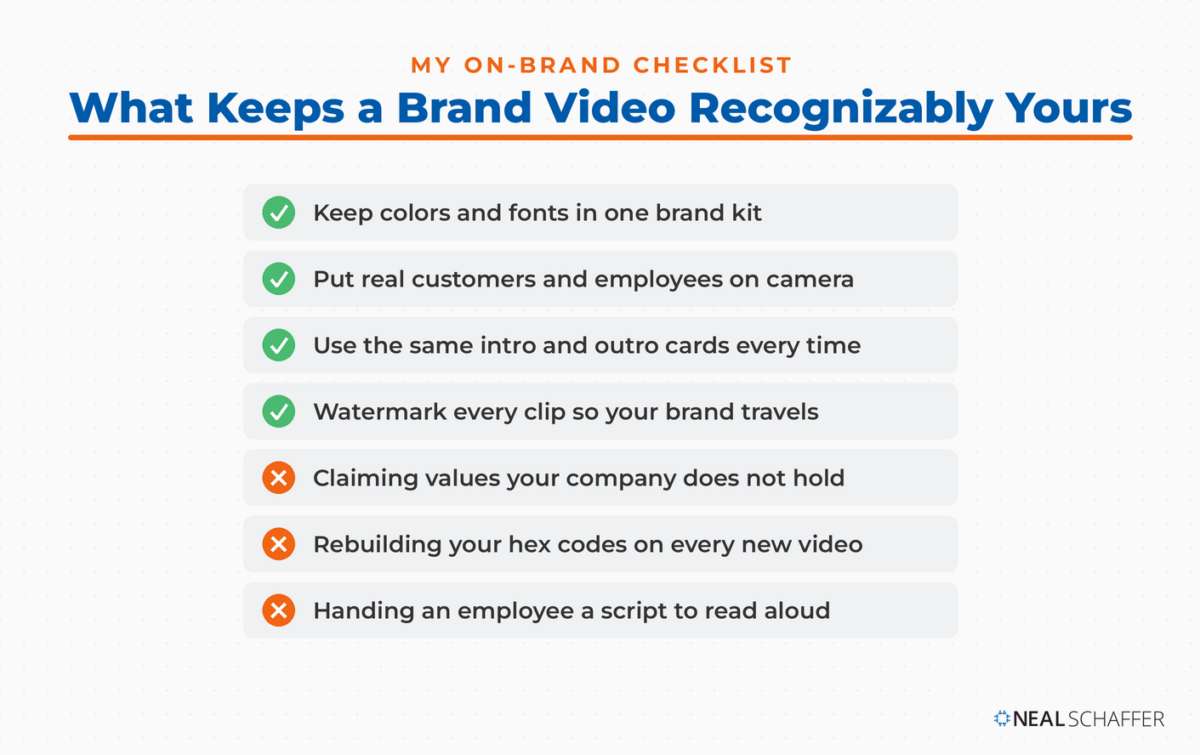
Keeping a video on brand comes down to five things: knowing who it is for, matching your actual values, using consistent colors and fonts, adding branded intros and outros, and putting real people rather than actors on screen wherever you can. Get those right and a modest production still reads as professional.
Start with the audience, always. A tutorial can carry humor if the audience will welcome it, and dry is fine if they will not. Think about the language too. Every industry has a handful of words everyone is reaching for at any given moment, and whether one of them helps or grates depends entirely on who is watching.
Match the video to what your company actually values, not what you wish it valued. Corporate responsibility films from companies with poor employee reputations are transparent to the people who would know. A values-based mission is worth featuring. A borrowed one is not.
The visual consistency work is where most people either overthink it or skip it. Your colors, your fonts, your logo watermark, and your intro and outro cards should be identical every time, because that repetition is what makes a video recognizably yours before anyone hears a word.
I keep all of that in one place rather than rebuilding it per video. A brand kit in Adobe Express stores your logos, colors, fonts, and graphics together, and you can apply your brand colors and fonts to a design in a click rather than re-entering hex codes. I am an Adobe Express Ambassador, and this is the specific feature that earns the endorsement for me. Canva has an equivalent if you are already there.
A watermark deserves its own note. It is usually a checkbox in your editor, and it means that if someone borrows a clip, your brand travels with it.
Finally, use your actual customers and employees rather than people reading their answers. Audiences read actors as fake faster than they used to. Just make sure everyone on camera has agreed to be there.
Frequently Asked Questions
A brand video is about your company, its story, and its values, and it targets people who are not ready to buy. A product video describes a specific product to someone already considering a purchase. Most businesses need both, but they belong at different stages and usually on different pages.
Shorter than you think. Completion rates fall steadily as length grows, so a homepage company story video works best somewhere between thirty seconds and two minutes. Save longer runtimes for interviews, webinars, and training content where the viewer has already opted in.
Not always, but the economics are better than most people assume once you batch. If you are filming several videos in one session, a professional shoot day costs far less per video than it first looks. It also buys you lighting and sound you will not replicate on a phone.
Everywhere your brand already appears. As I mentioned above, mine are spread across blog posts, landing pages, my YouTube channel, and my LinkedIn profile. Cutting shorter versions for social distribution extends the same asset, and the formats differ enough that social media videos and short-form video are their own decisions.
Not by conversions in month one. Watch retention and completion first, then brand-level signals like branded search volume and direct traffic over quarters rather than weeks. The latest video marketing statistics are a useful benchmark for what normal looks like before you judge your own numbers.
Start With the Video Only You Can Make
Pick the job before you pick the format. Decide whether this video is introducing your company, explaining an offer, or proving a result, and let that one decision drive everything downstream: the script, the length, the budget, where it gets published, and whether a real human needs to appear on screen at all.
Then write the story properly, using all three acts rather than only the middle one. Most companies film nothing but the product, which is exactly why most company videos are forgettable.
Batch the shoot. Given the throughput a single half day buys you, film the story video and the explainers in one session rather than treating each as a separate project.
And publish it in more than one place. A brand video that lives only on your homepage is doing a fraction of the work you paid for.
For the broader picture of how video fits alongside everything else you are doing, start with my video marketing tips. If you would like help building a coordinated strategy across video, search, and social, download a free preview of Digital Threads or get in touch about Fractional CMO services. And if you are learning as you go, I am always happy to hear what you are building.
Actionable advice for your digital / content / influencer / social media marketing.
Join 13,000+ smart professionals who subscribe to my regular updates.
